
 Script Planner Assistant▸
 AI Apps
 AI News

Paper-Ai: Write Papers with Real References via AI
Paper-Ai: Write Papers with Real References via AIIntroduction
Paper-ai, an AI tool that searches real literature and generates papers citing real references. It supports searching for relevant literature on platforms such as Semantic Scholar, arxiv, and PubMed. You only need to enter keywords to search for related real literature, and you can have natural conversations with AI to get writing assistance. Paper-Ai will provide suggestions and automatically generate a paper framework that you can directly modify.
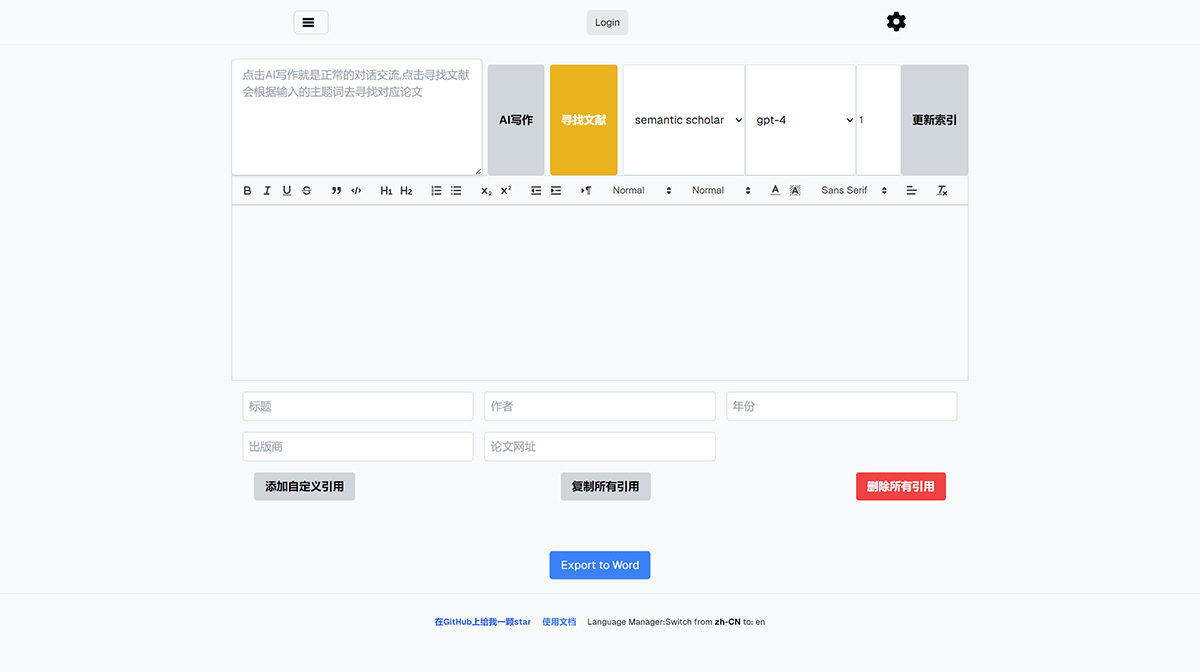
Paper-Ai Features:
Artificial intelligence writing function: Click "AI Writing" to start a normal conversation. The AI will provide writing suggestions or answer questions based on your input.
Literature search function: Click "Search Literature" to search for papers on Semantic Scholar, arxiv, or PubMed (selected via a drop-down box) based on the keywords you enter. The system will integrate the information into your paper. Two papers are searched at a time, and an error message will be displayed if no results are found.
Literature organization function: Each batch of retrieved literature will be organized at the bottom of the page.
Export to Word: The Export to Word button at the bottom of the page allows you to export the paper and literature citations directly to Word, which is very convenient.
Built-in multiple free AI models: Please check the settings interface in the upper right corner.
Cloud sync and multi-paper editing function: This feature is tentatively priced at 20 RMB for permanent access. Please click the list button in the upper left corner to purchase; you need to register an account before purchasing.
How to use Paper-Ai?
The input box on the left side of Paper-Ai has two uses:
1. Click "AI Writing" to read the content of the input box and engage in normal conversation.
2. Click "Search Literature" to find papers based on the topic words you enter (if you enter English keywords, you will get English literature; if you enter Chinese keywords, you will get Chinese literature). Next to the literature search button is a selection box used to choose which website to retrieve papers from. Currently, you can choose arxiv, semantic scholar (recommended), or pubmed (highly recommended).
3. Below that is a model selection box used to choose the AI model for the conversation. Which models are supported depends on your API.
4. Further down is a large input box where users can modify content, and Paper-Ai generates content.
5. At the very bottom is Paper-Ai's literature management area, used to organize the searched literature in a format that conforms to Chinese citation standards.















