Script Planner Assistant▸
 AI Apps
 AI News

Aimu Subtitle Editor
Aimu Subtitle EditorIntroduction
aimu, an online free subtitle editor, whose core advantage lies in providing comprehensive subtitle processing features, supporting video transcoding, speech recognition, subtitle translation, and one-click subtitle embedding.
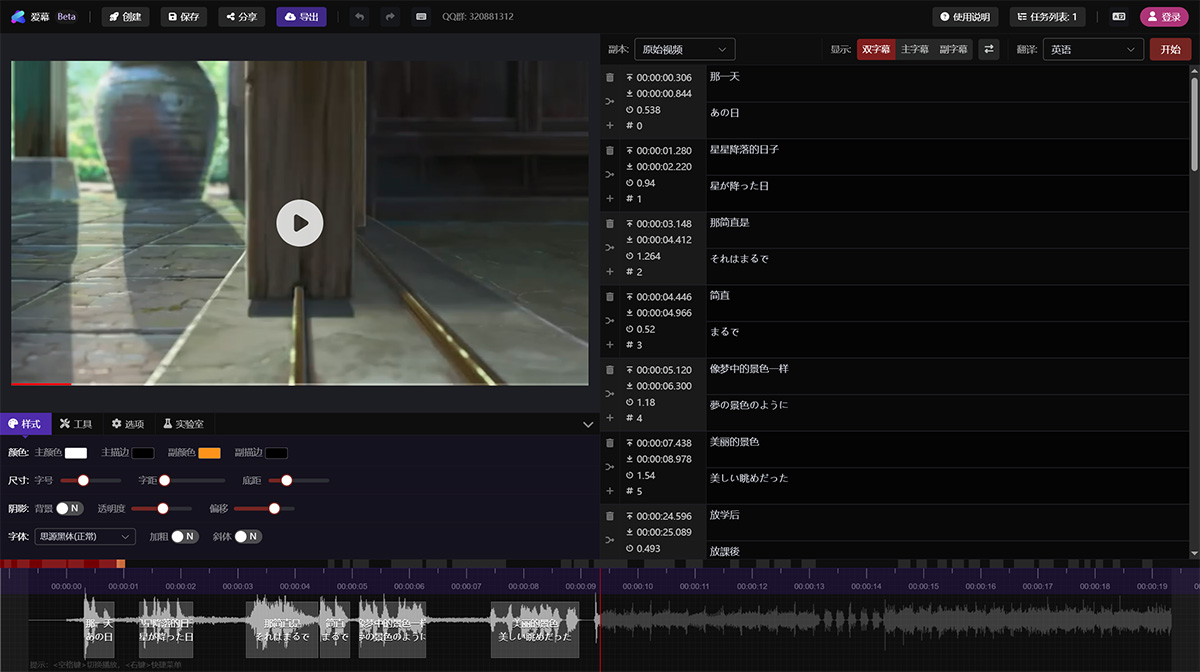
aimu Subtitle Editor Features:
Online Video Transcoding
Online Subtitle Embedding
Automatic Speech-to-Text (iFlytek API)
Subtitle Multilingual Translation (Baidu Translate API)
Timeline Audio Waveform Generation
Subtitle Multilingual Translation
Support for Bilingual Subtitles
Support for Subtitle Style Adjustments
Support for Multiple Subtitle Styles
Supports export of common subtitle formats such as srt, ass, and vtt.
How to Use aimu Subtitle Editor?
1. Open the official website of aimu Subtitle Editor.
2. Select the features you need based on your requirements, such as speech recognition, subtitle translation, etc.
3. Upload a video or audio file.
4. Follow the prompts to perform operations, such as adjusting subtitle styles and translating subtitles.
5. After editing is complete, download the subtitle or video file.
aimu Subtitle Editor Pricing Model:
aimu Subtitle Editor uses a staged points-based pricing model. You don't need to use all features; you only pay for the features you use.
| Video Transcoding | Speech Recognition | Export Video | Translate Subtitles | Create Copy |
|---|---|---|---|---|
| 2 points/minute | 1 point/minute | 1 point/minute | 0.5 points/minute | 1 point/minute |
Points Explanation: Registered users will initially receive 20 free points. After registration, you can get an additional 20 points by binding your email. By sharing your referral link, you can earn 10 points for each successful registration through your link.