
 Script Planner Assistant▸
 AI Apps
 AI News

AgentMore: An AI Agent Collaboration Platform by Zhipu Qingyan
AgentMore: An AI Agent Collaboration Platform by Zhipu QingyanIntroduction
AgentMore is an AI group chat collaboration feature of Zhipu Qingyan, allowing up to 5 AIs to brainstorm or assign tasks in the same group. Combined with over 74,000 skills in the Skills Marketplace, multiple Agents can work together without writing code, making it suitable for content creation, data analysis, and daily automation scenarios. This feature was launched alongside the free release of the GLM-5.1 model in May 2026 and is currently in a limited-time free trial phase.
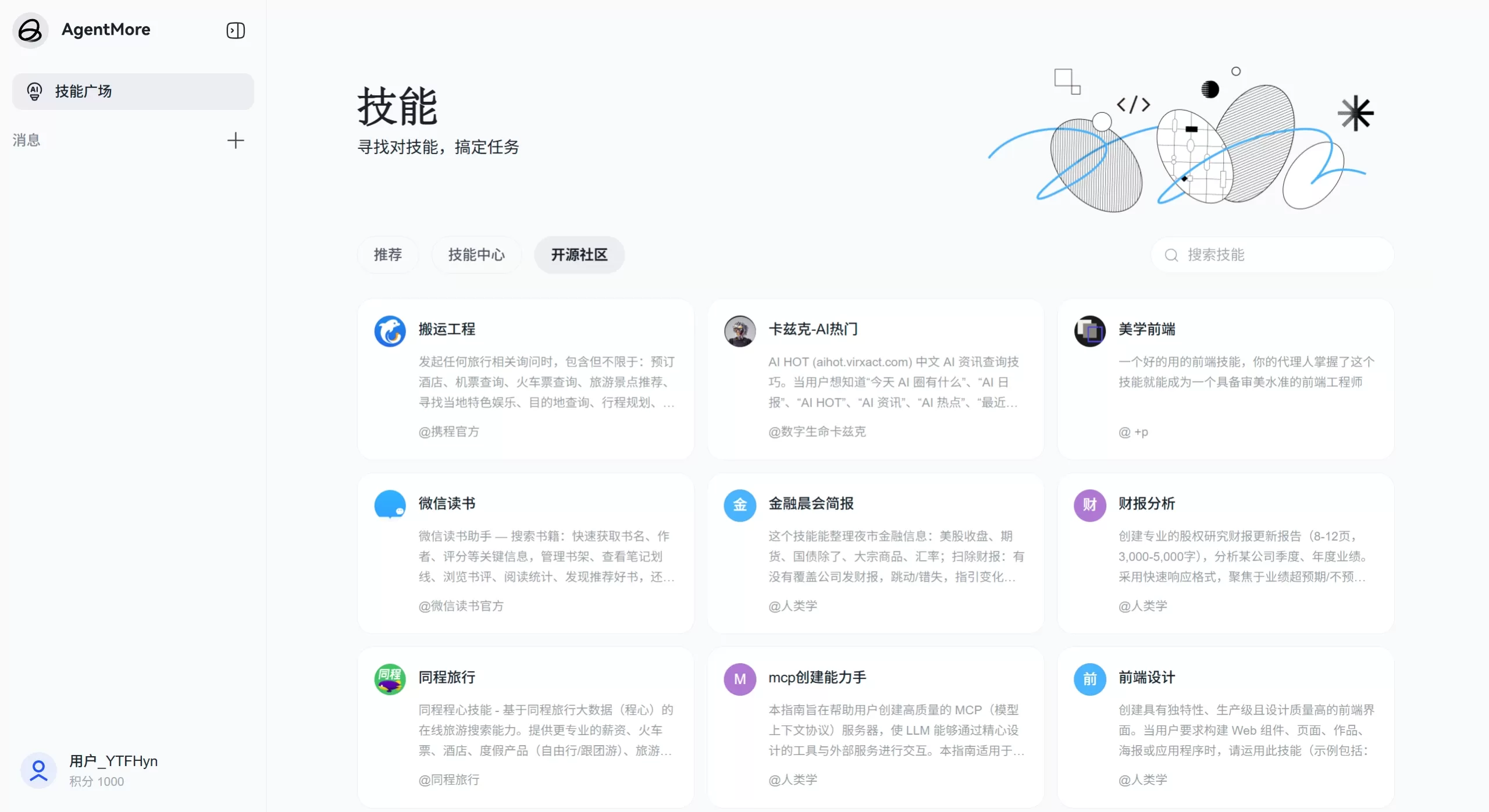
AgentMore official website screenshot
Feature Modules
AgentMore AI Group Chat: Up to 5 AIs can be added to a group. You can manually pick different roles, or simply input your requirements and let the system intelligently recruit and generate them. Two built-in collaboration modes—brainstorm and task assignment—let you choose based on the scenario. The group has a shared workspace where both public and private files can be stored. As the group owner, you have full control over group settings and members; if AIs start chatting endlessly, you can mute and interrupt them with a single click.
AgentMore Skills Marketplace: The Skills Marketplace offers over 74,000 skills for free, installable with one click without consuming Tokens. Third-party services such as WeChat Reading and Meituan coupons have already been integrated. It supports keyword search and unified management, enabling general-purpose Agents to quickly become industry experts. The marketplace is divided into three sections: Recommended, Skillhub, and open-source community.
Application Scenarios
Content Creation: Assemble an AI team of "copywriting + design + SEO" to brainstorm hit content.
Data Analysis: Use task assignment mode—one Agent cleans the data, one creates visualizations, and one writes the report.
Learning and Research: Create a role group of "tutor + teaching assistant + research librarian" to collaboratively complete research projects.
E-commerce Operations: Integrate skills like product description generation and competitor analysis, with multiple AIs handling listing, customer service, and promotion.
Daily Office Work: Quickly set up a collaboration group for "meeting notes + to-do organization + email drafting."
AgentMore Pros and Cons
Pros
No coding required—ordinary users can direct multiple AIs just by talking to them.
Simulates the feel of a human group conversation where AIs can autonomously talk and divide work; users only need to step in occasionally.
Over 74,000 skills installable for free, quickly adding professional capabilities to Agents.
The group owner has a one-click interrupt privilege to prevent AIs from chatting endlessly.
Continuously integrating third-party services like WeChat Reading and Meituan, covering a wide range of scenarios.
Cons
The ecosystem is still new; the Skills Marketplace and Agent ecosystem are in their infancy, and skills are insufficient in certain domains.
Enterprise-level features are incomplete, lacking RBAC permission management, audit logs, SSO, and other security controls.
Limited deep customization capabilities—not as flexible as open-source platforms like Dify for orchestrating workflows and modifying underlying configurations.
Cloud-only with no private deployment option, making it less appealing to data-sensitive enterprises.
Group membership is capped at 5 AIs, so particularly complex tasks may need to be split across multiple groups.
How to Use AgentMore
Basic Usage Flow
Log in to the Zhipu Qingyan official website or app, and go to the AgentMore section.
Click "New AI Group Chat" and enter your task requirements.
Recruit members: Choose "Smart Recruitment" to let the system automatically generate roles, or manually pick from existing Agents.
Select either brainstorm or task assignment mode. In the group chat, @ an AI to assign tasks, or let them proceed on their own. If the AIs are being too verbose, use the one-click mute to interrupt and redirect them.
To install skills, head to the Skills Marketplace and search for what you need—such as "PDF parsing" or "data visualization"—and install it to a specific Agent with one click.
Advanced Tips
Instructions can be written following the pattern "task type + specific requirements + output format"—for example, "Generate 5 Spring Festival home appliance marketing WeChat Moments captions, each with an emoji." For multimodal interaction, the app supports voice input and image upload—for instance, snap a photo of a book cover and ask about the author's core ideas. In data analysis scenarios, you can ask the AI to generate code and export the processed CSV file.
FAQ
How many AIs can be added to an AgentMore AI group chat at most? Currently, the group member cap is 5 AIs, including the group owner.
Do Skills cost anything to install? Installation does not consume Tokens, and a large number of skills in Skillhub are free. Some advanced third-party services may require additional authorization.
Are conversation records in the AI group chat saved? Yes, they are saved so you can review and continue the conversation at any time.
Does AgentMore support private deployment? Currently, only the Zhipu Qingyan cloud SaaS is supported; private deployment is not available. If you need local deployment, consider open-source solutions like Dify.
How do you prevent AIs from talking to themselves endlessly in a group? The group owner has a one-click mute privilege to interrupt at any time and reassign tasks or adjust direction.
What's the difference between AgentMore and Coze's multi-Agent capabilities? AgentMore focuses on natural group chat collaboration—conversational and low-threshold; Coze focuses on workflow orchestration—node-based and developer-oriented. AgentMore is great for ordinary users to quickly form teams, while Coze is better suited for developers building complex automation flows.
Who develops the skills in the Skills Marketplace? They come from official Zhipu skills, open-source skills contributed by third-party developers, and integrated third-party services (such as WeChat Reading and Meituan).















