Script Planner Assistant▸
 AI Apps
 AI News

96 Editor: An Online Editing and Formatting Tool for WeChat Official Accounts
96 Editor: An Online Editing and Formatting Tool for WeChat Official AccountsIntroduction
96 WeChat Editor is a professional and powerful online editing and typesetting tool for the WeChat public platform. It offers a rich library of templates and materials along with various typesetting styles, and supports a mobile preview feature, making it convenient for users to typeset and edit WeChat graphics, articles, and content. Its distinctive features include one-click typesetting, text editing, material editing, article violation detection, and sensitive word detection.
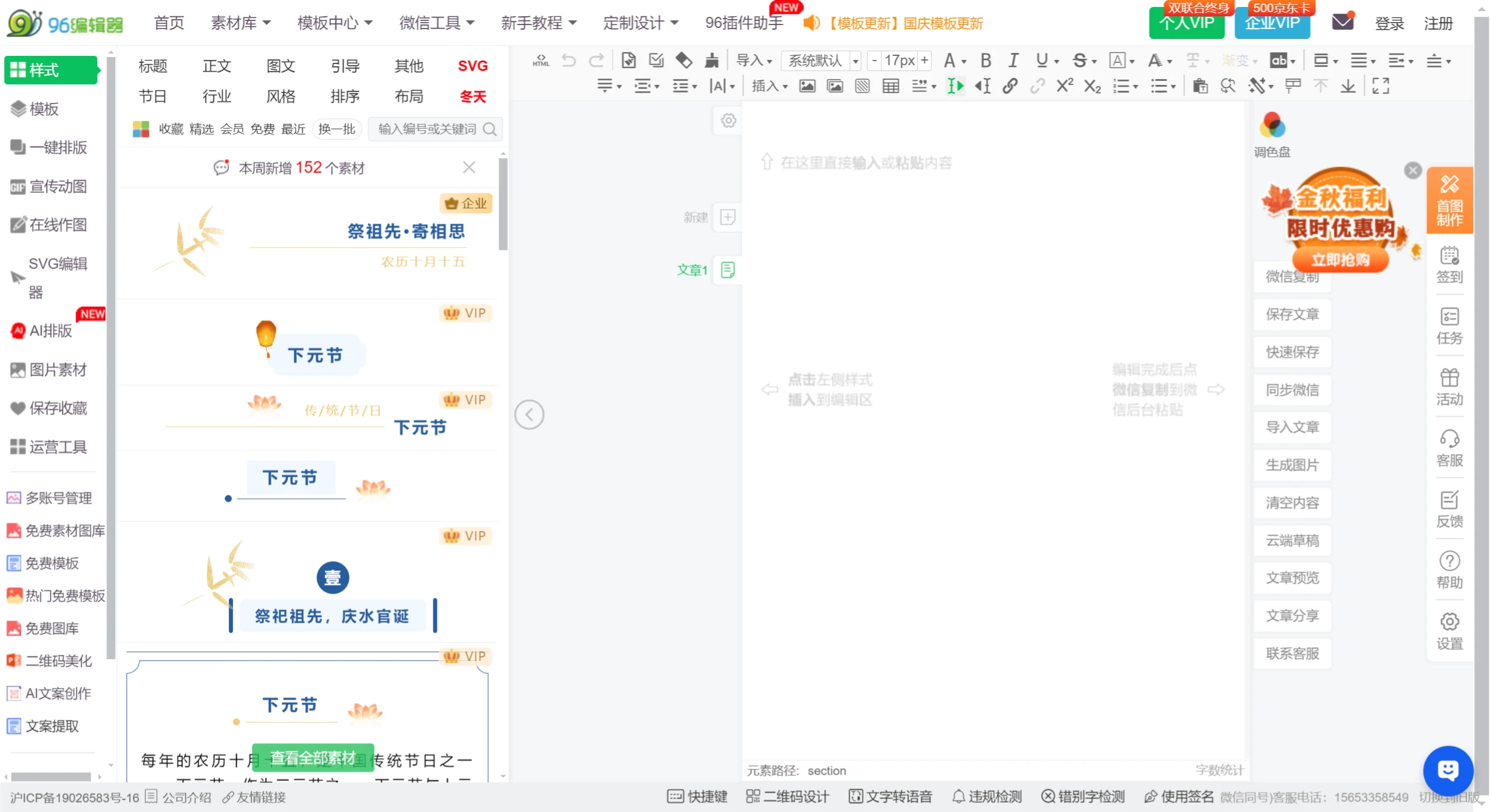
96 Editor Functional Areas and Usage Instructions:
Left Toolbar
Styles and Templates: Provides a wide variety of styles and templates, covering titles, introductions, borders, images, endings, etc., suitable for articles of different themes and styles.
One-Click Typesetting: Quickly beautifies articles, ideal for users who are pressed for time or unfamiliar with typesetting.
Promotional Animations and Online Image Creation: Built-in features help create dynamic images and perform basic image editing.
SVG Editing: Supports editing vector graphics to enhance the visual effect of articles.
Image Materials: A rich image library to meet content illustration needs.
Save Favorites: Users can bookmark frequently used styles or templates for easy reuse.
Top Menu
Home, Material Library, Template Center: Centralized resources for quick access.
WeChat Tools: Includes WeChat public account synchronization to improve work efficiency.
Beginner Tutorials and Typesetting Training: Helps new users quickly master editing skills.
VIP Service: Offers individual and enterprise memberships, providing more advanced features and customized services.
Above the Editing Area
Font, Font Size, Color Adjustment: Detailed text formatting control to ensure articles look attractive.
Typesetting Adjustment: Paragraph spacing and line spacing control to enhance reading experience.
Special Formatting: Bold, italic, underline, etc., to highlight key content.
Multimedia Support: Image, video, and music upload links to enhance article expressiveness.
Clear Formatting: Maintains consistency when copying and pasting content from other sources.
Right Functional Area
WeChat Copy, Save Article: Convenient saving and export options to ensure content safety.
Quick Save, Synchronize: Real-time synchronization to WeChat public account, reducing operation steps.
Generate Image: Converts articles into image format, suitable for social media sharing.
Clear Content: Quickly reset the editing area to start a new creation.
How to Use 96 Editor
Log In to Account: Users need to log in to the 96 WeChat Editor with an account.
Select Template: Choose a suitable template from the template library.
Edit Content: Insert text, images, and other content as needed, and perform typesetting.
Preview Effect: Use the mobile preview function to see how the article appears on a phone.
Save Draft: After editing, drafts can be saved to the cloud to prevent loss.
96 Editor is a website under Shanghai Songshen Network Technology Co., Ltd. 96 Editor is a one-stop new media operations tool that helps them address typesetting beautification, online image creation, and other issues. The website boasts a massive collection of exquisite materials and SVG interactive effects, helping users improve office efficiency.