
 Script Planner Assistant▸
 AI Apps
 AI News

Watermarkly: Automatic Face and Object Blurring Tool
Watermarkly: Automatic Face and Object Blurring ToolIntroduction
Watermarkly is a premium tool designed to protect sensitive information present in photos before they are shared online. Its primary function includes concealing specific elements in images to preserve privacy and maintain confidentiality. With its capabilities, Watermarkly offers a comprehensive set of features, notably:
Sensitive Information Concealment: Users can effortlessly obscure sensitive details in photos, such as faces and license plates. This feature is particularly useful when batch editing large numbers of images at once.
Automatic Detection and Blurring: The tool employs advanced algorithms powered by Edge ai to automatically detect faces and license plates across bulk images. This automation greatly simplifies the process, saving time and effort.
Customizable Blur Options: Watermarkly gives users the flexibility to select which faces or license plates to blur and which to keep in clear focus. This level of customization ensures precise control over the editing process.
Browser-Based Functionality: Watermarkly operates in a web browser, providing convenience and accessibility without requiring users to download or install additional software. This approach streamlines usage across various devices without compromising performance.
Local Image Processing: Crucially, the tool ensures the security of user images by performing all processing tasks locally on the user's device. This commitment to data privacy means images never leave the user's control or get stored on external servers.

Key Features of Watermarkly:
Batch Blurring. There is no limit to the number of photos you can upload. Save your time by blurring faces, license plates, and other objects in multiple images at once.
AI Detection. Our app automatically detects all faces and license plates and blurs them instantly. Simply drag your photos into the app and download the processed copies.
Selective Blurring. With just a click of your mouse, you can choose which faces or license plates to keep unblurred.
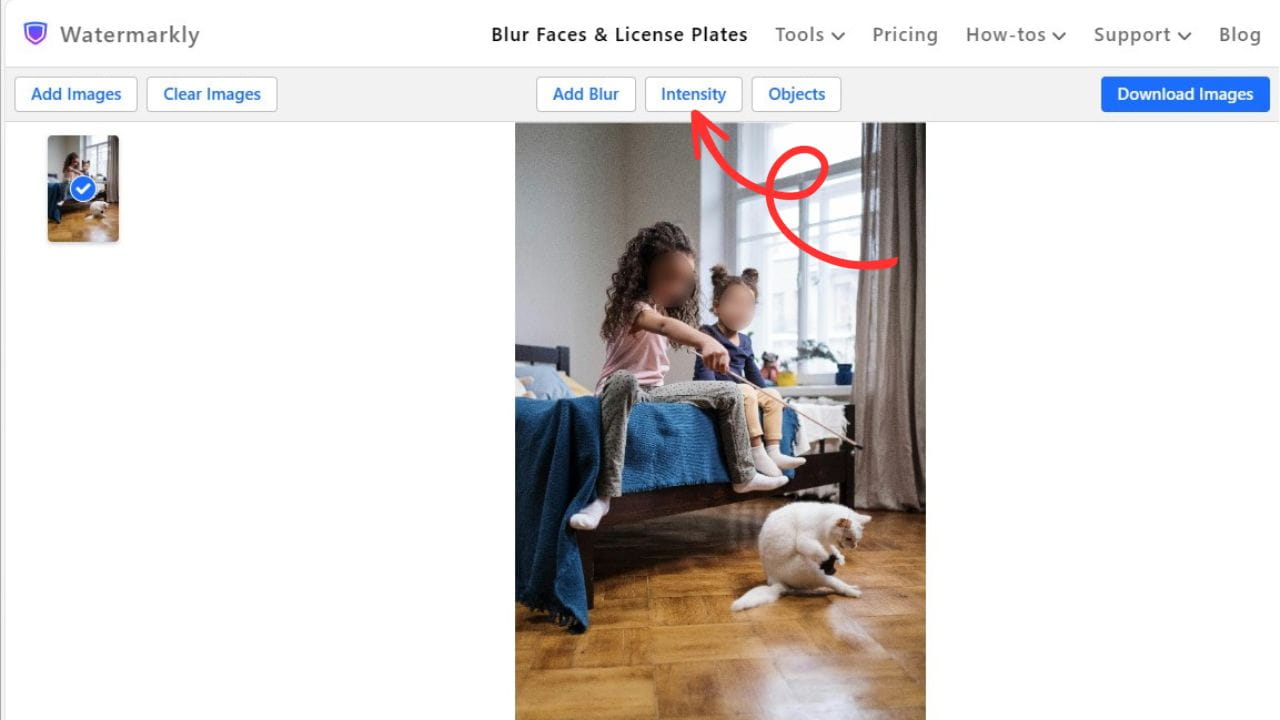
Adjustable Blur Intensity. Select the necessary level of blurriness to protect your sensitive data while ensuring your images still look presentable.
Versatility. To blur any object, you can add a new blur area and then adjust its size, position, and shape.
Different Shapes. You can easily switch between oval and rectangular shapes for your blur areas to find the most suitable fit.
Smooth Borders. Watermarkly creates smooth, seamless borders for blurred areas that look neat and polished in your images.
How to Use Watermarkly?
It's super simple. Just do the following:
1. Upload your images to the Watermarkly Face Blur app. Drag and drop files or import them from your device or cloud storage. Blur Faces
2. Check the results. Faces in all photos will be automatically blurred. If you're satisfied with everything, simply click "Download Images" and get the processed copies. Face Blur
3. Make edits if necessary. If you're not satisfied with the blur intensity, if certain faces need to be visible, or if you want to adjust the blur areas in any other way, you can easily do all of this with the help of the editing toolkit.
Overall, Watermarkly provides a powerful solution for individuals or businesses seeking to protect private information in their images before sharing them online. Its combination of automatic detection, customizable editing options, browser-based functionality, and a commitment to user data security makes it a valuable asset for maintaining confidentiality in the digital realm.














