
 Script Planner Assistant▸
 AI Apps
 AI News

Numerous.ai: Use ChatGPT Directly in Spreadsheets
Numerous.ai: Use ChatGPT Directly in SpreadsheetsIntroduction
Numerous.ai is an AI-powered tool that uses ChatGPT to write content in spreadsheets, extract text, categorize data, and generate formulas.
With Numerous.ai, you get an AI-powered spreadsheet toolbox that acts as an add-on for Excel and Google Sheets. Simply prompt ChatGPT in a formula and drag it down to perform repetitive tasks across thousands of rows at once.
In addition, you can use simple formulas to instantly generate content such as marketing copy, SEO descriptions, customer responses, and messages.
Key Features of Numerous.ai:
1. Teach it to perform repetitive tasks. Simply provide a few examples and watch it automatically complete the rest.
2. Let ChatGPT help you craft compelling marketing copy or SEO-friendly descriptions
3. Quickly analyze customer reviews—easily categorize reviews and analyze their sentiment.
4. Clean up data: reformat messy data to make it consistent.
5. Generate unlimited content: simply provide examples of what you want and generate unlimited content. Use AI to batch-write content, product descriptions, SEO keywords, and more.
6. Extract information in bulk: easily extract large amounts of data using numerous.ai
7. Batch translation: translate any content in any language into another language with very high quality.
8. Enrich your spreadsheets with real information: answer with factual information based on the AI's own knowledge or the knowledge you provide to it.
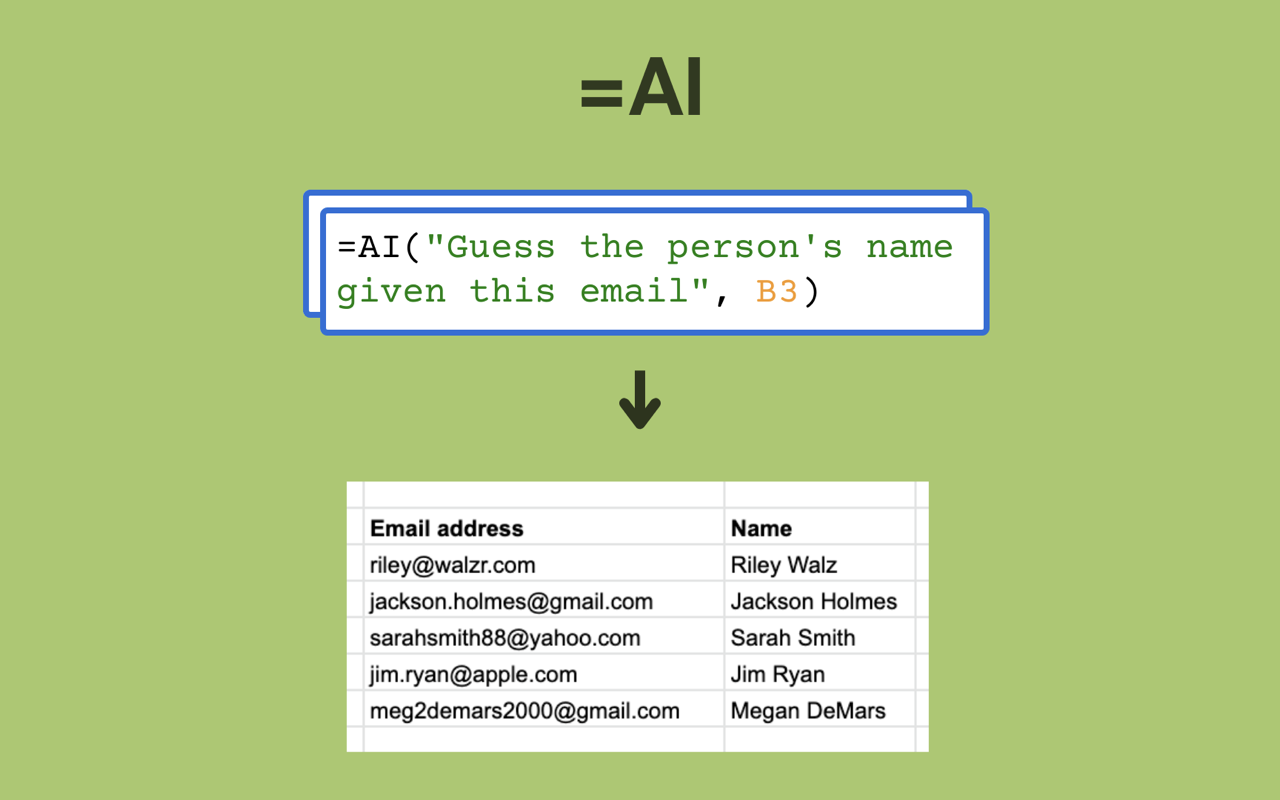
How to Use the Numerous.ai Chrome Extension:
Use AI to generate formulas in Google Sheets, categorize items, format cells, and perform repetitive tasks.
The Numerous.ai Google Sheets add-on allows you to use AI to perform repetitive tasks and use spreadsheets like a power user. Here's how:
1. Prompt ChatGPT in your spreadsheet
Use the =AI() function directly in your spreadsheet, similar to formulas like =SUM() and =AVERAGE(), to provide prompts directly to ChatGPT.
- Want to summarize customer support messages? =AI("Here's a message from a customer:", A2, "Summarize in 1-2 bullet points")
- Need to figure out which state a phone number is from? =AI("What state is the phone number", A2, "from?
Then you can drag the function down and automatically do this for hundreds of cells.
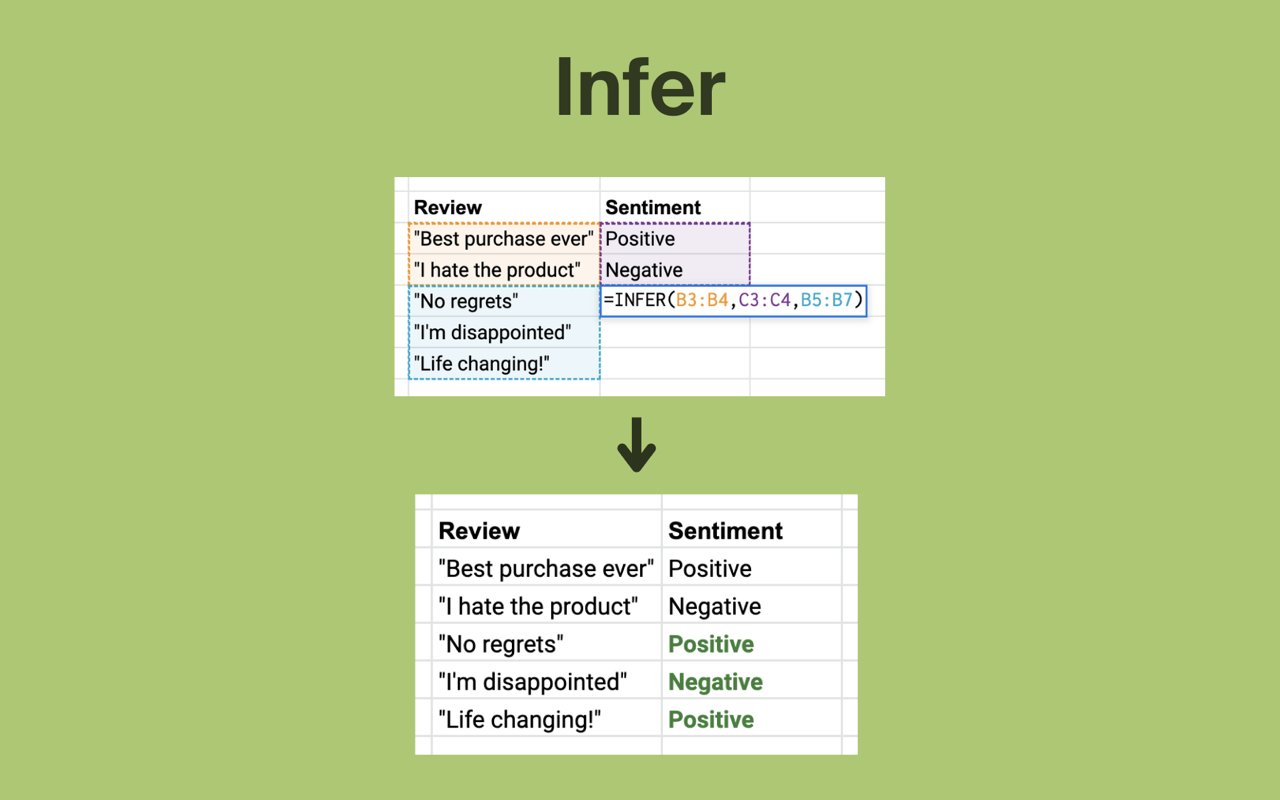
Let AI handle time-consuming tasks by showing it a few examples
If you need to do some mind-numbing busywork like:
- Manually format hundreds of cells
- Categorize a thousand items
- Perform sentiment analysis on a large batch of messages
You can teach the AI by providing it with 4 or 5 good examples, and use the "infer" feature to complete it for all other cells.
2. Use AI to write text
- =WRITE("A tagline for the brand", A3, "mentioning its main features, such as", B3)
- =WRITE("Give", A2, "thanks for their", B2)
You can have AI write text for you—simply tell it what you want.
3. Generate formulas using simple English
Simply describe what you want, and Numerous.ai will generate the formulas to do it. This even works for the most complex formulas: from SUM, COUNTIF, AVERAGE to VLOOKUP, QUERY, REGEX, and more.
4. Explain complex formulas
If you receive a spreadsheet from a colleague but don't know what a formula does, you can use the "Explain Formula" feature, which tells you what the formula does in plain English.
The Numerous.ai extension allows you to launch the Numerous Google Sheets add-on faster. Since Numerous is most useful when you understand its capabilities and they come to light, a faster startup experience means you'll be able to use Numerous faster and more often, enabling you to accomplish more tasks that can only be achieved by using Numerous.















