
 Script Planner Assistant▸
 AI Apps
 AI News

VideoDrafter: A Diffusion Model for High-Quality Video Generation
VideoDrafter: A Diffusion Model for High-Quality Video GenerationIntroduction
VideoDrafter is an open diffusion model for high-quality video generation. Compared with previous video generation models, VideoDrafter's biggest feature is its ability to generate multiple scenes of video at once while keeping the subject consistent.
Project address: https://videodrafter.github.io
Paper address: https://arxiv.org/abs/2401.01256
VideoCrafter is led by Tencent's AI Lab and the Hong Kong University of Science and Technology, with researchers from the Chinese Academy of Sciences, the Chinese University of Hong Kong, and the City University of Hong Kong also participating. It is a brand-new video generation model that provides a creation and editing suite. Built on diffusion models, it can generate photos and videos from text descriptions. Even people with no video editing or animation experience can easily produce professional-quality videos.
VideoDrafter currently includes Text2Video and Image2Video models. The Text2Video model is used for general-purpose text-to-video generation, while the Image2Video model is used for general-purpose image-to-video generation. The commercial Text2Video model can generate high-quality videos, but it is not open source.
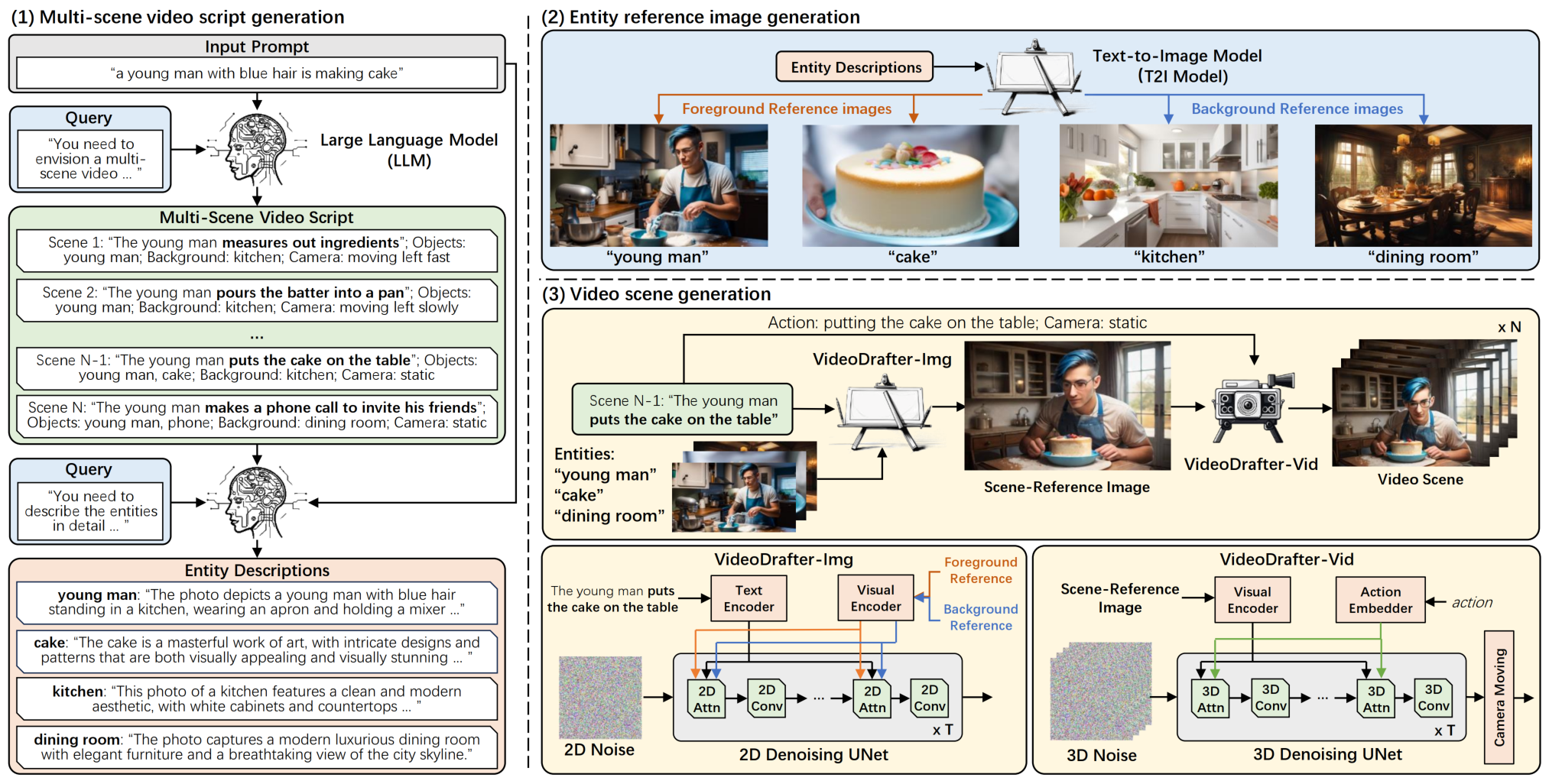
VideoDrafter Features:
VideoCrafter is an innovative open-source video creation and editing suite.
It uses diffusion models and machine learning to generate realistic videos from text descriptions.
This tool is user-friendly, ideal for newcomers, and delivers professional-grade output.
Working with VideoCrafter involves converting text into visual sequences and stitching them together.
Its versatility allows the creation of various types of videos, from educational content to promotional materials.
Step-by-step guides make it easy to get started with VideoCrafter.
The tool is free to use and accessible to all creators.
VideoDrafter Usage Steps:
1. Create a written outline for the video.
2. Set the video-related parameters according to your preferences, including resolution and frame rate.
3. Use the "Generate" button.
4. Enter some text, and VideoCrafter will generate the video for you.
5. The generated video can be modified with the help of the integrated editor.
6. After making adjustments, the video can be saved in multiple formats, including MP4, MOV, and AVI.
VideoCrafter's user-friendliness makes it easy to use even for those who have never worked with video or animation software before. The output quality of VideoCrafter is very high, comparable to commercially produced films. Whether you want to create explainer videos or short films, VideoCrafter can handle it. What's more, VideoCrafter is a free, open-source project.














