
 Script Planner Assistant▸
 AI Apps
 AI News

CodeArts Snap: Intelligent Programming Assistant by HUAWEI Cloud
CodeArts Snap: Intelligent Programming Assistant by HUAWEI CloudIntroduction
Huawei Cloud Intelligent Programming Assistant CodeArts Snap, as the first domestically developed AI code assistance programming tool among cloud vendors, is committed to creating a new modern development paradigm. By transforming natural language into standardized, readable, secure programming languages free of open-source vulnerabilities, it boosts developer programming efficiency and helps enterprises quickly respond to market demands.
CodeArts Snap provides its services to developers in the form of a VSCode plugin and is now available on the VSCode plugin marketplace.
Huawei Cloud CodeArts Snap Plugin Installation Entry:https://plugins.jetbrains.com/plugin/21068-huawei-cloud-codearts-snap
CodeArts Snap is built on the Pangu R&D large model to deliver three core capabilities: intelligent generation, intelligent Q&A, and intelligent collaboration. It reshapes software development across multiple R&D scenarios, including intelligent requirement management and analysis, new code development, legacy code optimization, code quality guarding, and convenient application deployment.
Huawei Cloud CodeArts Snap Features:
Code Generation: Huawei Cloud CodeArts Snap helps developers generate code in the editor. Simply use to trigger code generation. If you want to use the or function, please change the default value to in "Settings".Alt+CEnter to trigger when pausedonoff
Unit Test Generation: Select a single function in the editor for which you want to generate a unit test, then right-click to choose the "Unit Test" menu > . The generated unit test code will appear in the "Chat" tab on the right sidebar.CodeArts Snap
Code Explanation: Select the code snippet you want to explain in the editor, right-click to choose the "Code Explanation" menu > . The code explanation will appear in the chat tab on the right sidebar.CodeArts Snap
Code Commenting: Select the code snippet you want to comment in the editor, right-click to choose the "Code Comment" menu > . The code comment will appear in the "Chat" tab on the right sidebar.CodeArts Snap
Code Debugging: If a code error occurs during IDE debugging and running, select the code that needs modification, right-click and choose > "Code Debugging" menu. Enter the error log in the interactive card that pops up, and you will receive a solution provided by CodeArts Snap.CodeArts Snap
Prompt Center: Use the Alt+Y hotkey or open the CodeArts Snap tool window, and click the input field to view the Prompt Center features. Click into the Prompt Center to learn about some good practices for writing Prompts. After asking a question in the R&D Q&A, you can add the question to Favorites, add it to the Prompt Center, and add it to the IDE Prompt Center settings. Remove from Favorites, delete from the Prompt Center, and synchronously remove from the IDE Prompt Center settings. Additions and removals in the IDE Prompt Center will also be synchronized to the Prompt Center in R&D Q&A.
"/" Shortcut Function: Use the Alt+Y hotkey or open the CodeArts Snap tool window, click the input box and type "/" to view the shortcut function options.
R&D Knowledge Q&A: Click to open the CodeArts Snap tool window and ask R&D questions in the interactive box.
Huawei Cloud CodeArt Snap Advantages:
Intelligent Generation:Based on tens of millions of open-source code repositories, optimized with billions of lines of code, it helps developers improve development efficiency and reduce code errors and vulnerabilities through code generation, unit test case generation, and more.
Intelligent Q&A:Trained on high-quality data including tens of millions of R&D books, technical blogs, and product documentation, it accurately delivers 200+ Huawei Cloud service technical support and general R&D technical knowledge through interaction, helping developers quickly solve cloud-native development technical challenges.
Intelligent Collaboration:Supervised fine-tuned on Huawei Cloud's tens of thousands of API technical documentation data, supporting seamless connection with 200+ Huawei Cloud services. As a super entry point, it enables one-stop application deployment, allowing developers to focus on business development.
CodeArts Snap Installation Guide:
Install VSCode
Go to the VS Code official website to download and install version 1.72.0 or above.
Install the CodeArts Snap plugin (search for CodeArts Snap in the plugin marketplace)
Open VSCode, use the shortcut Ctrl + Shift + X or click the Extensions button on the left sidebar, type Huawei Cloud CodeArts Snap or CodeArts Snap in the plugin search input box that pops up, and click the Install button.
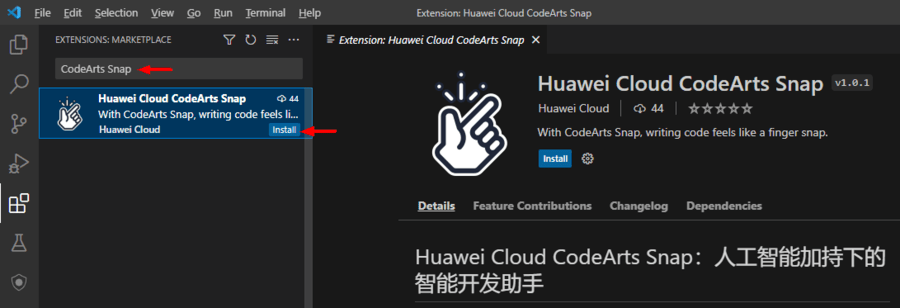
Register a Huawei Cloud account
If you already have a Huawei Cloud account, please proceed directly to the next step. If you don't have one yet, please click this link to register an account. For steps on real-name authentication, you can refer to this link. For individual authentication, scanning the QR code is recommended as the most convenient method.
Obtain AK/SK and log in
CodeArts Snap relies on the Huawei Cloud Toolkit foundation for account login. After installing the plugin, you can either click Login according to the pop-up prompt in the lower right corner of VSCode, or click Huawei Cloud Toolkit: Not Logged In in the lower left corner of VSCode to open the Huawei Cloud Toolkit login interface.
You can click Access Keys on the Huawei Cloud Toolkit login interface to quickly go to the Huawei Cloud console, and click Create Access Key to apply for an access key. You may fill in some remarks when applying for the key.
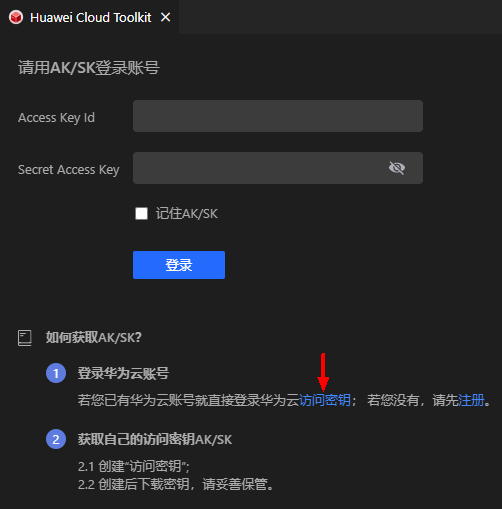
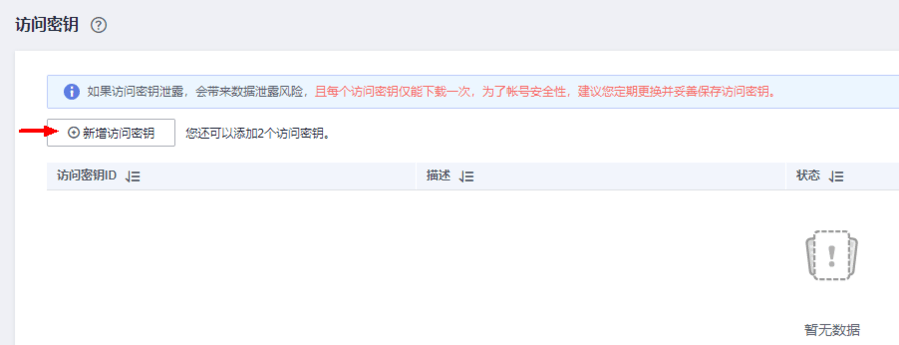
Once created successfully, the system will prompt you to click Download Now, and the access key information will be saved in the credentials.csv file. Please note that each user can add up to 2 access keys, and each access key can only be downloaded once. Please keep them safe. If you accidentally lose a key, there's no need to worry — just delete the old key and reapply for a new one.
Huawei Cloud CodeArts Snap runs as an IDE plugin for developers, and has launched its. Our service is currently in the invite-only beta phase. If you're interested, please feel free to click the link above to register for our trial list!












