Script Planner Assistant▸
 AI Apps
 AI News

PromptBench: A Unified Library for Evaluating and Understanding Large Models
PromptBench: A Unified Library for Evaluating and Understanding Large ModelsIntroduction
PromptBench is a unified library for evaluating LLMs. It consists of several key components that are easy for researchers to use and extend: prompt construction, prompt engineering, datasets and model loading, adversarial prompt attacks, dynamic evaluation protocols, and analysis tools. PromptBench is designed as an open, universal, and flexible codebase for research purposes, which can facilitate original research in creating new benchmarks, deploying downstream applications, and designing new evaluation protocols..
PromptBench project address:https://github.com/microsoft/promptbench
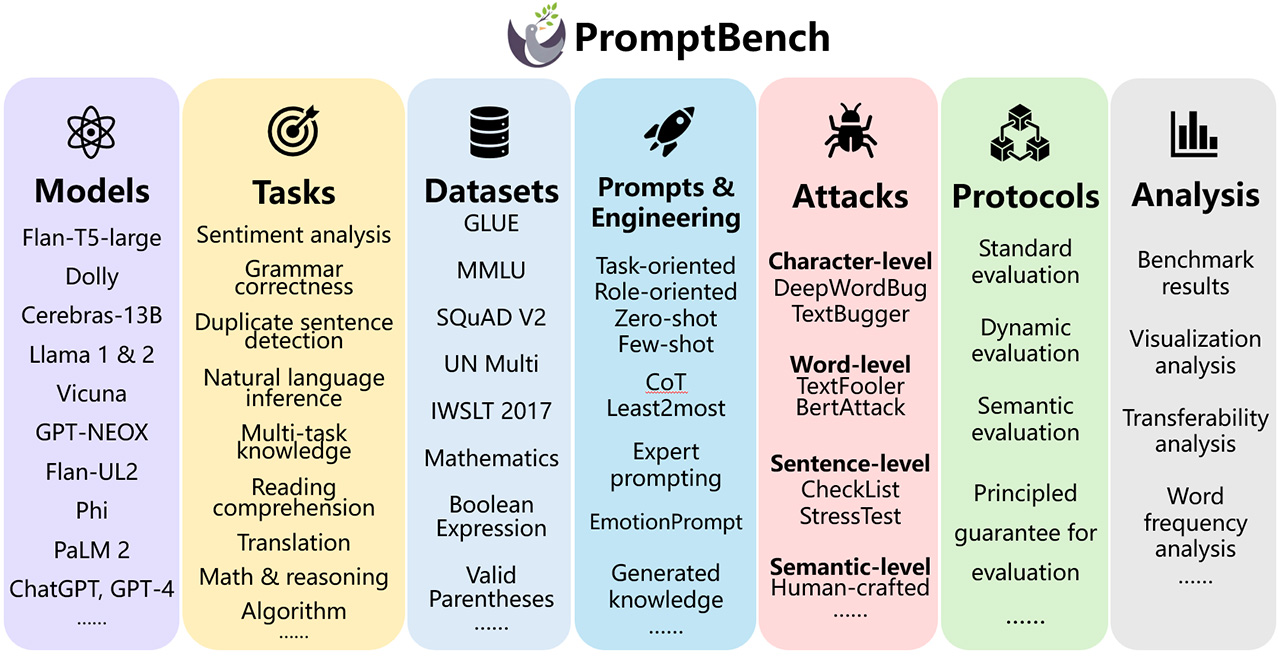
What does promptbench currently offer?
Rapid model performance evaluation: We provide a user-friendly interface that allows you to quickly build models, load datasets, and evaluate model performance.
Prompt engineering: We have implemented several prompt engineering methods. For example: Few-shot Chain-of-Thought [1], Emotion Prompt [2], Expert Prompting [3], etc.
Evaluating adversarial prompts: promptbench integrates prompt attacks [4], enabling researchers to simulate black-box adversarial prompt attacks on models and evaluate their robustness (see details here).
Dynamic evaluation to mitigate potential test data contamination: We have integrated the dynamic evaluation framework DyVal [5], which generates evaluation samples on the fly with controllable complexity.
PromptBench installation via pip
We provide a Python package called promptbench for users who want to get started with evaluation quickly. Simply run:
pip install promptbench
Please note that the pip installation may lag behind the most recent updates. Therefore, if you want to use the latest features or develop based on our code, you should install via GitHub.
Install via GitHub
First, clone the repository:
git clone [email protected]:microsoft/promptbench.git
Then
cd promptbench
To install the required packages, you can create a conda environment:
conda create --name promptbench python=3.9
Then install the required packages using pip:
pip install -r requirements.txt
Please note that this only installs the basic Python packages. For prompt attacks, you also need to install TextAttack.
PromptBench usage:
Promptbench is easy to use and extend. The following examples will help you become familiar with promptbench so you can quickly use it, evaluate existing datasets and LLMs, or create your own datasets and models.