
 Script Planner Assistant▸
 AI Apps
 AI News

Ymi.Ai_云技派,专注ai人工智能!
Ymi.Ai_云技派,专注ai人工智能!Introduction
Ymi.ai is a website that integrates AI chat, AI prompt library, AI tools recommendations, AI community, AI news, and technology innovation sharing, aiming to provide everyone with a highly creative and convenient AI experience! As a professional AI mobile assistant, Ymi.Ai will lead you to explore the fascinating world of AI and inspire the endless potential of future technology. Here, only imagination has no limits!
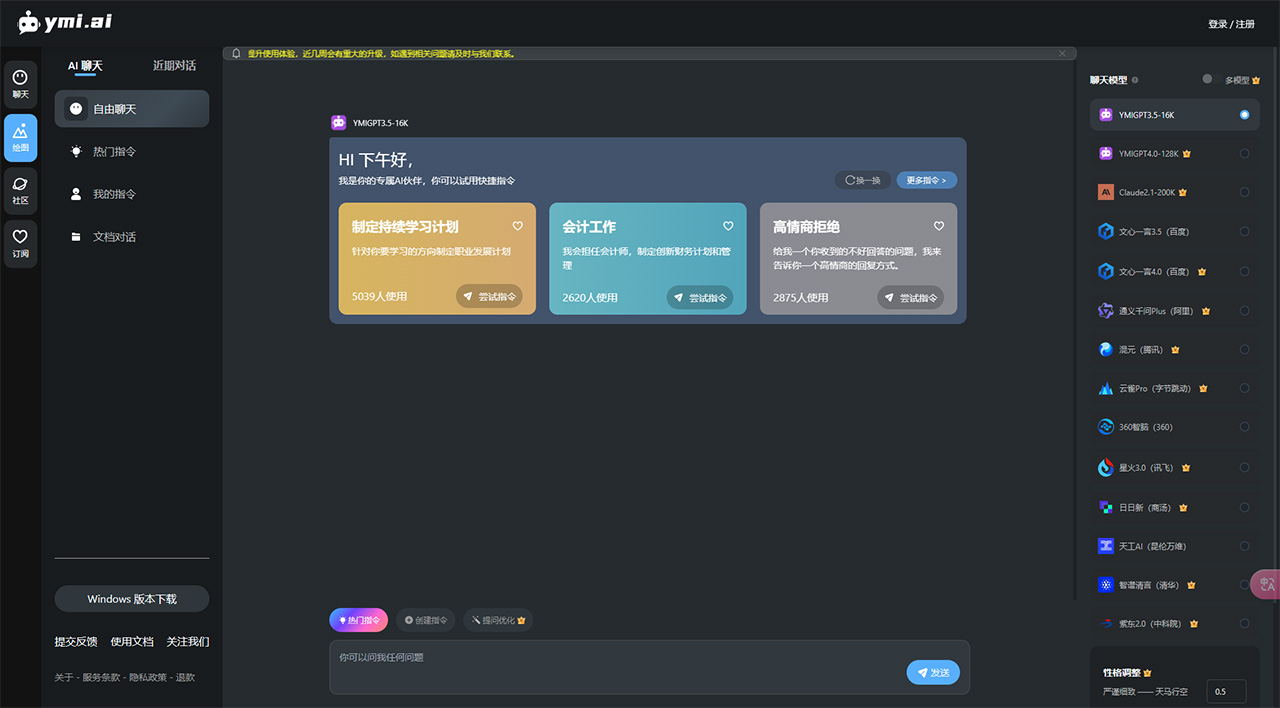
Ymi.Ai Feature Introduction:
AI Chat: With the Ymi.Ai bot powered by OpenAI CHAT instruction technology, and already connected to the internet, you can easily achieve creative writing, automatic translation, information retrieval, intelligent virtual assistant, and many other convenient functions. Say goodbye to expensive learning costs and start a brand-new AI journey anytime, anywhere.
AI Drawing: Ymi.Ai is equipped with cutting-edge neural network AI art technology. Powered by Stable Diffusion, it can generate high-quality images with just simple prompts and descriptions. Whether you are a professional designer, artist, or amateur enthusiast, Ymi.Ai can help you create highly creative masterpieces.
AI Community: Join the Ymi.Ai community to share and communicate with like-minded people. Whether it's practical application or theoretical discussion, you can find friends with similar interests here. Let us break free from constraints together and embrace the freedom of innovation!
AI Tools Recommendations: Ymi.Ai recommends the most cutting-edge and practical artificial intelligence technologies and applications for you, helping you gain deeper insights into more AI tools and improving work efficiency across various fields.
AI Real-Time News: Closely follow industry trends, share hot AI news from home and abroad, lead the forefront of combining AIGC and application layer fields, providing the latest and most comprehensive AI news and innovation achievements on CHAT instructions, Stable Diffusion, Midjourney, and Bard, helping you stand firm at the forefront of technology and become a leader in the industry spotlight.
AIGC: Provides AI customized services for tens of millions of small and medium-sized enterprises, with massive business opportunity information and a convenient and secure online trading marketplace, as well as a community platform where customers can meet friends through projects and interact authentically.
Ymi.Ai Feature Highlights:
Integrates the latest AI technology, offering a one-stop experience for drawing, writing, automatic translation, and more.
Create and share your AI masterpieces, drawing endless inspiration and creativity from the community.
Ymi.Ai allows you to create your own personal exclusive bot, building your own AI assistant—your AI understands you best.
Stay updated with the latest industry news and exclusive AI recommendations, keeping you at the forefront of technology.
Multi-platform compatibility, available anytime, anywhere. Whether on desktop or mobile, enjoy a smooth experience.
Aggregating the most popular models from home and abroad, Ymi.Ai lets you experience different top-tier models.
Ymi.Ai Advanced Usage:
After becoming familiar with the various sections of the website and gaining a certain understanding of Ymi.Ai's models and instructions, you can try out advanced gameplay, which is more personalized, richer, and more fun, while also showcasing your impressive skills!
1. Instruction Creation/Sharing
- When you have a great instruction that can be applied to your work or life, and in most cases no longer need quick instructions, you can choose to create an instruction and save and share your excellent instructions;
- Click "Create Instruction" on the chat homepage
- During the instruction creation process, you need to fill in four modules: instruction title, instruction description, instruction content, and category;
- Instruction title mainly reflects the main purpose of the created instruction, what it does, or what role it can play
- Instruction description is a more detailed expanded description of the function of the created instruction
- Instruction content is the complete content of the created instruction
- Category is the classification for the instruction
- After filling in all the information, click Confirm, and the system will prompt you that the creation is successful;
- Then you can go to the "My Creations" section on the Ymi.Ai homepage and click to enter, where you can see the instructions you created; to use them, simply click again;
2. Large Model Selection and Switching
- Go to the official homepage, register and log in
- Click the model plugin
- When no selection is made, the default is ERNIE Bot (Baidu) model
- At this time, the system defaults to selecting dual models for Q&A. When asking questions, both models will output answers simultaneously, with the effect shown:
- When you click the ERNIE Bot model again, the checkmark in the box disappears, and the system considers that the ERNIE Bot model is turned off and only the Spark model is enabled, as shown in the figure;
- After confirming the model you want to use, you can interact with the bot in the chat box~
3. Personality Adjustment Feature Usage
- After entering and logging in to the Ymi.Ai official homepage, at the bottom of the quick instruction scene area, there is a "Personality Adjustment" plugin
- Click Personality Adjustment
- Example: Select Rigorous and Meticulous, then enter "Please briefly introduce yourself" in the chat box;
- Click Send
4. P Coin System Feature Usage
- In the P Coin system, regular users can get 30 P Coins per day, and VIP users can get 300 P Coins per day;
- Using features consumes 1-10 P Coins;
- For detailed consumption and acquisition details, see the corresponding "Feature Introduction" section;
- At this time, the interface shows 296 P Coins. We select the default ERNIE Bot model and chat directly;
- Click Send
- As you can see, after one Q&A, the P Coins become 295, meaning one P Coin was consumed;
5. Question Optimization Feature Usage
- After entering and logging in to the Ymi.Ai official homepage, at the bottom of the quick instruction scene area, there is a "Question Optimization" plugin
- Before using the "Question Optimization" plugin, you need to first enter the question you want to ask in the chat dialog box, such as "How is the weather today"
- Then click "Question Optimization"















