
 Script Planner Assistant▸
 AI Apps
 AI News

Magic Copy_云技派,专注ai人工智能!
Magic Copy_云技派,专注ai人工智能!Introduction
Magic Copy is a cutout tool that lets you remove backgrounds from images directly in your browser. It supports Chrome, Firefox, and Microsoft Edge, and uses the Segment Anything Model (SAM) AI model recently released by Meta AI. With a single click, you can extract the parts you want from any image, making the cutout process much more convenient.
Magic Copy Installation Address:
Magic Copy is a Chrome extension, and it can also be installed on Microsoft Edge and Mozilla Firefox. I'll use Edge as an example below, but the operations are the same.
Microsoft Edge Store:https://microsoftedge.microsoft.com/addons/detail/magic-copy/pimhjjlpgdhochlnpahelpbjncdgmica
Google Web Store:https://chromewebstore.google.com/detail/magic-copy/nnifclicibdhgakebbnbfmomniihfg
How to Use Magic Copy:
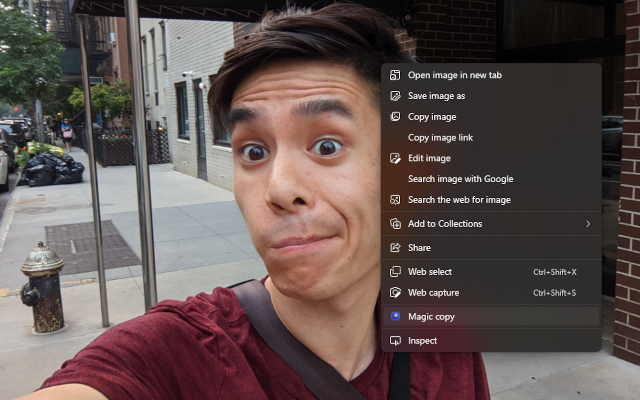
Once installed, right-click on an image on a webpage, and you'll see the "Magic Copy" option in the context menu. Click it, and Magic Copy will start analyzing the objects in the image. After a short while, an image interface with buttons at the top will appear.
Click on the image to select the object under your cursor; the selected object will be highlighted with a light purple overlay, though the color is quite subtle, so you'll need to look carefully. Alternatively, you can press the Preview button at the top left to make the selected object stand out. If you missed a spot, you can press the "Edit" button at the top left to add to your selection, and if you've selected too much, you can use the multiple "Undo" buttons at the top right to cancel selections.
There are Edit and Preview buttons at the top right of the photo. You can use Preview to check which objects have actually been selected.
Once you're satisfied with the selected objects in Preview, you can press the "Copy" button at the top right to copy the selected portion to the clipboard, making it easy to paste into other image editing software. Alternatively, you can press the "Download" button to download the selected object to your computer in PNG format. The PNG file uses a transparent background, so it's easy to embed into other photos.














