Script Planner Assistant▸
 AI Apps
 AI News

Lingyu Assistant
Lingyu AssistantIntroduction
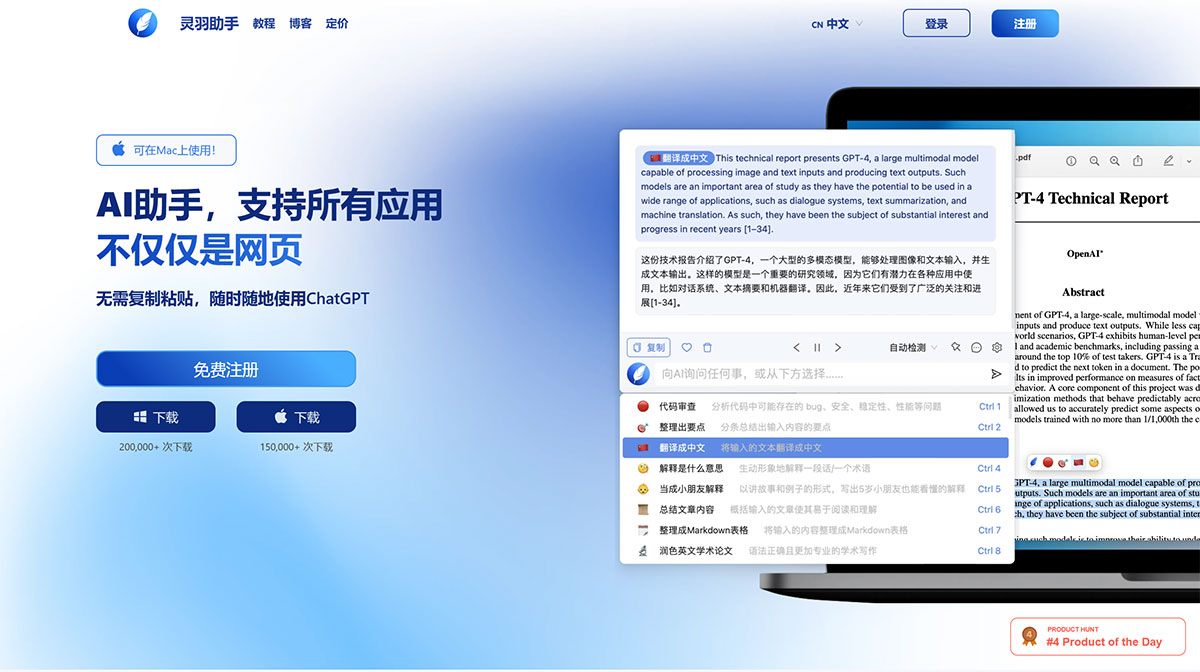
Lingyu Assistant (AI Anywhere) is a desktop intelligent assistant that can help you translate, polish, and explain selected text with one click, chat anytime, anywhere, and use built-in or custom prompts to generate high-quality content, assisting you in creating copywriting, reading, coding, communication, and more.
Features of Lingyu Assistant:
As a global Copilot, Lingyu Assistant integrates seamlessly with all apps and websites. Simply press Option+Space (Alt+Space on Windows) to launch it.
Quick Actions: Just select a piece of text, then click the floating button to polish, explain, translate, or debug it with one click—no copying and pasting required.
Launcher + Chat Window: Press Option+Space anytime, anywhere to chat with ChatGPT. Beyond that, our AI launcher offers 50 curated features, from replying to messages to debugging code—you'll get high-quality answers for all of them.
Personalized Experience: You can easily add more features by writing prompts. Lingyu Assistant intelligently recommends features you might need based on your usage habits and the app you're currently in.
Use AI Anytime, Anywhere: Unlike browser extensions, Lingyu Assistant works locally.This means it integrates seamlessly with your favorite applications, including PDF readers, communication tools, text editors, code editors, and more.
Quick Actions: Process selected text with one click—translate, explain, summarize, or use any other common functions to effortlessly handle any text you select in any application.
Personalized Copilot: Powerful AI features at your fingertips—click Option + Space (Alt + Space on Windows) to access a variety of high-quality AI features. You can also customize functions by adding your own prompts.Lingyu Assistant dynamically adjusts the order of features based on your usage and preferences.
Chat: Press the shortcut to chat anytime, anywhere—whether you need help completing a task, assistance with writing, or chatting with friends, Lingyu Assistant is there to help.
FAQ about Lingyu Assistant
Is Lingyu Assistant free?
Lingyu Assistant is free for all users, but our free version has daily usage limits.For unlimited access and more features, please upgrade to our paid version.
How do I use Lingyu Assistant?
Simply press Option + Space or Alt + Space to start a conversation with Lingyu Assistant.Or, select any text from an application or website and let Lingyu Assistant explain, translate, or polish it for you.