Script Planner Assistant▸
 AI Apps
 AI News

Baidu Mind Map
Baidu Mind MapIntroduction
Baidu Mind Map (百度脑图) is an online mind mappingtool launched by Baidu. It is a convenient mind map editor that runs online, syncs to the cloud, and is completely free.
Baidu Mind Map lets you create, save, and share your ideas directly online. With no installation required, cloud storage, easy sharing, a comfortable experience, and rich features, the simple yet highly intuitive Baidu Mind Map presents complex things in a way that makes them easy for readers to understand and organize.
Baidu Mind Map is very popular among users thanks to its intuitive, visual, and easy-to-understand nature. In office or study processes, we often need to use mind maps, including for learning, writing, communication, presentations, management, meetings, making ppt, and more. Baidu Mind Map focuses on being simple and easy to use, with cloud storage, easy sharing, a comfortable experience, and rich features. It works like a web-based version of Office, allowing you to create mind maps directly in your browser.
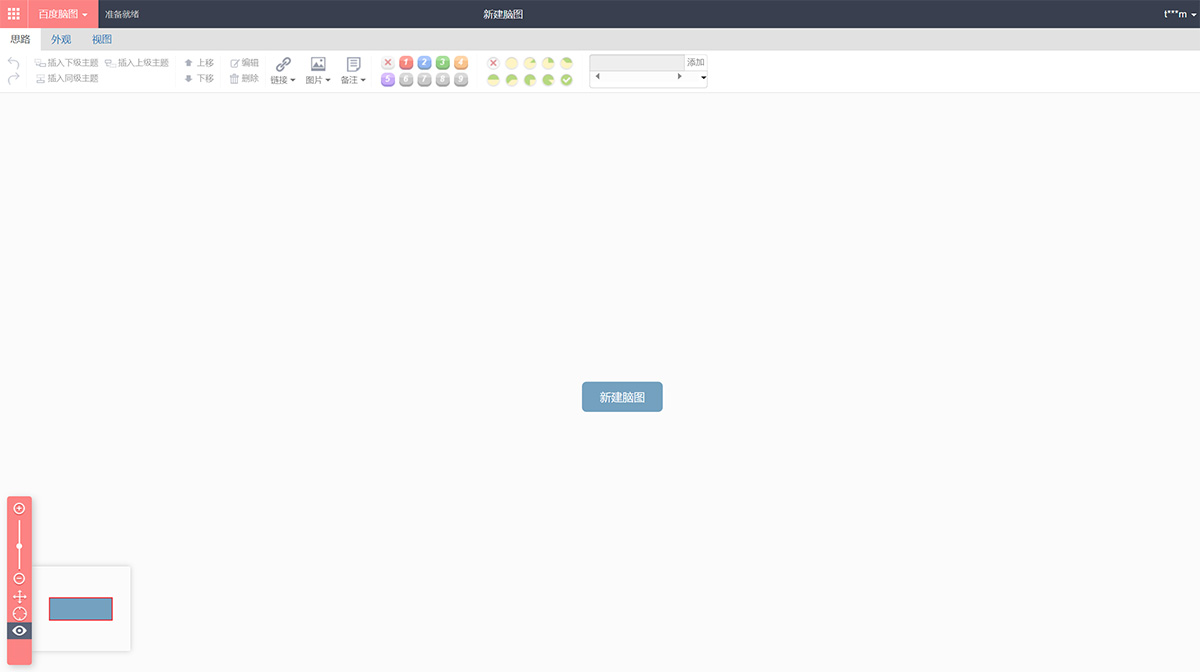
Baidu Mind Map has three menu bars: Ideas, Appearance, and View.
Operating Baidu Mind Map is very simple, with only a few of the most commonly used basic buttons, including:
Create topics: (Parent, Sibling, Child),
Operate topics: (Move Up, Move Down, Edit, Delete),
Insert information: (Link, Image, Note, Icon, Tag),
Plus the very common "Undo" and "Redo" buttons.
And there's the great convenience of no installation needed! Just open your browser and start using it right away — no client installation required. Simply visit the Baidu Mind Map website and click to enter, and you can start drawing mind maps. Of course, you'll need to register a Baidu account first.
Features of Baidu Mind Map:
Convenient mind map editing and management: Baidu Mind Map provides an intuitive interface and rich editing features, including adding, deleting, and modifying nodes, adjusting node order, and setting relationships between nodes. Users can easily create and modify mind maps to meet different needs.
Supports multiple mind map structures: Baidu Mind Map supports multiple mind map structures, such as organizational charts, directory organization charts, logical structure charts, fishbone diagrams, and Tianpan diagrams. Users can choose different mind map structures based on their needs to suit different application scenarios.
Cloud storage and sharing features: Baidu Mind Map supports cloud storage, allowing users to store their mind maps in the cloud and access and edit them anytime, anywhere. At the same time, users can share mind maps with others, making team collaboration and communication easy.
Supports importing and exporting multiple file formats: Baidu Mind Map supports importing and exporting multiple file formats, such as XMind, FreeMind, etc., making it convenient for users to convert between different software.
Automatic real-time save feature: Baidu Mind Map provides an automatic real-time save feature. During the editing process, every modification is automatically saved, preventing data loss due to unexpected situations.
Supports multi-platform use: Baidu Mind Map can be used on multiple platforms, such as PC, mobile phone, tablet, etc., allowing users to edit and manage mind maps anytime, anywhere.
How to use Baidu Mind Map?
Baidu Mind Map is very simple to use. Users can edit and configure it according to their own needs to meet different work and study requirements.
1. Open Baidu Mind Map and log in to your Baidu account.
2. Select "New Mind Map" from the menu bar at the top of the page to enter the mind map editing page.
3. On the editing page, you can start editing your mind map. Use the Tab and Shift+Tab keys on your keyboard to add or delete nodes, or use the right-click menu to edit.
4. During editing, you can adjust the structure of the mind map by dragging nodes. You can also use the tools in the menu bar to perform formatting, theme settings, and other operations.
5. After completing the editing, you can choose to save or export the mind map. When saving, you can choose to save to Baidu Netdisk or a local file. When exporting, Baidu Mind Map allows you to export to multiple formats, such as PNG, SVG, TXT, etc.