Script Planner Assistant▸
 AI Apps
 AI News

Doubao Web: ByteDance's AI Chat & Q&A Assistant
Doubao Web: ByteDance's AI Chat & Q&A AssistantIntroduction
Doubao Web Version is an AI intelligent Q&A assistant launched by ByteDance, offering smart conversation, AI image generation, video generation, PPT creation, document parsing, programming help, and more. The web version can be used by simply opening doubao.com in a browser—no client installation needed—and data syncs seamlessly with the mobile app and desktop version. It is currently one of the AI assistants with the largest user base in China.
The advantage of the web version lies in comfortable operation on a large screen and convenient multitasking. Scenarios like document editing, code display, and PPT generation are much more handy than on mobile.
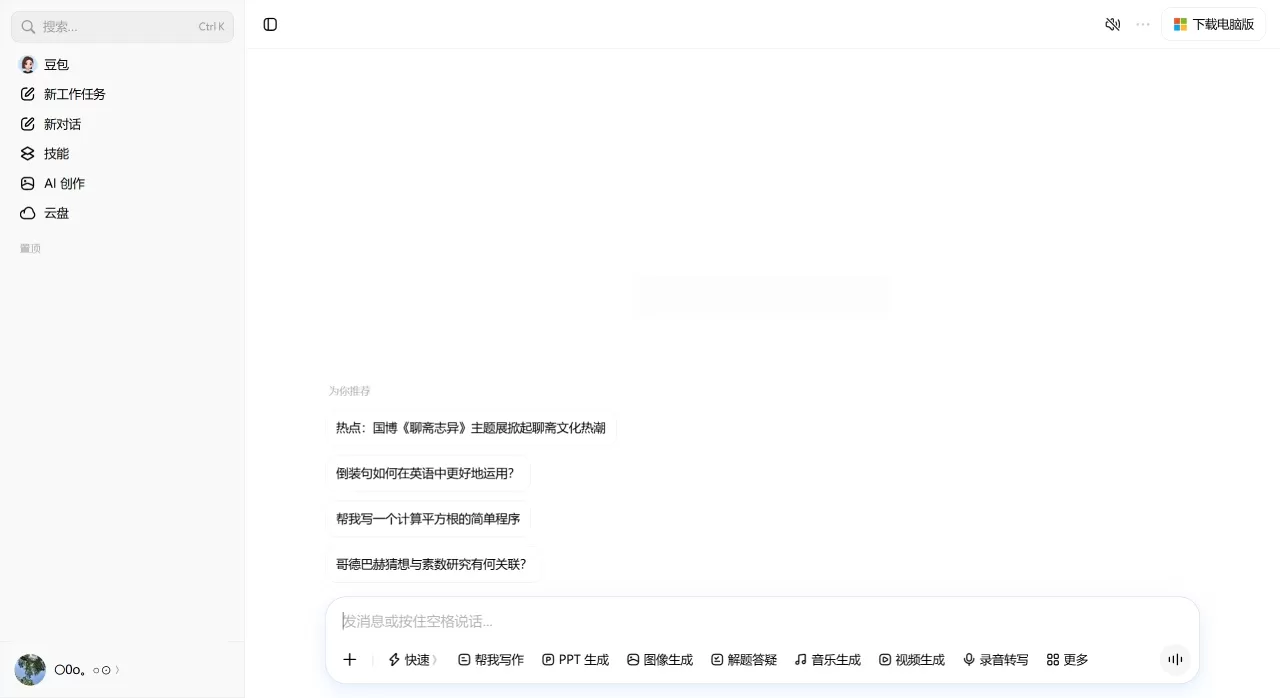
Core Features of Doubao Web Version
Smart Conversation: Supports multi-turn continuous dialogue with context, can search the web for real-time information, and answers are annotated with source citations. The maximum context length supports up to 200K tokens—even an entire novel can be fed in and the conversation continues.
AI Image Generation: Supports both text-to-image and image-to-image. Multiple styles are available such as ink wash painting, cartoon, Chinese style, and Japanese style, and you can also set the size and aspect ratio. The "Super Creative 1.0" updated in April 2025 supports context-aware generation, mixed text-image layouts, batch generation (up to 20 images at once), and one-sentence style transfer.
AI Video Generation: Built-in Seedance video generation model, supporting both text-to-video and image-to-video. Just input descriptions covering subject, action, scene, and style to generate videos, ideal for short video creators to produce footage.
AI PPT: Enter the topic and chapter requirements to automatically generate an outline. After confirmation, pick a style and color scheme, and generate a complete PPT with one click. Supports export and download.
Document Parsing: Supports uploading PDF, Word, Excel, image, and other formats (single file no larger than 50MB). Can perform summary extraction, key Q&A, and information comparison. Files uploaded during conversation are automatically synced to "AI Cloud Drive."
Programming Assistance: Code generation, debugging, logic explanation, and technical Q&A. The web version comes with built-in syntax highlighting and one-click copy.
Translation: Supports translation between over 100 languages including Chinese, English, Japanese, and Korean, free of charge with no word limit. New in 2026: professional domain terminology library, multi-turn conversational translation (preserving previous context), and translation style selection (formal/colloquial/academic).
Voice Interaction: Supports voice input and voice playback. Speech recognition supports Mandarin, Cantonese, Sichuanese, and other dialects.
AI Music Generation: Input lyrics and style preferences to generate a complete music piece.
Expert Mode: Professional version, powered by the Seed 2.0 Pro flagship model, focused on deep professional reasoning, long-chain tasks, and multimodal understanding—ideal for academic research, legal consulting, and complex solution design.
Office Task Mode: Professional version, integrating the Doubao 2.1 series models, capable of executing Agent tasks. Includes browser automation, document analysis, data calculation, image-text generation, and scheduled asynchronous tasks, such as scheduled weekly report generation and online Office suite. However, local file manipulation and browser automation are limited to Windows/Mac desktop clients; the web version can only handle cloud documents and web retrieval.
Application Scenarios for Doubao Web Version
Daily Q&A: Looking up information, answering questions, life consulting—replacing traditional search engines
Content Creation: Writing articles, polishing copy, generating scripts, continuing novels
Workplace Productivity: Writing weekly reports, making PPTs, organizing meeting minutes, analyzing Excel data
Design Creation: Generating illustrations, creating short video footage, designing poster concepts
Learning & Research: Reading papers, translating foreign materials, organizing knowledge points, learning programming
Cross-Language Communication: Real-time translation, document translation, email polishing
Professional Analysis: Legal consulting, medical advice, financial data analysis (Expert Mode)
Doubao Web Version Pricing
Free Version
Basic conversation, writing, translation, AI image generation, document parsing, programming assistance, and other features are completely free with no hard usage limits. However, high-compute features such as AI image and video generation have daily quota limits, and queuing may be required during peak hours.
Professional Version (launched June 24, 2026)
| Plan | Monthly Fee | Annual Fee | Quota Benefits |
|---|---|---|---|
| Standard | 68 CNY/month | 688 CNY/year | Expert Mode, Office Task Mode, and other quotas are over 5× the free version |
| Enhanced | 200 CNY/month | 2048 CNY/year | 4× the quota of the Standard plan |
| Premium | 500 CNY/month | 5088 CNY/year | 10× the quota of the Standard plan |
The core difference of the paid version is not in features, but in quota and priority: no queuing during peak hours, no throttling, and more generous usage limits. After student verification, the Standard plan can be purchased at a special 6-month price (38 CNY/month).
Enterprise / Developers
Call Doubao's underlying capabilities via API through the Volcengine platform, billed by usage. Supports model fine-tuning (SFT) and private knowledge base integration, with pricing following business solutions.
Core Advantages of Doubao Web Version
Large user base and fast product iteration: 350 million monthly active users provide data feedback that continuously optimizes the model, with a high frequency of new feature releases.
Basic features are truly free: Core capabilities such as conversation, writing, translation, and image generation have no paywall—unlike ChatGPT which locks GPT-4 behind Plus.
Full modality coverage: Chat, image, video, music, PPT, programming, translation—done all on one platform without switching back and forth.
Deep office integration: Office Task Mode can operate the browser, generate Office documents, and execute scheduled tasks—not just "answering questions" but "doing the work for you."
Strong Chinese context understanding: ByteDance's product DNA makes Doubao more handy with Chinese expression, internet memes, and local business scenarios.
Multi-platform data sync: Web, app, desktop, and browser extension—data syncs in real time after login.
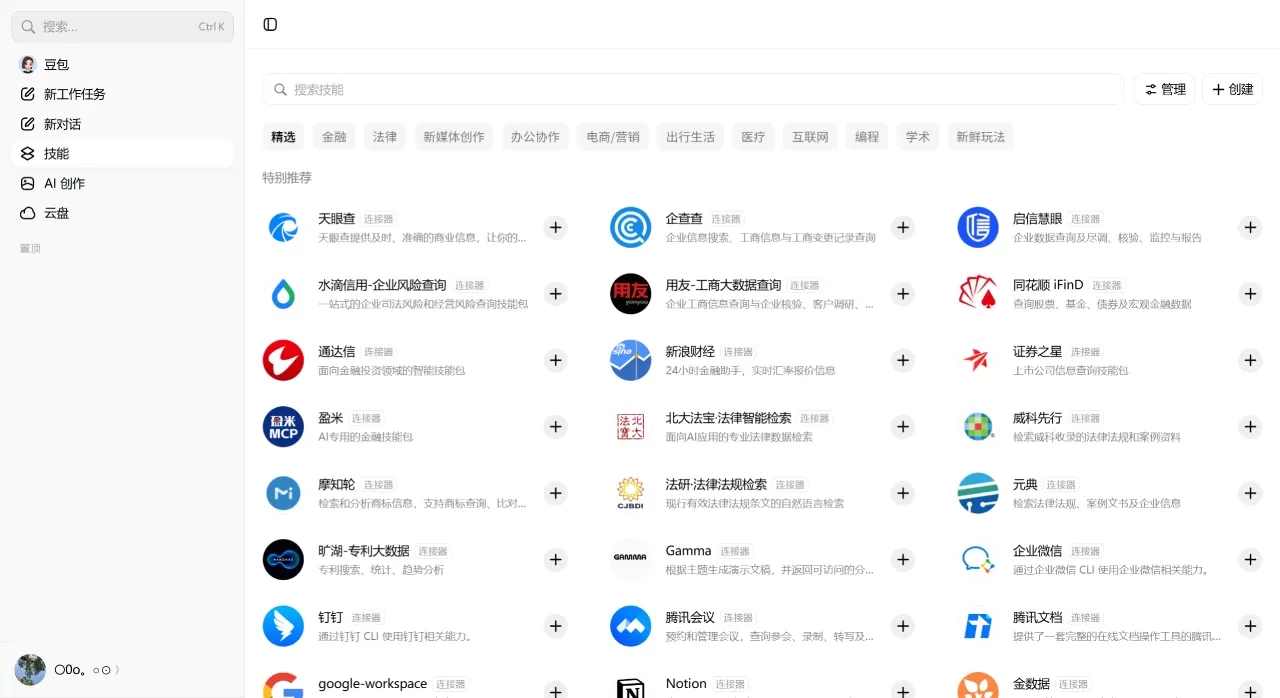
How to Use Doubao Web Version
Quick Start
Open doubao.com or doubao.com/chat/ in your browser to go directly to the conversation interface
Ask questions directly without logging in, or click login to manage your records
Above the input box, you can switch models and enable web search
AI Image Generation
Click the "Image Generation" entry next to the input box, or visit doubao.com/chat/create-image
Enter a description of the image, choose the style and size
Click Generate and wait for the image
Document Parsing
Click the "+" icon next to the input box to upload files, or visit doubao.com/chat/chat-with-doc
Upload PDF/Word/Excel and other files
Ask questions directly, such as "Summarize the key points of this report" or "Compare the data of Plan A and Plan B"
AI PPT
Find the "AI PPT" entry below the chat box
Enter a topic, such as "NEV Market Analysis Report, divided into three chapters: industry status, competitive landscape, and future trends"
After confirming the outline, choose a style and color scheme, and generate with one click
Supports export and download
Expert Mode
Log in and enter the chat interface
Find the "Expert Mode" toggle above the input box
When enabled, switch to the Seed 2.0 Pro model, suitable for handling complex professional questions
Office Task Mode
Update to the latest version and find the "Office Task Mode" entry in the Tools bar at the top of the chat
Grant cloud document and web search permissions on the web version
Enter your work goal command, and AI will automatically break down and execute multi-step tasks
Programming Assistance
Visit doubao.com/chat/coding or directly ask code-related questions in the chat
Supports code highlighting and one-click copy
How Does Doubao Web Version Compare with Competitors?
| Comparison | Doubao | Kimi | DeepSeek | ChatGPT |
|---|---|---|---|---|
| Monthly Active Users | 345 million (Mar 2026) | 166 million | 127 million | - |
| Basic Features | Completely free | Completely free | Completely free | GPT-3.5 free, GPT-4 paid |
| Paid Plans | ¥68/¥200/¥500 per month | ¥49/¥99/¥199/¥699 per month | No consumer paid plans | $20/month (Plus) |
| Context Length | 200K Tokens | 200K Tokens | 128K Tokens | 128K Tokens |
| Web Search | ✅ Supported | ✅ Supported | ✅ Supported | ✅ Supported on Plus |
| AI Image Generation | ✅ Built-in | ❌ Not supported | ❌ Not supported | ✅ DALL-E (Plus) |
| AI Video Generation | ✅ Built-in Seedance | ❌ Not supported | ❌ Not supported | ✅ Sora (Plus) |
| Document Parsing | ✅ Supported | ✅ Supported | ✅ Supported | ✅ Supported |
| Local File Control | ✅ Desktop supported | ❌ Not supported | ❌ Not supported | ❌ Not supported |
| Voice Interaction | ✅ Supported | ✅ Supported | ❌ Not supported | ✅ Supported |
| Programming Assistance | ✅ Supported | ✅ Supported | ✅ Excellent | ✅ Supported |
| Multilingual Translation | ✅ 100+ languages, free | ✅ Supported | ✅ Supported | ✅ Supported |
| PPT Generation | ✅ Built-in | ✅ Supported | ❌ Not supported | Requires plugin |
| AI Music | ✅ Built-in | ❌ Not supported | ❌ Not supported | ❌ Not supported |
Why Choose Doubao Web Version
Doubao Web Version is ideal for users who don't want to install software and prefer an out-of-the-box experience. Basic features are completely free—chat, writing, translation, and image generation are all available directly. The large-screen experience is more comfortable than on mobile, and document parsing and PPT generation work better on the web. If you only need to look up information, write copy, or create simple design images daily, the free version is sufficient. If you have heavy workloads, need batch document processing, or want to skip queues during peak hours, the ¥68/month Standard plan offers excellent value.
FAQ
Q: What's the difference between the web version and the client?
The core AI capabilities are identical. The desktop client additionally includes "AI Browser" and "Selection/Screenshot AI Assist" features, and can also control local files. The web version wins on no installation required—open and use.
Q: Can I use it without logging in?
Yes. Without logging in, you can use basic features like smart chat and AI image generation, but there are usage limits, conversation history is not saved, and you cannot use the Pro subscription or create agents. Logging in (via phone number/WeChat/Douyin) is recommended to sync your data.
Q: Will the free version be downgraded in the future?
Officially, basic features will remain permanently free, including daily Q&A, copywriting, translation, document summaries, and other core capabilities, with no usage limits. The Pro version is an optional premium service.
Q: What can Office Task Mode do?
It can automatically operate browsers, batch extract web data, generate PPTs, edit Office documents online, and set scheduled tasks. The free version offers limited access for trial; the web version cannot control your local computer.
Q: Are there any file upload limits?
Supports common formats such as PDF, Word, Excel, PPT, images, audio, TXT, etc. The single-file limit is 50MB (some channels show 128MB; refer to the actual interface). Multiple files can be uploaded at once.
Q: How do I cancel the Pro version auto-renewal?
In the Doubao App or client, go to [Me] → [Subscription Management] → [Cancel Subscription]; iOS users need to cancel in the App Store subscription settings.
Last updated: August 14, 2026