Script Planner Assistant▸
 AI Apps
 AI News

TTS-Vue: Microsoft Text-to-Speech Tool
TTS-Vue: Microsoft Text-to-Speech ToolIntroduction
Software Introduction:
TTS-Vue is an open-source and free Microsoft speech synthesis tool, built using Electron + Vue + ElementPlus + Vite.
TTS-Vue Features:
1. Microsoft Speech Synthesis API
Microsoft's official speech synthesis API, using WebSocket connection.
2. Supports SSML Speech Synthesis Markup Language
SSML is an XML-based markup language that allows developers to specify how to use text-to-speech to convert input text into synthesized speech.
3. Supports Batch Conversion
Select multiple txt files for batch conversion.
4. Large File/Long Text Slicing
When the content to be converted is too long, it can be automatically split into multiple smaller pieces and converted separately. After conversion, they are automatically stitched together into one file.
5. Voice Preview
You can preview the voice when selecting it, and configure the preview reading content on the settings page.
6. Logging Function
Records issues during operation.
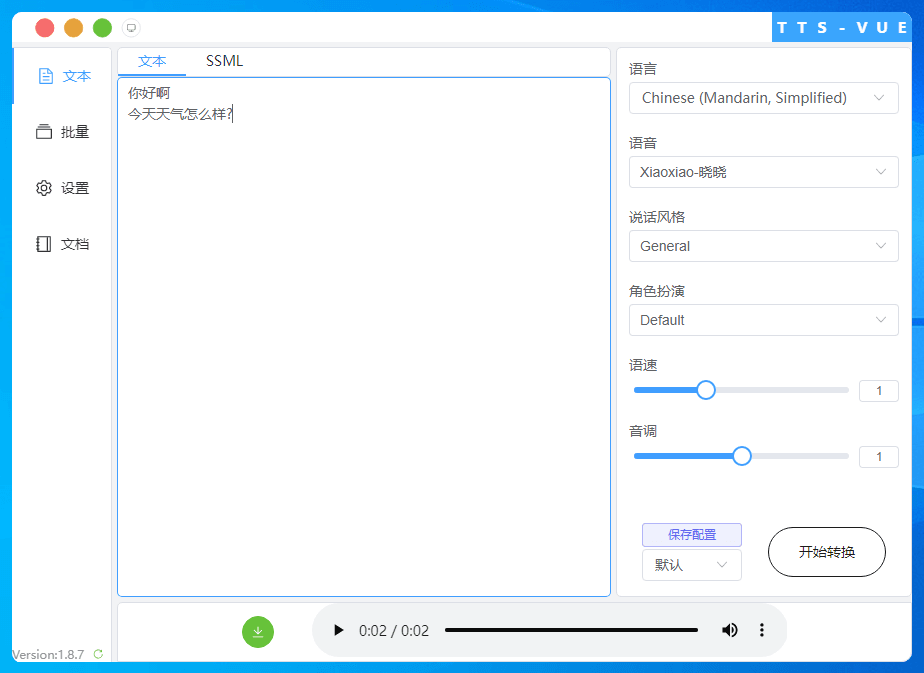
How to Use TTS-Vue:
1. Copy the text into the text box below, which is the content input area.
2. Select the desired voice, style, and role in the control bar on the right.
3. Click Start Conversion
Note:
When the text is long, TTS-Vue will automatically slice the file internally, detecting the next occurrence of , 。 ? , . ? symbols approximately every 300 characters, splitting at these points, converting them to speech sequentially, and automatically stitching them together.
If the text is long and contains no punctuation, the conversion will fail.
For overly long text, even with punctuation, conversion may still have issues. (The cause has not yet been determined.)
For texts of several thousand characters or more, it is recommended to split them into multiple txt files yourself for batch conversion.
TTS-Vue can add SSML tags within the text to handle pauses, interruptions, and polyphonic characters.
The green download button in the bottom control bar can be used to download the file after conversion is complete.

TTS-Vue Homepage: https://loker-page.lgwawork.com/home.html
Open Source Address: https://gitee.com/LGW_space/tts-vue
TTS-Vue Download Address:
Gitee: https://gitee.com/LGW_space/tts-vue/releases/latest
GitHub: https://github.com/LokerL/tts-vue/releases/latest
Lanzou Cloud: https://wwn.lanzoul.com/b0f3ype9g Password: em1n