
 Script Planner Assistant▸
 AI Apps
 AI News
Nano Banana 2 vs. the Original Nano Banana: Key Differences and Upgrades

Nano Banana 2 vs. the Original Nano Banana: Key Differences and Upgrades
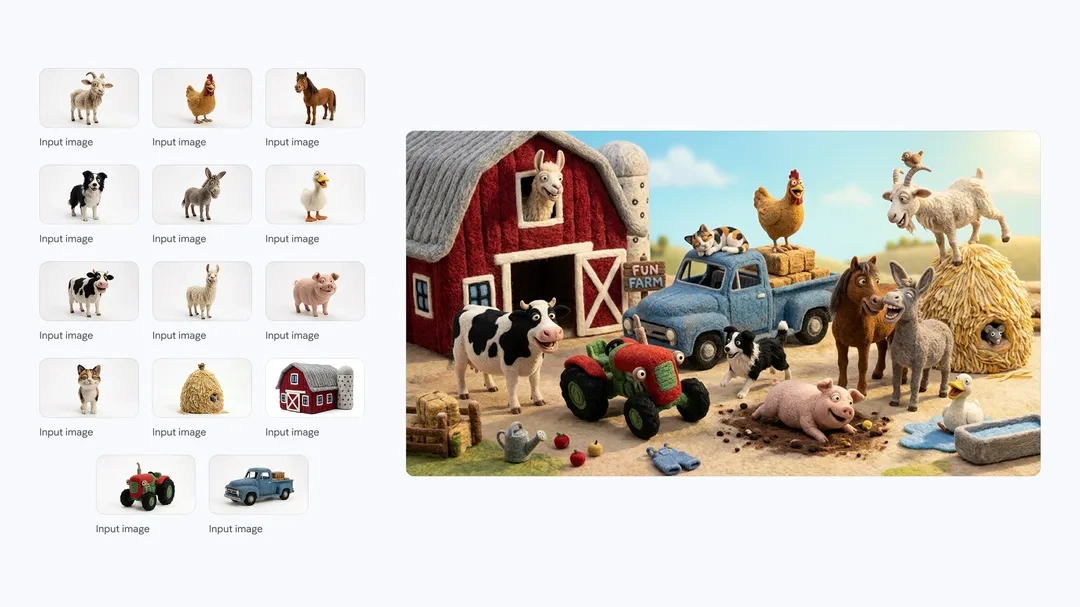
Both Nano Banana 2 and the original Nano Banana are image generation tools from Google's Gemini series, but Nano Banana 2 has largely fixed the shortcomings of its predecessor. In actual use, the differences mainly come down to these aspects:
Differences Between Nano Banana 2 and the Original Nano Banana
The generation logic is completely different
The original Nano Banana is a "one-shot deal"—you input a prompt, and it produces an image directly; the quality depends on luck. With complex scenes, like "a mirror reflecting another room," it often confuses the two scenes and generates images with broken logic.
Nano Banana 2, on the other hand, has switched to a multi-step reasoning mode: it first plans the composition, then checks for issues, and finally self-corrects. This "Plan→Evaluate→Improve" loop makes it much more reliable on complex instructions.
The resolution is finally sufficient
The original Nano Banana topped out at around 1080p, which is fine for a phone wallpaper but falls short for print or large-screen displays. Nano Banana 2 natively supports 2K and even 4K (4096×4096), so the output can be used straight away for posters, e-commerce detail pages, and similar applications, with no need for upscaling afterward.
Text rendering: from "disaster" to "usable"
This is probably the biggest pain point improvement. The original model basically produced gibberish when generating text—"OPEN" becoming "OPFN" was the norm. Nano Banana 2's text accuracy has hit 94%, and Chinese, English, and even multilingual mixes all render correctly, making it finally usable for ad images with slogans and UI design drafts.
Speed is actually faster
Logically, quality improvements should mean slower speeds, but Nano Banana 2 generates a 4K image in about 10 seconds, which is faster than the original's 20–30 seconds for a 1080p image. Google has optimized inference efficiency, which is quite surprising.
What other differences are there in actual use?
Character consistency: With the original, drawing the same person across different scenes often led to changes in appearance; the new version maintains a unified style across scenes.
Editing features: The original only allowed changing the prompt and redrawing; the new version supports region-based editing—just select the part you want to modify.
Complex compositions: The new version reliably handles scenes with more than 10 objects plus multiple people; the original often "loses things."
Which one should you choose?
| Your needs | Recommendation |
|---|---|
| Quick concept images, creative play | The original is still usable, but Google is already pushing the new version |
| Print materials, ad images | You must go with Nano Banana 2—text accuracy and high resolution are hard requirements |
| E-commerce product images, brand assets | The new version's multilingual support and consistency save a lot of hassle |
| Budget-sensitive | Nano Banana 2's Flash version is actually cheaper, at about $0.04–$0.07 per image—lower than the original Pro version |
The original Nano Banana is like a "fast but rough" sketching tool, while Nano Banana 2 truly has commercial value—especially with its text accuracy and high resolution, which, once filled in, allow many real workflows to run smoothly. If you're still using the original, the cost of upgrading is low, but the experience improvement is significant.









