
 Script Planner Assistant▸
 AI Apps
 AI News
The Complete Seedance 2.0 (Jimeng) User Manual
小编 ·

The Complete Seedance 2.0 (Jimeng) User Manual
I. Seedance 2.0 Overview
Jimeng Seedance 2.0 is the next-generation AI video generation model launched by ByteDance. It adopts a dual-branch diffusion transformer architecture that can simultaneously generate video and audio. The biggest breakthrough of Seedance 2.0 is its upgrade from "text-to-video" to a multimodal video creation platform, taking creation from "generation" to "control". Feng Ji, the producer of "Black Myth: Wukong", praised it as "currently the strongest video generation model on the planet".
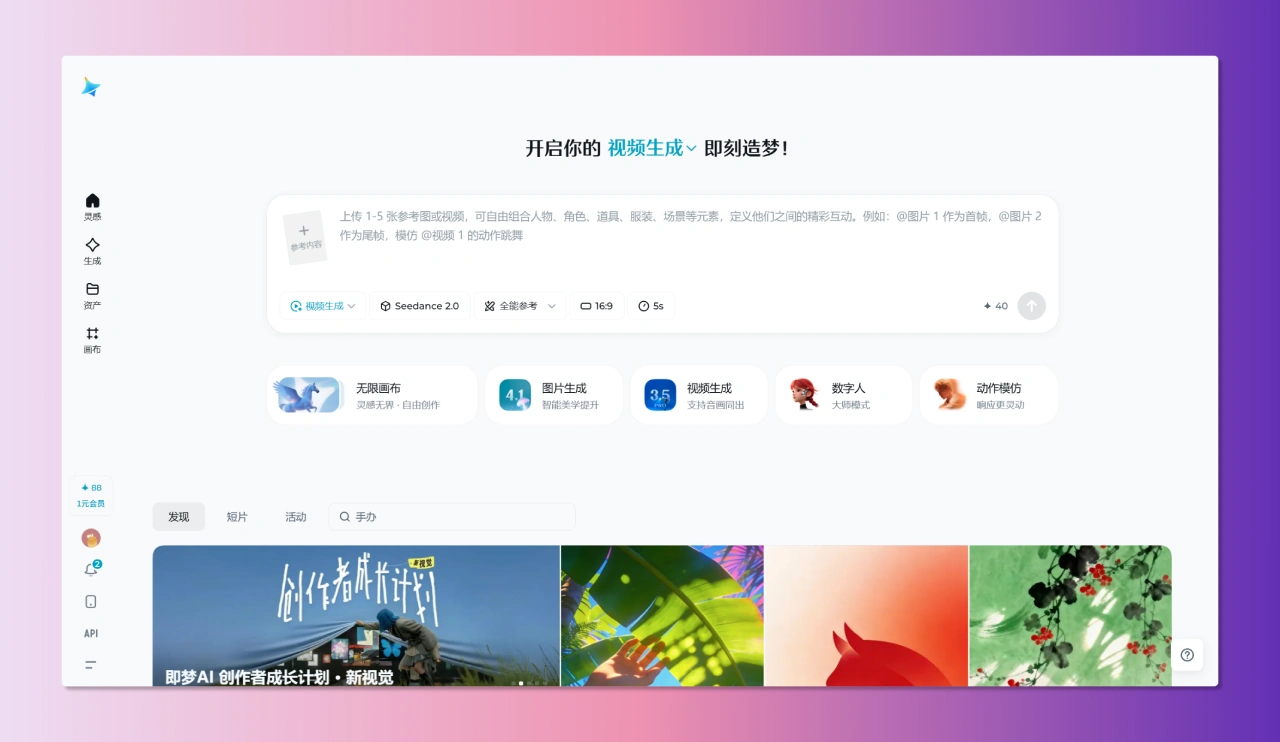
Core Features of Seedance 2.0
Fast Output: Create a multi-shot video with original sound in about 60 seconds.
Diverse Inputs: Supports text, image, video, and audio inputs simultaneously.
Simple Operation: Automatic shot division and camera movement — no need to write complex prompts to describe camera motion.
Audio-Visual Sync: Audio and visuals are aligned during generation, with accurate lip-sync.
II. Seedance 2.0 Access Entry
1. Jimeng AI (Primary Entry)
Usage Requirements: Available directly for members (membership starts at approximately 69 yuan)
Supported Platforms: Web version, Mobile App
2. Doubao App
Invoke via prompts in Doubao: Use a prompt like "Use Seedance 2.0 to generate a Shaw Brothers-style fighting video", and Doubao can iteratively refine the prompt.
3. Xiaoyunque App
Provides 3 free trial opportunities
III. Detailed Explanation of the Two Generation Modes
Mode 1: First/Last Frame Mode (Beginner-Friendly)
Applicable Scenario: Only one first-frame image (or last-frame image) + text prompt
Operation Steps:
Select "AI Video" → Select "Seedance 2.0" → Select "Single Frame / First-Last Frame" mode
Upload the first-frame image (optional: upload a last-frame image)
Write a prompt describing the video content
Set parameters (duration, aspect ratio, etc.)
Click "Generate"
Features: The simplest way to get started, ideal for quick experimentation
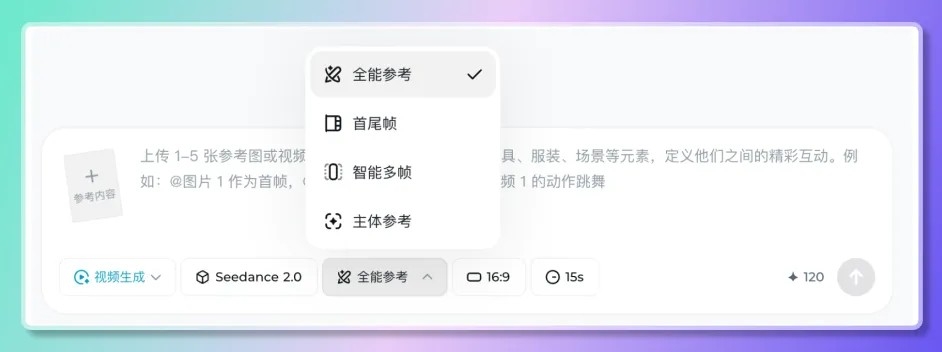
Mode 2: Full Reference Mode (⭐ Core Play)
Applicable Scenario: Need to mix inputs of images + video + audio + text for precise control
Operation Steps:
Select "AI Video" → Select "Seedance 2.0" → Select "Full Reference" mode
Upload reference materials (up to 12 files):
Images: Up to 9 (characters, scenes, styles)
Videos: Up to 3 clips (action, camera movement reference)
Audio: Up to 3 clips (soundtrack, sound effect reference)
Use the @material name syntax to specify the purpose of each material
Write detailed prompts
Generate video
IV. Detailed Explanation of @ Reference Syntax
Basic Reference Format
@图片1 作为首帧
@视频1 参考镜头语言
@音频1 用于配乐
@图片2 作为角色参考
Advanced Combination Usage
| Usage Scenario | Prompt Example |
|---|---|
| Specify First Frame | @图片1 作为首帧,一位少女站在樱花树下 |
| Action Reference | @图1 为首帧,参考@视频1 的打斗动作 |
| Multi-Image Continuous Action | @图1@图2@图3,角色从跳跃直接过渡到翻滚 |
| Video Extension | 将@视频1 延长5秒 (Set generation duration to 5 seconds as well) |
| Video Fusion | 在@视频1 和@视频2 之间加一个场景,内容为xxx |
| Style + Action | @图片1 作为角色,参考@视频1 的运镜风格,@音频1 作为背景音乐 |
Correct Usage of @:
Set first frame and reference: @图片1 作为首帧,参考 @视频1 的镜头语言,@音频1 用于配乐
Set characters: @图片1 的女生作为主角,@图片2 的男生作为配角
Set camera movement: 完全参考 @视频1 的所有运镜效果和转场
Set scenes: 左边场景参考 @图片3,右边场景参考 @图片4
Set actions: @图片1 的人物参考 @视频1 中的舞蹈动作
Set voice: 旁白的音色参考 @视频1
💡 How to Trigger "@": Type the "@" character in the input box, or click the "@" button in the parameter tools bar
💡 Tip: File quantity is limited (up to 12); prioritize uploading materials that have the greatest impact on visuals and pacing
V. Prompt Writing Guide
Structure of an Excellent Prompt
[Scene Description] + [Character Action] + [Camera Movement] + [Atmosphere/Mood] + [Special Requirements]
Example Prompts
Basic Example:
樱花树下,一个女孩扭头看向一只猫,花瓣飘落,微风吹过她的头发。女孩摸了摸猫的头,对猫说"你好呀,小家伙",最后画面定格在女孩脸上。
Complex Camera Movement Example:
The camera follows a man in black as he flees rapidly, with a group of people chasing behind. The camera shifts to a side tracking shot as the panicked figure crashes into a roadside fruit stand, scrambles back to his feet, and continues running, amid the chaotic sounds of the crowd.
Multimodal Reference Example:
@图片1 as the first frame, @视频1 referencing the camera movement style,
@音频1 as the background music. A martial arts hero practices swordplay in a bamboo forest, sword aura sweeping across as fallen leaves flutter. The camera slowly pushes in from a wide shot to a close-up, with a bleak, tragic atmosphere.
Prompt Optimization Tips
Be specific: describe concrete actions, expressions, and clothing details
Sense of scene: clearly define time, location, and lighting conditions
Sense of camera movement: even without detailed description, the model will auto-storyboard, but you can specify special camera movement requirements
Emotion words: use words like "bleak," "cheerful," "tense" to guide the atmosphere
VI. Detailed Parameter Settings
Basic Parameters
| Parameter | Options | Description |
|---|---|---|
| Video Aspect Ratio | 16:9 / 9:16 / 1:1 | Landscape suits YouTube/Bilibili; vertical suits Douyin/TikTok |
| Video Duration | 5–15 seconds | Standard generation duration is approximately 15 seconds |
| Visual Style | Realistic, cinematic, anime, cyberpunk, etc. | Choose the overall style based on the content |
| Credits Consumed | Approx. 30 credits/15 seconds | Consumed within the Jimeng membership system |
Advanced Settings
First-frame control: upload the first image to define the video's starting frame
Last-frame control: upload the final image to define the video's ending frame
Reference strength: controls how much the AI learns from reference materials
VII. In-Depth Analysis of Core Features
1. Auto-Storyboarding and Auto-Camera Movement
Breakthrough: no need to precisely describe complex camera instructions like "camera pans from left to right" or "wide shot followed by close-up."
How it works: the model automatically plans storyboards and camera movements based on the plot, generating sequences with shot-size variations, camera motion, and spatiotemporal coherence.
Effect: a simple prompt can produce results comparable to a professional director's camera work.
2. Comprehensive Multimodal Reference
Supported Files:
Images ×9: character design, scene atmosphere, clothing details
Videos ×3: camera movement style, action poses, rhythm reference
Audio ×3: background music, sound effect style, voiceover reference
Advantages: pixel-level guidance of generation results, effectively mitigating the issue of excessive randomness in AI-generated content.
3. Native Audio-Video Synchronization
Capabilities:
Precise matching of character lip movements with speech rhythm
Facial expressions aligned with audio emotion
Phoneme-level lip-sync across 8+ languages
Environmental sound effects physically matching scene materials
Value: no post-production voiceover needed—truly one-click generation of a complete video.
4. Multi-Shot Narrative Capability
Features:
Consistent character appearance across multiple shots
Continuous lighting and color tone
Unified overall visual style
Application: directly generates complete narrative segments with multiple shot transitions, without the need for complex workflow fixes.
VIII. Post-Production Editing and Optimization
Post-Generation Features
| Feature | Description |
|---|---|
| Regenerate | Retry after adjusting the prompt or reference materials for unsatisfactory results |
| Generate Soundtrack | One-click addition of AI-generated background music |
| Frame Interpolation | Smooths motion and enhances visual fluidity |
| Targeted Editing | Directly modify unsatisfactory parts, reducing the rejection rate |
Download and Sharing
Resolution: supports 1080p–2K HD output
Format: standard video format, compatible with all platforms
Copyright: generated videos come with full commercial usage rights, no attribution required
IX. Application Scenarios
1. AI Comic Dramas / Short Drama Production
Workflow:
Use an LLM to break down the novel into a storyboard script
Use Seedream 5.0 to produce character reference sheets (front view, side view, full body)
Use Seedance 2.0 to batch-generate 5–15 second shots
Leverage the multi-shot narrative feature to maintain character consistency
Natively generate voiceovers and sound effects
2. E-commerce Advertising
Rapid generation of product showcase videos
Automatic switching between multi-angle shots
Background music matched to product atmosphere
3. Film and TV Pre-visualization
Quickly generate proof-of-concept videos
Test different camera movement options
Reduce pre-production shooting costs
4. Social Media Content
Douyin/TikTok vertical videos
Xiaohongshu recommendation videos
YouTube horizontal content
X. Usage Limitations and Precautions
⚠️ Current Limitations
Real-person content restriction: real-person images or videos are currently not supported as primary references
Jimeng Web and Xiaoyunque explicitly indicate that real human faces are not supported as reference materials
In Jimeng App and Doubao App, if you need to use a real-person likeness, you must complete identity verification by recording your own likeness and voice before creating a digital avatar
Generation Suggestions
Avoid overly simple prompts: for facial emotion expression of animated characters, overly simple prompts may result in stiff expressions
Chinese text: there is still room for improvement in rendering Chinese text
Credit management: keep an eye on Jimeng membership credit consumption and plan your generation count wisely
XI. Quick Start Checklist
Visit the Jimeng AI official site (jimeng.jianying.com) and log in
Confirm your membership status (or claim a free trial on Xiaoyunque)
Prepare reference materials (images/videos/audio)
Choose a generation mode (First & Last Frame or All-Powerful Reference)
Write a detailed prompt (scene + action + atmosphere)
Use the @ syntax to specify the purpose of materials (All-Powerful Reference mode)
Set video parameters (aspect ratio, duration, style)
Generate and preview the result
Use post-production features to optimize (if needed)
Download the HD video
Jimeng Seedance 2.0 Official User Manual:https://bytedance.larkoffice.com/wiki/A5RHwWhoBiOnjukIIw6cu5ybnXQ









