
 Script Planner Assistant▸
 AI Apps
 AI News
Qwen-Image: Open-Source Image & Poster Generation Model by Alibaba Tongyi
小编 ·

Qwen-Image: Open-Source Image & Poster Generation Model by Alibaba Tongyi
Qwen-Image is an open-source image generation foundation model released by Alibaba's Qwen team on August 5, 2025, with 20 billion parameters and built on the MMDiT architecture. It excels at complex text rendering and precise image editing, and is particularly skilled at generating large amounts of accurate Chinese text. It also supports Chinese prompts, leading many other models on Chinese-specific benchmarks such as LongText-Bench and ChineseWord.
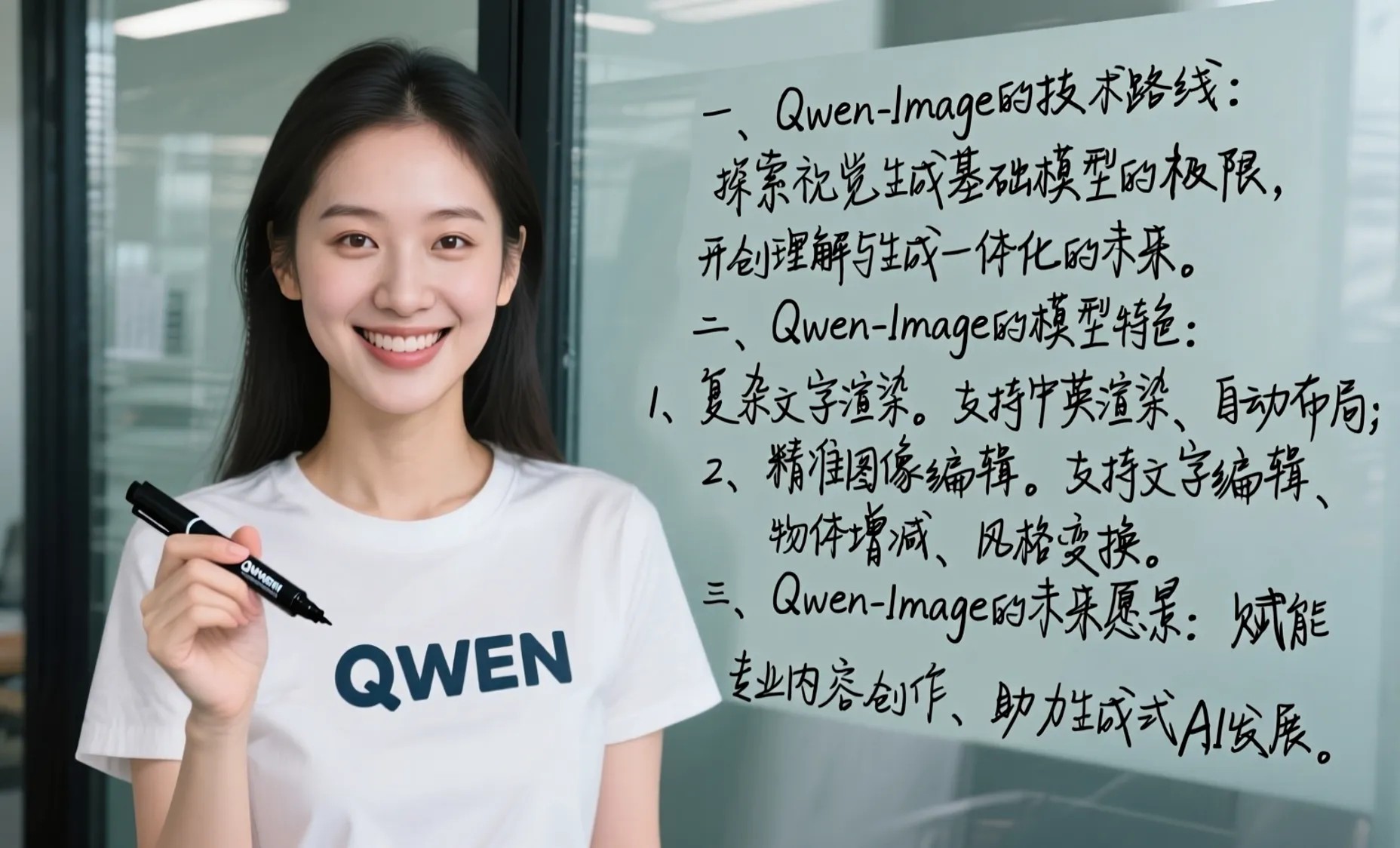
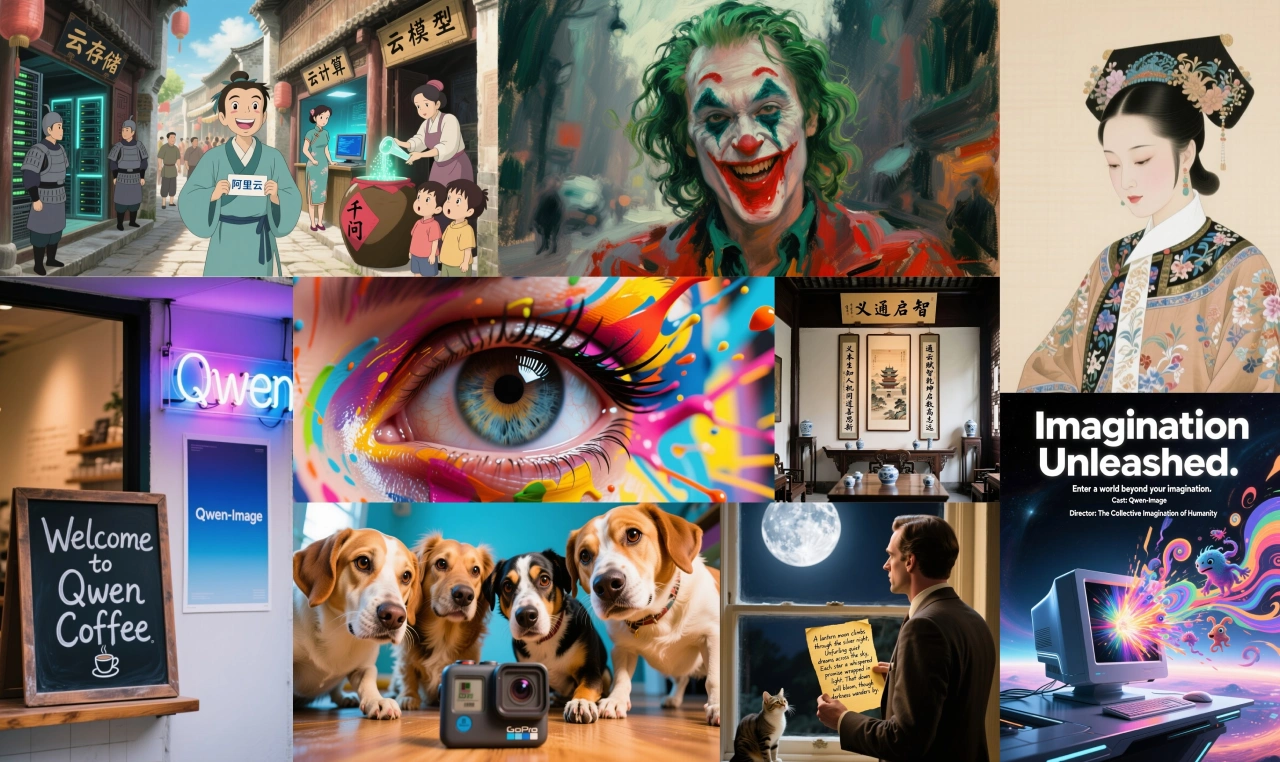
This model supports both Chinese and English, can handle different fonts, long paragraphs, and complex image-text layouts, and can generate images for various scenarios such as posters and PPT slides. It also supports image editing tasks including style transfer, adding/removing objects, and adjusting poses. It can be applied in many industries such as advertising design, film and television production, game development, and education/training. Users can experience it by selecting the image generation feature in QwenChat (chat.qwen.ai), where they can generate posters, PPT pages, product promotional images, and more, as well as perform various edits on images, providing designers with a powerful tool.
Main Features
Strong text rendering capability: Supports multi-line layouts, paragraph-level text generation, and fine detail presentation. It delivers high-fidelity output in both Chinese and English, and performs well on benchmarks such as LongText-Bench, ChineseWord, and TextCraft. Its Chinese text rendering is significantly better than existing advanced models, and it can generate text in different languages and styles, write brush calligraphy, or directly generate PPT pages with both text and images.
Excellent image editing consistency: Through enhanced multi-task training, it maintains visual and semantic coherence during editing, supporting style transfer, adding/removing/modifying objects, detail enhancement, text editing, and adjusting character poses.
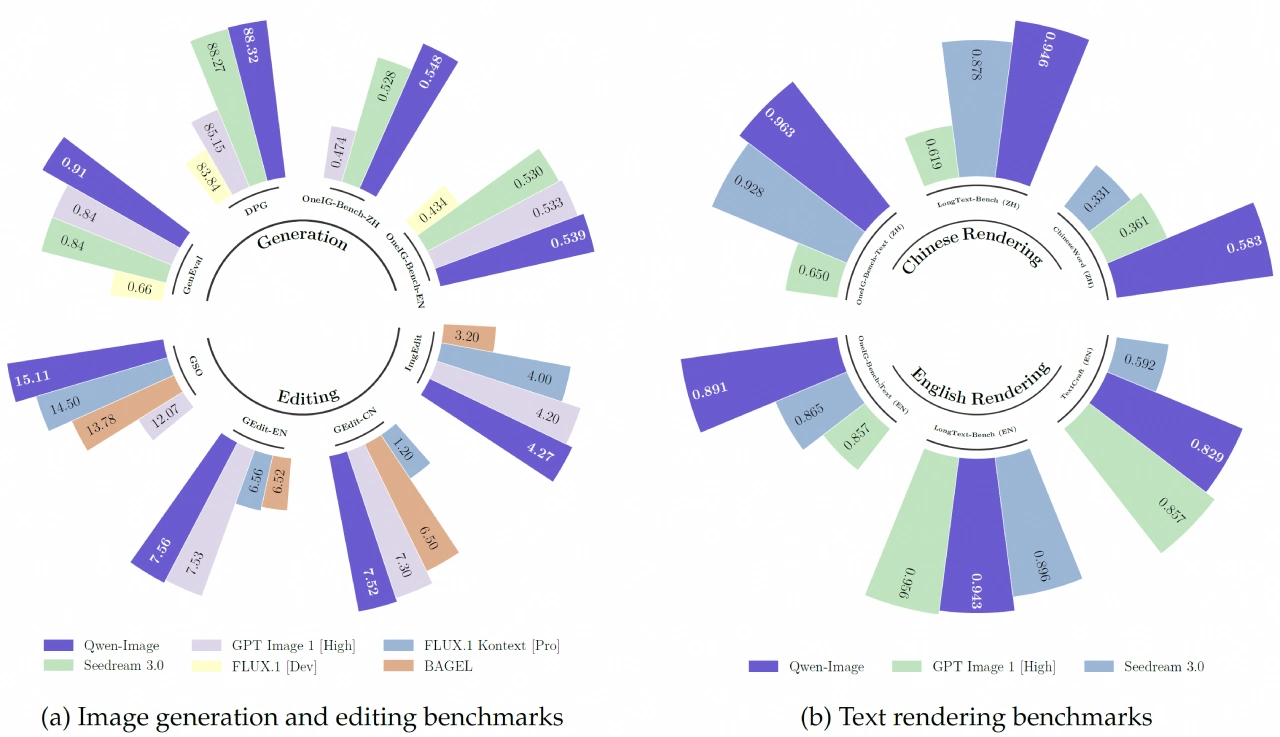
Great cross-benchmark performance: It has achieved top-tier performance on multiple public benchmarks including GenEval, DPG, and OneIG-Bench for general image generation, and GEdit, ImgEdit, and GSO for image editing.
Core Components
Qwen2.5-VL Multimodal Large Language Model: Serves as a conditional encoder that extracts features from text, and based on system prompts, describes the color, quantity, and text of objects and backgrounds in detail, providing a basis for image generation and making the generated content more refined.
Variational Autoencoder (VAE) from the Wan-2.1 video generation model: Acts as an image tokenizer that compresses input images into compact latent representations, which are then decoded and restored during inference. The team froze the encoder and only fine-tuned the decoder to make image details stand out more.
Multimodal Diffusion Transformer (MMDiT): Serves as the backbone diffusion model that processes the relationship between noise and image latent representations under text guidance. It incorporates a multimodal scalable RoPE method to help distinguish between image and text information, enabling both high-resolution image generation and accurate text rendering.
Qwen-Image Technical Architecture
MMDiT Architecture: Uses a multimodal diffusion transformer to achieve deep integration of text and images.
VAE with Single Encoder and Dual Decoder: Responsible for compressing images into compact latent representations and decoding them back into pixels after generation. By balancing reconstruction loss and perceptual loss, it can realistically restore image details.
Multimodal Scalable Rotary Position Embedding (MSRoPE): Encodes text information along the "diagonal" of the image grid, maintaining text independence while leveraging the benefits of scaling image resolution.
Training Strategy
Adopts multi-stage, progressive pre-training: Training progresses gradually from low to high resolution, from general to specialized content, and from massive datasets to refined datasets.
Supervised Fine-Tuning (SFT) and Reinforcement Learning (RL) used in the later stages of training: Fine-tuned with manually curated high-quality data, and the model also learns human preferences through techniques such as DPO.
Application Scenarios
Advertising Design: Quickly generates high-quality images based on brand style, supports style transfer and detail optimization, helping designers quickly try multiple effects to meet client needs.
Film and Television Production: Used for preliminary concept art, scene previews, and character design, shortening production cycles and reducing costs.
E-commerce Visuals: Merchants can quickly generate product display images, virtual try-on images, and marketing materials, enhancing user experience and purchase rates.
Poster Creation: Generates impactful and artistic posters (such as movie and event posters) based on text and design requirements, adapting to different styles and themes.
PPT Creation: Generates enterprise-level PPT pages, featuring a starry blue main color scheme with flowing tech lines and subtle glow particle effects, creating a professional and modern look, and supporting various styles and layouts.
Performance
General Image Generation: Performs excellently on benchmarks such as GenEval, DPG, and OneIG-Bench.
Image Editing: Achieves top-tier performance on professional benchmarks such as GEdit, ImgEdit, and GSO.
Text Rendering: Outstanding capability on benchmarks such as LongText-Bench, ChineseWord, and TextCraft, with Chinese text rendering far surpassing existing top models.
Qwen-Image Advantages
Better Chinese Support: Specifically optimized for Chinese, with rendering quality far superior to DALL-E.
Completely Free: No paid subscription required, and can be deployed locally.
Open Source and Transparent: Code is publicly available and can be customized and modified.
Stronger Editing Features: Supports more diverse image editing operations.
No Usage Limits: Not subject to API call rate limits.
How to Use Qwen-Image
Environment Preparation: Install the latest version of diffusers.
Basic Code:
from diffusers import DiffusionPipeline
import torch
model_name = "Qwen/Qwen-Image"
if torch.cuda.is_available():
    torch_dtype = torch.bfloat16
    device = "cuda"
else:
    torch_dtype = torch.float32
    device = "cpu"
pipe = DiffusionPipeline.from_pretrained(model_name, torch_dtype=torch_dtype)
pipe = pipe.to(device)
prompt = '''一个穿着"QWEN"标志T恤的中国美女正拿着黑色马克笔面向镜头微笑。她身后的玻璃板上手写体写着"欢迎使用Qwen-Image,一款强大的图像基础模型"'''
aspect_ratios = {
    "1:1": (1328, 1328),
    "16:9": (1664, 928),
    "9:16": (928, 1664),
    "4:3": (1472, 1140),
    "3:4": (1140, 1472)
}
width, height = aspect_ratios["16:9"]
image = pipe(
    prompt=prompt + "超清,4K,电影级构图",
    width=width,
    height=height,
    num_inference_steps=50,
    true_cfg_scale=4.0,
    generator=torch.Generator(device=device).manual_seed(42)
).images[0]
image.save("qwen_image_example.png")
GB or above of VRAM is recommended), the CPU generation mode is slower but still usable.
✅Qwen-Image Official Introduction: https://qwenlm.github.io/zh/blog/qwen-image/
✅Qwen-Image Model: https://huggingface.co/Qwen/Qwen-Image
✅Online Use: https://chat.qwen.ai/ (Select Image Generation below the input box)









