
 Script Planner Assistant▸
 AI Apps
 AI News
Claude Code vs Cursor: Which AI Coding Assistant Is Better?
小编 ·

Claude Code vs Cursor: Which AI Coding Assistant Is Better?
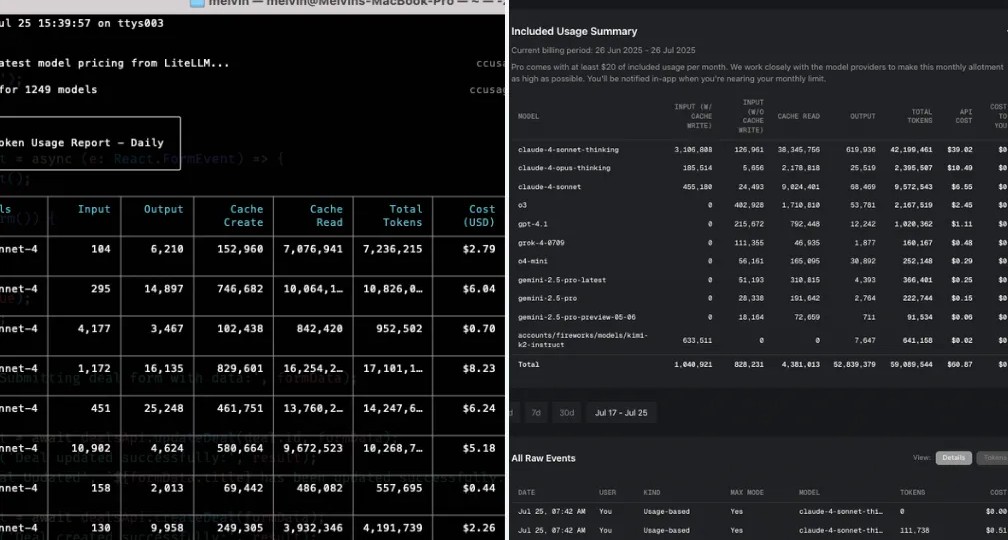
Claude Code and Cursor are two popular AI coding assistants that are growing rapidly and favored by many developers. They represent two different interaction modes: Command Line Interface (CLI) and Integrated Development Environment (IDE). Claude Code is suitable for developers with limited budgets who need a large context window (200K tokens), with a subscription-based pricing starting at $20/month, and strong multimodal support, ideal for complex input scenarios. Cursor is suitable for users who need a full-featured editor and flexible configuration, supporting multiple cutting-edge models, with a default context window of 128K tokens, billed by API usage, and offering an intuitive usage statistics dashboard. So, what are their similarities and differences?
Tool Form and Interaction Mode
✅Claude Code: Command-line tool, pure CLI interaction, suitable for developers accustomed to terminal operations, focused on a single window with fewer distractions, low system resource usage, but with a steep learning curve and lack of visual diff display.
✅Cursor: A customized editor based on VS Code, graphical interface, intuitive and easy to use, VS Code users can get started seamlessly, rich extension ecosystem, powerful visual diff and batch operation features, but the interface is complex, consumes more resources, and requires switching between multiple panels.
Core Features
✅Code Generation and Understanding Capabilities:
Context window: Claude Code has a large 200K token window, suitable for handling large codebases; Cursor can reach 1M tokens in Max mode.
Cross-file refactoring: Claude Code can automatically identify dependencies, making refactoring more efficient; Cursor requires manual file selection.
Code quality score: Claude Code 8.7, with more code comments; Cursor 8.3.
✅Automation and Workflow Integration:
Claude Code: Has a Hooks system that enables various automated workflows, can plan complex task paths, and supports cross-file dependency analysis.
Cursor: Background agents support asynchronous execution of complex tasks, with high bug-fix efficiency; the task planning system can break down complex requirements, and Composer mode can generate cross-file changes.
Resource Consumption
✅Claude Code: Minimalist design, fast startup, low memory usage, low system resource consumption.
✅Cursor: Rich in features and interface elements, with relatively higher resource consumption.
Privacy and Data Security
✅Claude Code: Supports local terminal execution, data does not need to be stored, high security, supports enterprise-level controls, and has compliance certifications.
✅Cursor: Supports privacy mode, code stays local, no data storage, also supports enterprise-level controls and compliance certifications.
Applicable Scenarios
✅Claude Code: Suitable for complex tasks such as large codebase refactoring, system-level architecture design, automated script writing, and legacy system maintenance.
✅Cursor: Suitable for daily feature development, front-end UI component implementation, small and medium-sized project management, team collaborative development, and other scenarios.
Pricing Model
✅Claude Code: Personal version $20/month, enterprise version $100–$200/month, overage billed by token, monthly subscription, advanced features require an upgrade.
✅Cursor: Personal version $20/month, enterprise version $40/user/month, overage $0.04 per request, with heavy usage incurring an additional average monthly expense of about $24.16.
Both can generate and understand code and support features like automated workflows, but there are obvious differences in implementation and experience. As for which one is better between Claude Code and Cursor, you can choose according to your own needs.









