
 Script Planner Assistant▸
 AI Apps
 AI News
Page Magic: A Chrome Extension to Modify Webpage Appearance via Natural Language
小编 ·

Page Magic: A Chrome Extension to Modify Webpage Appearance via Natural Language
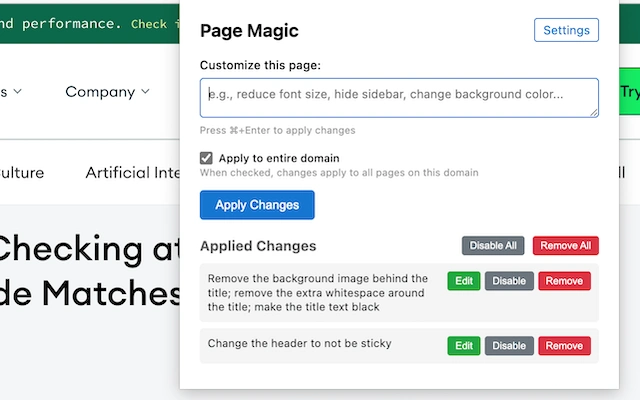
Page Magic is a Chrome extension that leverages AI to customize the appearance of web pages, allowing users to modify the look of any website through AI technology. Users can simply tell Page Magic what changes they want using plain instructions, such as adjusting the layout, modifying colors, or adding elements. It supports making multiple changes to the same page, and changes can be enabled, disabled, or removed at any time.
Key Features
User Interface: Provides a clean popup window where users can view web page changes in real time after entering instructions.
Settings Options: Users can add API keys, select AI models, and view API usage costs.
Real-time Preview: After entering change instructions, the web page displays the effects instantly.
Installation
Install via Chrome Web Store
Page Magic is available on the Chrome Web Store, and users can download and install it directly from the store.
Chrome Web Store link (needs to be replaced with the actual extension ID).
Build and Install Locally
If users prefer to build and install the extension themselves, they can follow these steps:
Clone the GitHub repository.
Install dependencies: Run npm install.
Build the extension: Run npm run build.
Open chrome://extensions/ in Chrome and enable Developer mode.
Click "Load unpacked" and select the cloned repository directory.
Find Page Magic in the extensions list and click "Options" to configure it.
Add the Anthropic API key and select the model to use.
Click "Save" to save the settings.
How to Use
Open any web page.
Click the Page Magic extension icon.
Enter change instructions in the popup window.
Click the "Apply" button, and the changes will take effect within seconds.
Changes are applied cumulatively, so users can make multiple changes to the same page, and can enable, disable, or remove changes.
Use Cases
Web Page Personalization: Users can adjust web page colors, fonts, layout, and more according to their preferences.
Development and Testing: Developers can quickly test web page changes without manually modifying code.
Accessibility Tools: Helps users with visual impairments adjust web page accessibility settings.
Project Address
Github: https://github.com/khaledh/pagemagic









