
 Script Planner Assistant▸
 AI Apps
 AI News
FactSnap: The AI-Powered Enemy of Fake News
小编 ·

FactSnap: The AI-Powered Enemy of Fake News
FactSnap is a fact-checking browser extension developed by Studio NAND that verifies the accuracy of information on web pages. Recently, its weekly traffic reached 53 million, surpassing many well-known products. When using it, users only need to highlight and select text, and FactSnap can quickly provide an initial judgment and conduct in-depth verification through multiple models. However, it still has shortcomings in handling Chinese and understanding context. Despite this, FactSnap's original intention is to provide users with a convenient and quick information verification tool. If it can enhance its multilingual and contextual analysis capabilities in the future, its prospects will be even broader.
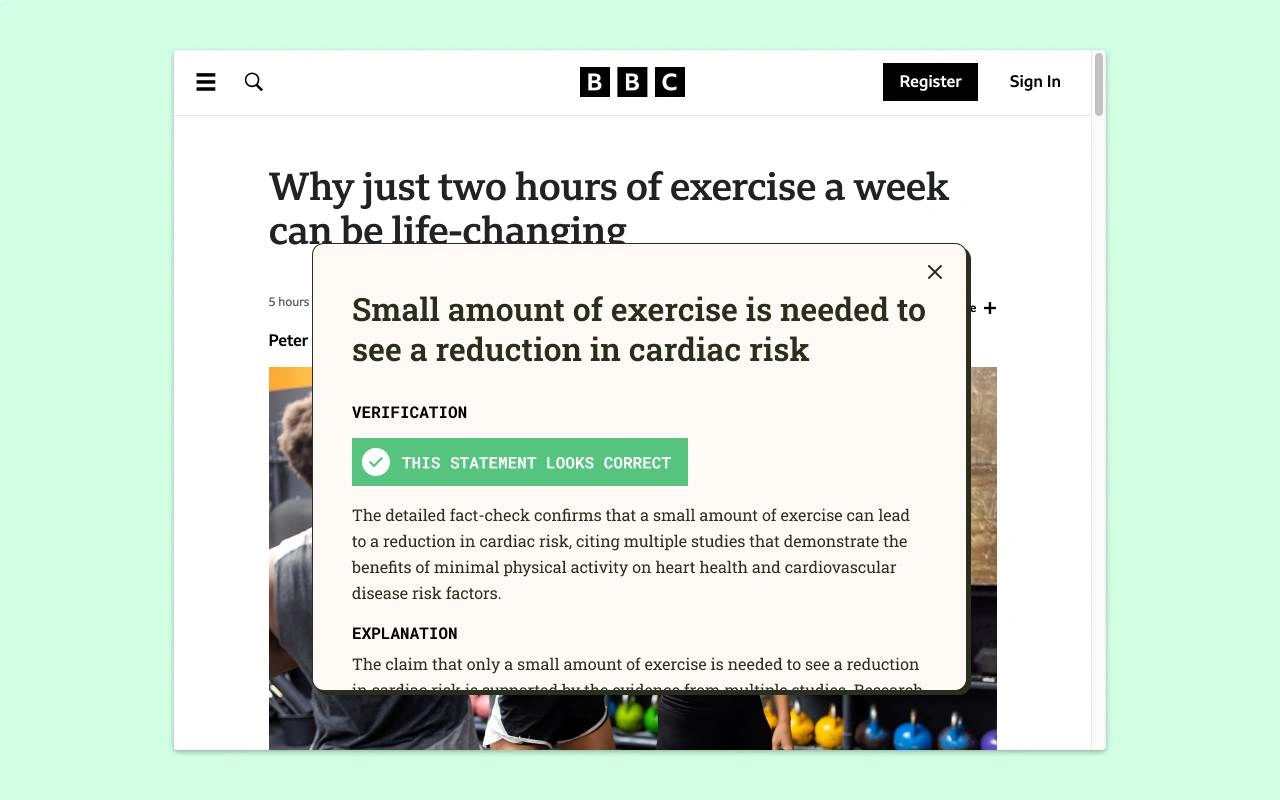
How It Works
FactSnap adopts a "three-stage" judgment method:
Initial Analysis: FactSnap calls the LLaMA 3.3 model through the Groq platform to quickly perform an initial judgment on the text highlighted by the user, usually delivering results within 1 second.
Information Retrieval: Simultaneously calls the exa.sh search engine to find web materials related to the statement, which serve as input for the next step of judgment.
Detailed Verification: Uses the GPT-4o-mini model to compare and analyze the statement with the found literature or web content, generating detailed text along with cited sources.
Features
Real-Time Verification: When browsing web pages, if users have doubts about a piece of text, they can highlight and select it for quick verification, and FactSnap will provide results instantly.
Concise Presentation: Verification results are presented in a concise summary form, making it easy for users to quickly understand the authenticity of the information.
Browser Integration: As a browser extension, FactSnap integrates seamlessly into the user's browsing experience and is easy to use.
Free and No Login Required: The current version requires no login, is free, has no data uploads, and is ready to use right out of the box.
Advantages
Fast Response: FactSnap can complete fact-checking in a short time, helping users quickly determine the authenticity of information.
Multi-Model Collaboration: Through the division of labor and cooperation of different models, FactSnap achieves a reasonable balance between fast response and content explanation, providing relatively accurate verification results.
Detailed Explanations: In addition to giving judgment results, FactSnap also provides detailed explanations and cited sources to help users better understand the verification process and basis.
Limitations
Limited Context Understanding: FactSnap has shortcomings in identifying unstructured language and metaphors, and may not accurately understand non-literal intentions in social contexts.
Insufficient Multilingual Support: Currently, FactSnap does not support Chinese and has weak capability in handling non-English information.
Poor Cross-Browser Compatibility: Currently, FactSnap only supports the Chrome browser, limiting usage for users of other browsers.
Applicable Scenarios
FactSnap is suitable for a variety of scenarios, such as researchers who need to quickly verify information, students confirming academic sources, journalists ensuring reporting accuracy, and any users who wish to combat online misinformation.
Usage Steps
Install the Extension: Go to the FactSnap official website or the Chrome Web Store to install the extension.
Browse Web Pages: Browse web pages normally. When you see information you want to verify, select that text with your mouse.
Click the Extension Icon: Click the FactSnap icon in the browser toolbar, or right-click the selected text and choose "FactSnap".
Wait for Results: FactSnap will automatically analyze the selected text, and an initial result will be available within a few seconds.
View Detailed Results: If you want to learn more, you can click the "View Detailed Explanation" or "View Cited Sources" links provided by FactSnap to gain in-depth insight into the verification process and basis.
Official Website:https://factsnap.nand.io/









