
 Script Planner Assistant▸
 AI Apps
 AI News
Nanonets-OCR-s: A Model That Converts Tables in Images to Markdown
小编 ·

Nanonets-OCR-s: A Model That Converts Tables in Images to Markdown
What is Nanonets-OCR-s?
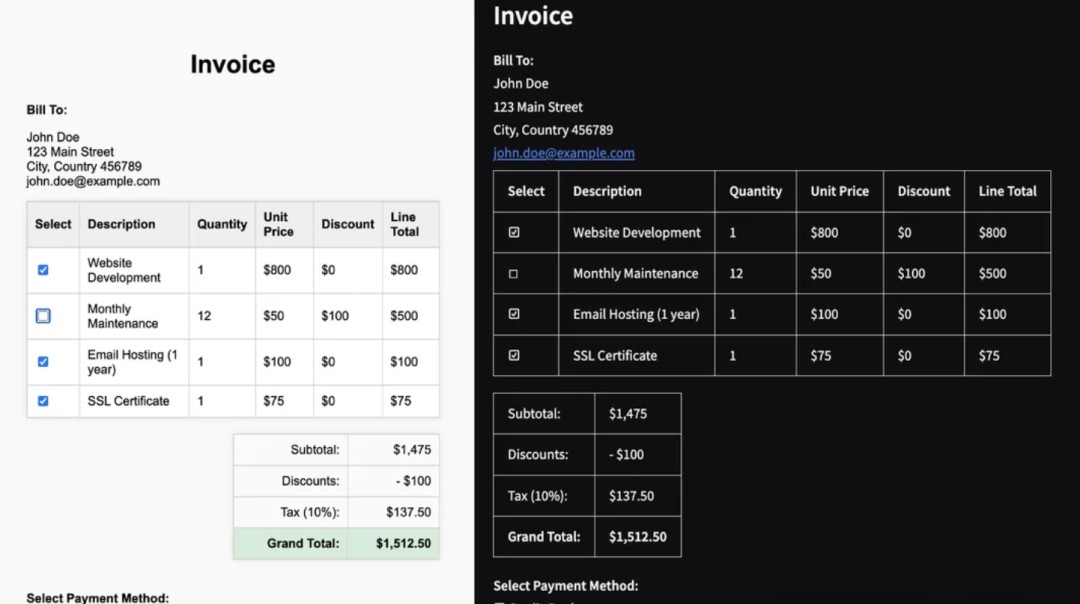
Nanonets-OCR-s can convert tables in images into Markdown format, and it can also recognize LaTeX syntax. It can also locate images in the document and convert them into <img> tags. Signatures are converted into <signature> tags, and symbols like checkboxes are represented using kaomoji. It can also handle tables with merged cells and output them in HTML format. The model size is 3.75B, fine-tuned based on Qwen2.5-VL-3B-Instruct, so it supports Chinese very well.
Feature Highlights
Table Conversion: Accurately extract complex tables and convert them into clean Markdown and HTML formats.
Formula Recognition: Accurately converts mathematical formulas in documents into LaTeX syntax, handling both inline and standalone formulas with ease.
Image Processing: Automatically recognizes images in documents and describes them with <img> tags for easy further processing.
Signature and Watermark Extraction: Detects signatures and watermarks in documents and marks them with <signature> and <watermark> tags respectively.
Checkbox Handling: Converts checkboxes and radio buttons in documents into standard Unicode symbols for easy reading and editing.
Usage
Via Python library:
Install the necessary libraries (such as transformers, etc.).
Load the pre-trained model, then process the image and extract content.
Via server interface:
Start the server, send requests through Python and related clients, and get the conversion results.
Via simplified tools:
Use tools like docext to launch the application with one click, simplifying the operation process.
Applicable Scenarios
Academic Research: Quickly convert formulas, charts, and tables in papers into editable Markdown format, making it easy to organize and conduct further research.
Business Office: Process contracts, reports, and other documents, extract key information while maintaining consistent formatting, improving work efficiency.
Legal Field: Identify and isolate important elements such as signatures and watermarks to ensure document integrity and accuracy.
Advantages
Powerful Features: Can recognize a variety of document elements to meet the needs of different scenarios.
Smart and Efficient: Through intelligent recognition and semantic tagging, the output content is easier to process.
Lightweight and Convenient: The model size is moderate, optimized based on existing technology, and supports Chinese.
Project Address
https://huggingface.co/nanonets/Nanonets-OCR-s









