
 Script Planner Assistant▸
 AI Apps
 AI News
Y2A-Auto: A Free Open-Source Flask Video Transfer Tool
小编 ·

Y2A-Auto: A Free Open-Source Flask Video Transfer Tool
What is Y2A-Auto?
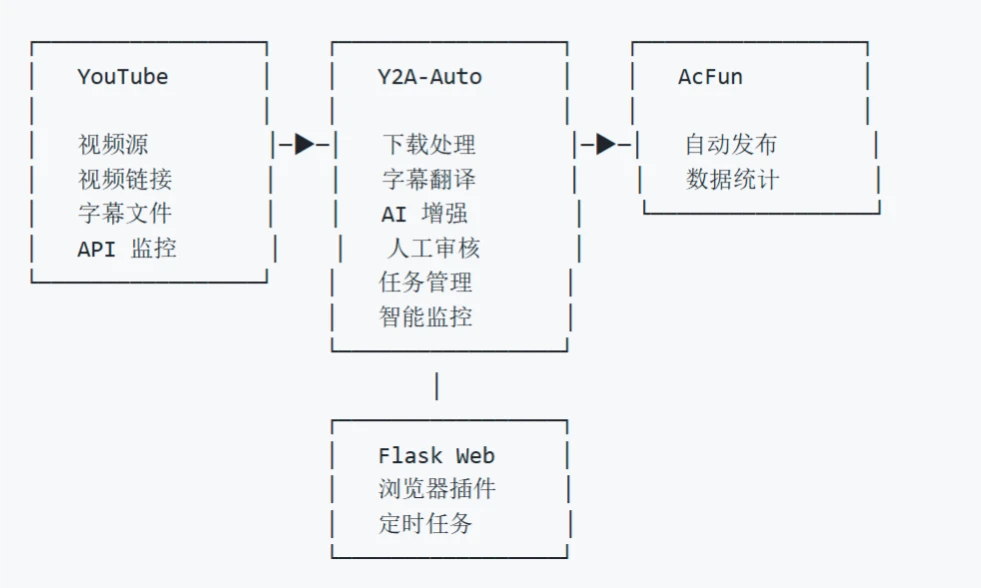
Y2A-Auto is a free and open-source video re-uploading tool built on Flask. It can directly migrate videos from YouTube to AcFun, providing a complete solution that includes downloading, translating subtitles, and automatic uploading. It also supports monitoring YouTube trending videos or specific channels, and comes with a user-friendly Web interface along with a Tampermonkey script for convenient use and management.
Features
Automated Migration: From downloading, subtitle processing, AI translation to automatic uploading, no manual intervention required.
YouTube Monitoring: Capable of monitoring YouTube trending videos, video channels, and specific search keyword content to automatically discover and filter videos that meet the criteria.
AI Enhancement: Uses the OpenAI API to translate titles, descriptions, and subtitles, automatically add tags, and review content.
Subtitle Processing: Automatically downloads subtitle files, supports batch translation, and can embed translated subtitles into the video content.
Web Interface: Provides a Web interface for convenient task management, monitoring configuration, and system settings.
Tampermonkey Script: Provides a Tampermonkey script that enables automatic Cookie synchronization and one-click pushing of videos to the processing queue directly from YouTube video pages.
Deployment Methods
Windows EXE Deployment
Download source code: git clone https://github.com/fqscfqj/Y2A-Auto.git.
Navigate to the build tools directory: cd build-tools, double-click build.bat to generate the EXE.
Launch the program: Go to the dist/Y2A-Auto directory and double-click start.bat.
Features: No need to configure Python or FFmpeg environments, portable and transferable, launch with a double-click.
Docker Deployment
Quick Start:
git clone https://github.com/fqscfqj/Y2A-Auto.git
cd Y2A-Auto
docker-compose up -d  # 预构建镜像
docker-compose -f docker-compose-build.yml up -d --build  # 本地构建
Directory Mounting:Configuration files, databases, downloaded files, and other data are persisted through directory mounting.
Local Deployment (Python Environment)
Clone the project and create a virtual environment: python -m venv .venv, then activate the environment.
Install dependencies: pip install -r requirements.txt, and install FFmpeg.
Launch the application: python app.py.
Usage Guide
Environment Configuration: Install the required software packages and dependencies based on the deployment method you choose.
Clone the Project: Clone the Y2A-Auto project using Git commands.
Build and Launch: Follow the steps corresponding to your chosen deployment method to build and launch.
First-time Configuration:
Access the Web interface: http://localhost:5000
Configure API keys and account information
Upload the Cookie file or set login credentials
Configure subtitle translation options
Set up YouTube monitoring rules
Task Execution: Add YouTube video URLs or have tasks added automatically through monitoring, then start task processing.
Project URL
https://github.com/fqscfqj/Y2A-Auto









