
 Script Planner Assistant▸
 AI Apps
 AI News
AI Screenshot Translator: One-Click Screenshot & Translate
小编 ·

AI Screenshot Translator: One-Click Screenshot & Translate
ai What is Screenshot Translator?
AI Screenshot Translator is specifically designed to solve the problem of text in foreign-language PDFs being impossible to copy. Users can capture screenshots with a predefined hotkey, recognize and translate the text in images with one click, thereby solving the issue of mathematical formulas in PDFs being difficult to copy. It also supports user-defined API interfaces, is compatible with multiple mainstream translation models, supports multi-window management, and allows comparison of translation results.
Core Features
Screenshot Translation: Supports custom hotkeys (default ALT+X); after selecting the area to be translated, the content is automatically sent to the AI model for processing.
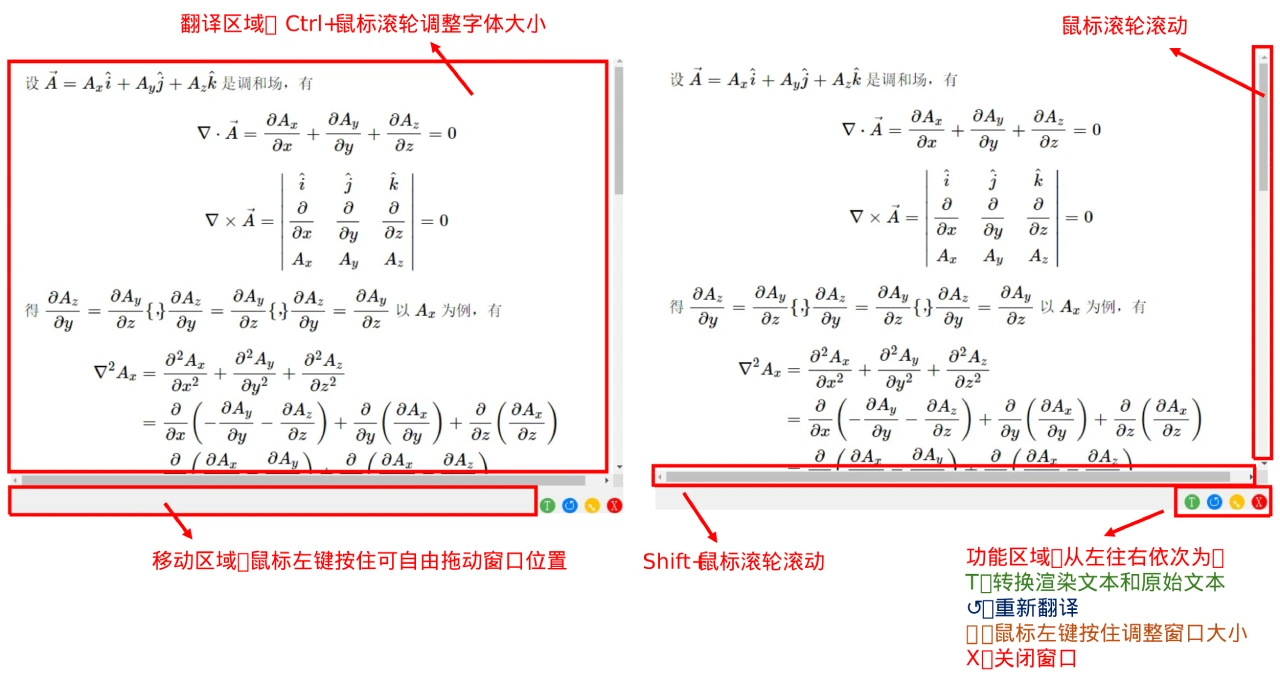
Multi-Window Management: Supports snapshot and translation stickers; all translation stickers can be freely dragged and resized, and multiple groups of translation stickers can be created.
Formula Handling: Supports restoring original text, making it easy for users to copy formula content.
Custom API Interface: Users can customize API interfaces to enhance the tool's flexibility and extensibility.
System Tray Operation: Supports running in the system tray — open it when in use, and it won't take up system buttons when not in use.
Pain Points Solved
Says goodbye to the bulkiness of commonly seen whole-document translation tools on the market.
Solves the problem of messy formatting or inability to copy formula blocks in PDFs.
Supports image-scanned PDFs, solving the issue of text being impossible to copy.
Installation and Usage
Download the source code and run: Users can clone the repository, then create a virtual environment locally and run the project.
Clone the repository: git clone https://github.com/Diraw/AI-Screenshot-Translator.git, then enter the project directory cd AI-Screenshot-Translator/src.
Create a virtual environment and run: Use conda to create a virtual environment conda create -n AI-Translator python=3.8, activate the environment conda activate AI-Translator, install dependencies pip install -r requirements.txt, and finally run the program python main.py.
Download the executable file: You can also go directly to the project's Releases page to download the executable file.
Use Cases
Academic Research: A paper-reading tool that quickly translates paragraphs or formulas in academic literature.
Daily Learning: Students who want an effortless way to get translations while reading English materials.
Open Source Address
https://github.com/Diraw/AI-Screenshot-Translator









