
 Script Planner Assistant▸
 AI Apps
 AI News
AI Gaokao Tong: The First Gaokao AI Agent by QQ Browser
小编 ·

AI Gaokao Tong: The First Gaokao AI Agent by QQ Browser
On May 23, 2025, QQ Browser launched the industry's first AI agent for the college entrance examination (Gaokao) field, "AI Gaokao Assistant" (AI Gaokao Tong). It represents another significant initiative by Tencent in the field of Gaokao services, providing candidates with comprehensive support from exam preparation to college application, ushering in a new "AI + Education" service model.
"AI Gaokao Assistant" is powered by Tencent's Hunyuan large model technology, integrates a vast amount of Gaokao-related resources, and builds an authoritative knowledge base. This includes real exam questions from the past 9 years, information on over 2,800 institutions and more than 1,600 majors, as well as core tools for institution comparison, major analysis, and college application. For the first time, it achieves an upgrade from a collection of tools to intelligent decision-making, forming a fully intelligent service system across the entire process.
Features of AI Gaokao Assistant
Exam Preparation Phase
Composition Tutoring: Provides candidates with writing ideas, techniques, and excellent sample essays for reference, helping candidates enhance their composition skills.
Problem Solving & Q&A: Capable of answering questions from various subjects, analyzing problem-solving approaches, and helping candidates tackle difficulties encountered in their studies.
Real Exam Resources: Offers real Gaokao exam questions from the past 9 years, facilitating targeted practice and mock exams for candidates to familiarize themselves with exam formats and question patterns.
During the Gaokao Period
Synchronized Exam Schedule: Updates the exam schedule for each Gaokao subject in a timely manner, ensuring candidates do not miss important exams.
Real Questions & Score Estimation: After the Gaokao concludes, quickly provides real exam questions and reference answers, facilitating score estimation for candidates to understand their exam performance.
College Application Phase
Application Plan Generation: After candidates input basic information such as region, score, selected subjects, MBTI personality, major preference, regional intention, and future employment goals, the system generates a "Reach, Match, Safety" three-tier application plan that complies with the new Gaokao rules. Each recommended institution's plan includes major recommendations, admission probability assessment, historical admission rankings, and arranges the "application order" based on admission difficulty.
Personalized Adjustments: Supports personalized adjustments on the desktop version based on dimensions like major preference, personality assessments (e.g., MBTI), and career inclinations, avoiding risks such as mismatched subject selections and score gaps.
Intelligent Q&A: Supports deep thinking, web search, and multi-turn conversations. It prioritizes calling upon authoritative knowledge bases including official Ministry of Education data and institutional admissions websites, ensuring the accuracy and timeliness of policy interpretations and score line data. Candidates inquiring about questions like "What were last year's cutoff scores for Tsinghua University in Guangdong?" or "What are the flagship majors of Shenzhen University?" can quickly receive clear and accurate answers.
How to Use AI Gaokao Assistant
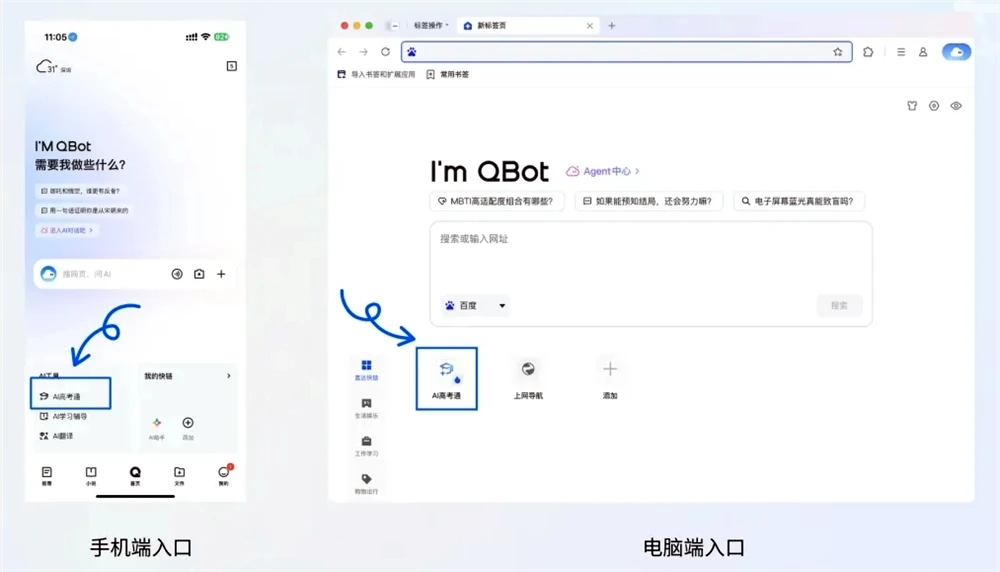
Candidates can use "AI Gaokao Assistant" in the following two ways:
Method 1: On the upgraded QQ Browser homepage, click the QBot icon, then enter the keyword "Gaokao" in the search bar to activate the service.
Method 2: Directly enter the keyword "Gaokao" in the QQ Browser search bar to enter the "AI Gaokao Assistant" service page.









