
 Script Planner Assistant▸
 AI Apps
 AI News
MathModelAgent: An AI Assistant for the Entire Math Modeling Workflow
小编 ·

MathModelAgent: An AI Assistant for the Entire Math Modeling Workflow
What is MathModelAgent?
MathModelAgent is an AI assistant specifically designed for mathematical modeling. Simply by inputting the problem, it can automatically complete the entire workflow—from problem analysis and model building to code writing and paper composition.
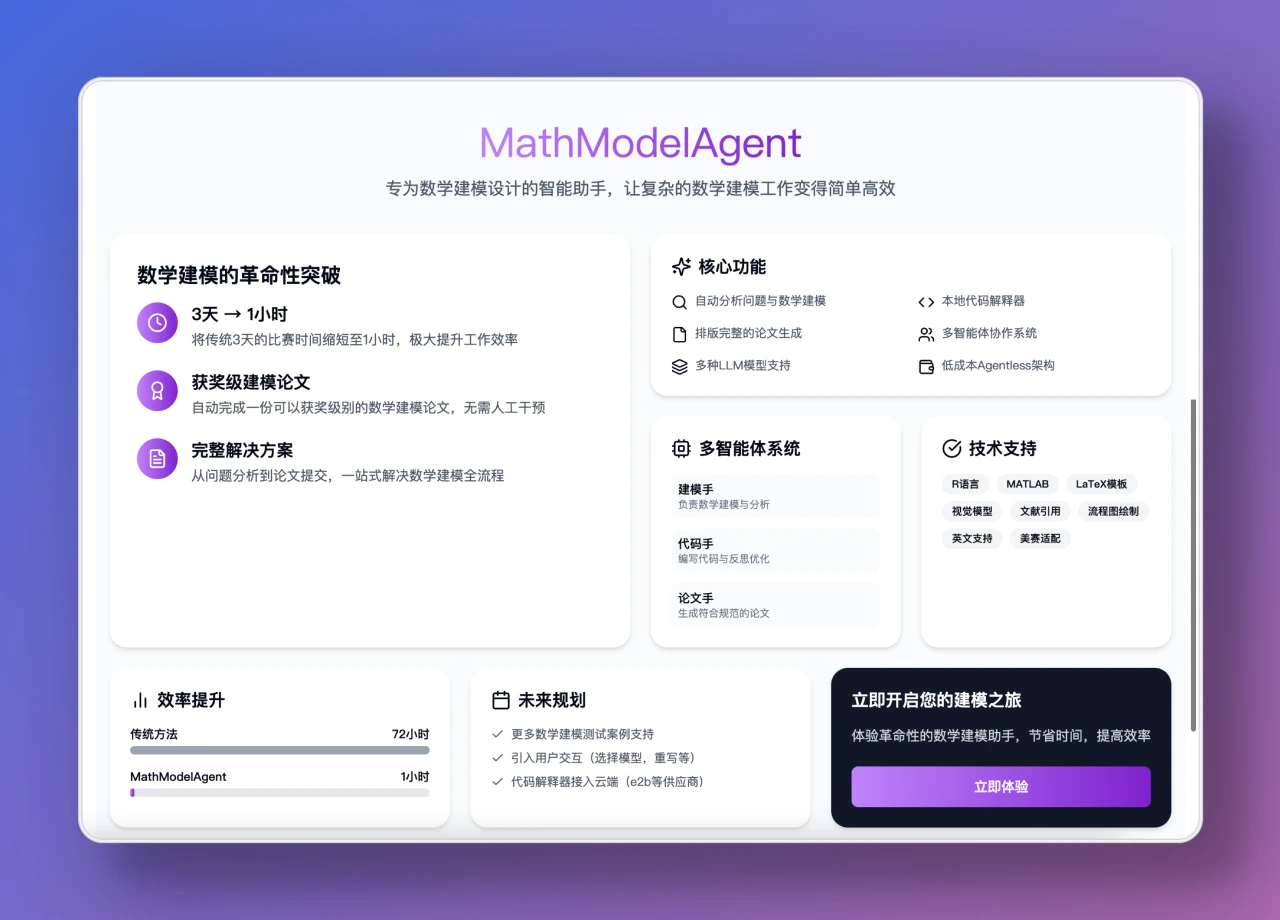
MathModelAgent Features
Full-Workflow Automation: MathModelAgent can automatically analyze problems, perform mathematical modeling, write code, correct errors, and compose papers. It comes with three built-in agents: the Modeling Agent (responsible for problem decomposition), the Code Agent (responsible for coding and error correction), and the Paper Agent (responsible for formatting), all of which work together through a multi-agent collaboration framework to achieve end-to-end automation.
Multi-Model Support: Each agent can be configured with different models (such as GPT-4, Claude, etc.) to meet the requirements of different tasks.
Local & Cloud Hybrid: Supports both local code interpreter and cloud-based services (such as E2B), allowing users to choose the appropriate execution environment based on their actual needs.
Low Cost: The cost of a single task is approximately 1 RMB.
Formatted Output: Capable of generating well-formatted papers, supports LaTeX format, with plans to integrate more format support.
Security Mechanism: Adopts local code sandbox isolation and supports sensitive data desensitization.

MathModelAgent Technical Architecture
The backend system of MathModelAgent includes a multi-agent system, a code execution environment, and data storage components, while the frontend provides an interactive user interface. Its multi-agent system implements problem analysis, mathematical modeling, code generation, and paper generation through coordinated workflows.
How to Use MathModelAgent
Environment Setup: Make sure Python, Node.js, and Redis are installed on your computer.
Model Configuration: Copy the configuration file template and fill in the model configuration and API key.
Install Dependencies: Clone the project via Git and install the dependencies for both the backend and the frontend.
Start Services: Start the backend and frontend services separately.
Run the Workflow: Run the test script or the full workflow; the generated papers and code will be saved in the specified directory.
MathModelAgent Use Cases
Mathematical Modeling Competitions: Helps participants quickly complete modeling tasks, saving time and effort.
Mathematical Modeling Research: Provides researchers with auxiliary tools to enhance research efficiency.
Data Analysis: Supports modeling tasks related to data analysis, helping data science projects.
Project Link
https://github.com/jihe520/MathModelAgent









