
 Script Planner Assistant▸
 AI Apps
 AI News
Nexus-Gen: Open-Source Multimodal Image Model Rivaling GPT-4o
小编 ·

Nexus-Gen: Open-Source Multimodal Image Model Rivaling GPT-4o
Nexus-Gen is an open-source image model released by the ModelScope team, with image understanding, generation, and editing capabilities comparable to GPT-4o. The model combines the text modeling capabilities of MLLMs with the image rendering technology of diffusion models, and adopts a unique high-dimensional feature space modeling approach that effectively solves the problem of error accumulation during inference commonly seen in traditional autoregressive models. By training the autoregressive and diffusion models separately, the image generation quality of Nexus-Gen has been significantly improved. In addition, it was trained using 25M pieces of data provided by the open-source community to promote the development of All-to-All models.
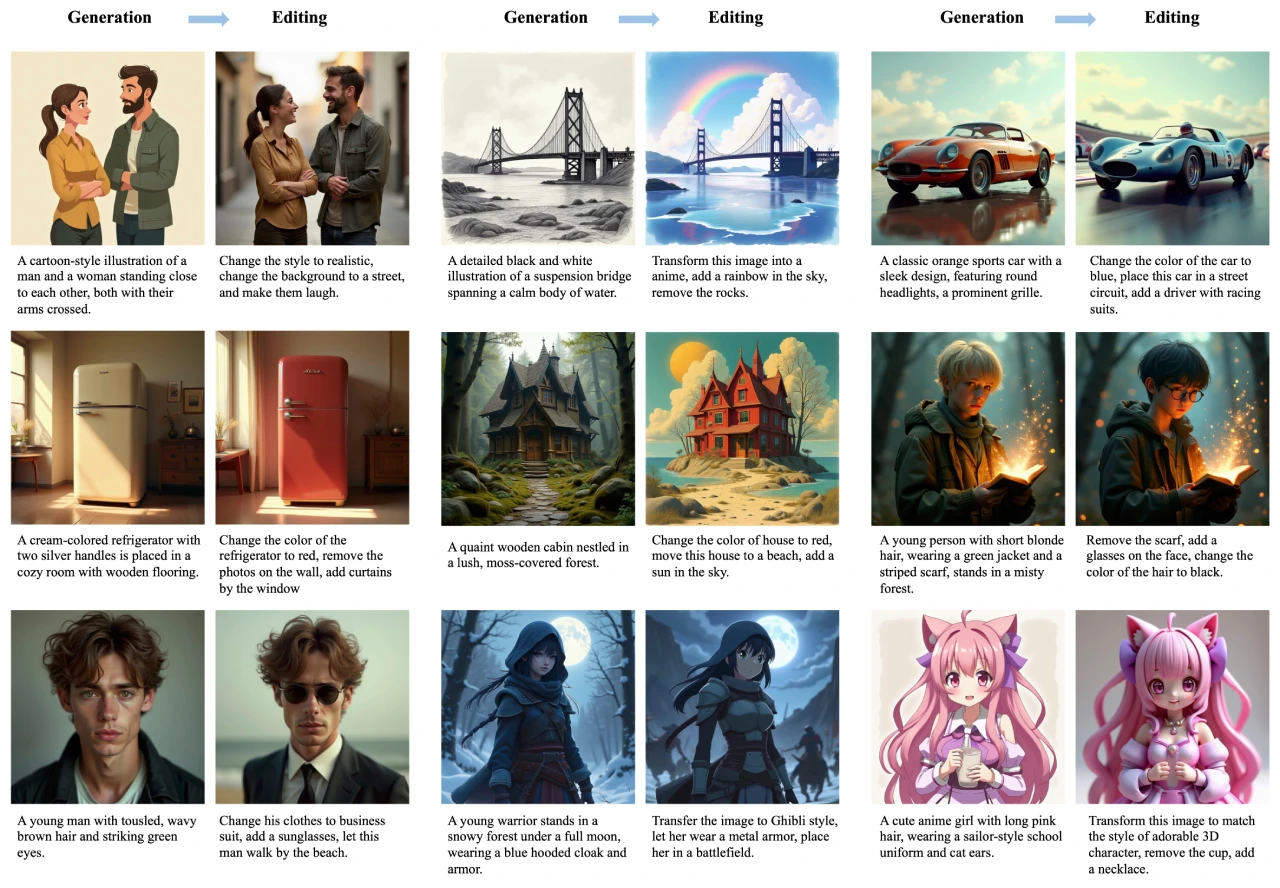
Nexus-Gen Features
1. Image Understanding
Accurate Recognition and Analysis: Nexus-Gen can accurately understand various elements in images, including objects, scenes, text, and more. For example, in optical character recognition (OCR) tasks, it can recognize text content in images with high precision and understand its semantics.
Multi-domain Adaptability: The model demonstrates excellent performance across multiple domains, including general visual question answering, language understanding, counting, code parsing, mathematics, and science tasks. For example, in visual question answering tasks, it can answer complex questions based on image content, such as "What animals are in the picture, and what are they doing?"
Contextual Understanding: Nexus-Gen not only focuses on the image itself, but also understands the context of the image by combining it with textual descriptions. For example, when given an image with a caption, it can interpret the image content more accurately based on the combination of text and image.
2. Image Generation
High-quality Image Synthesis: Nexus-Gen can generate high-quality images, whether of simple objects or complex scenes. For example, based on the text description "a golden retriever running on the grass," it can generate a clear, realistic image.
Creativity and Details: The model can generate creative and detailed images based on text prompts. For example, given the description "a nighttime view of a futuristic city, with neon lights flashing and flying cars穿梭其中," it can generate images with a futuristic and technological aesthetic.
Stylized Generation: Nexus-Gen supports image generation in multiple styles, including realistic, cartoon, and oil painting styles. Users can generate images that meet their needs by specifying a style.
3. Image Editing
Diverse Editing Operations: Nexus-Gen supports a variety of image editing operations, including object modification, object addition, object removal, color change, and style transfer. For example, users can request "change the red flowers in this photo to blue" or "add a butterfly to the picture."
Precise Control: The model can perform editing operations precisely according to text instructions. For example, users can request "change the sky in the picture to a sunset background," and Nexus-Gen can accurately identify and replace the background.
Multi-step Editing Workflow: Nexus-Gen can handle complex multi-step editing tasks. For example, users can request "first replace the old car in the picture with a new car, then change the background to a city street," and it can complete these operations in sequence.
Nexus-Gen Application Scenarios
1. Content Creation
Creative Design: Designers can use Nexus-Gen to quickly generate creative images as a starting point or source of inspiration for their designs. For example, when designing an advertising poster, initial visual effects can be generated based on copy.
Illustration and Painting: Artists can use this model to generate sketches for illustrations or paintings, and then create further works on that basis. For example, generating illustration sketches based on story descriptions saves creation time.
2. Advertising and Marketing
Advertising Material Generation: Advertising agencies can use Nexus-Gen to quickly generate image materials needed for advertisements. For example, generating product display images and scene images based on advertising copy.
Personalized Advertising: Generate personalized advertising images based on users' needs and preferences. For example, generating product recommendation images that match users' interests.
3. Game Development
Game Scene and Character Generation: Game developers can use Nexus-Gen to generate scenes and characters in games. For example, generating game maps or character visuals based on game storyline descriptions.
Expansion of Game Asset Library: Quickly generate large amounts of game assets to enrich game content. For example, generating buildings, props, and more in different styles.
4. Education and Training
Teaching Assistance: Teachers can use Nexus-Gen to generate images needed for teaching, helping students better understand course content. For example, generating images of animals and plants in natural science teaching.
Virtual Laboratories: Generate images of virtual experimental scenes and operational steps to help students conduct virtual experiments. For example, generating images of chemistry experiments to demonstrate the experimental process.
5. Entertainment and Socializing
Personalized Avatars and Images: Users can generate personalized avatars or images based on their own preferences for use on social media. For example, generating cartoon avatars with personal characteristics.
Creative Photo Editing: Share creative photo editing works on social media. For example, editing ordinary photos into artistic-style images to add fun.
Installation and Usage
Installation Steps
Install DiffSynth-Studio: Clone and install from source code with the command git clone https://github.com/modelscope/DiffSynth-Studio.git, enter the directory, and execute pip install -e. .
Install dependencies: Execute pip install -r requirements.txt.
For fine-tuning, install ms-swift: pip install ms-swift -U.
Prepare the model: Run python download_models.py.
Usage of Feature Scripts
Image Understanding: Run python image_understanding.py.
Image Generation
Image generation using detailed prompts: Run python image_generation.py.
Use Nexus-Gen for prompt polishing and image generation: Run python image_generation_with_selfpolish.py.
Image Editing: Run python image_editing.py.
Project Links
Paper: https://arxiv.org/pdf/2504.21356
github: https://github.com/modelscope/Nexus-Gen
modelscope: https://www.modelscope.cn/models/DiffSynth-Studio/Nexus-Gen
https://www.modelscope.cn/collections/ImagePulse----tulvmaidong-7c3b8283a43e40









