
 Script Planner Assistant▸
 AI Apps
 AI News
Figma Make: Figma's Brand-New Coding Tool for Designers
小编 ·

Figma Make: Figma's Brand-New Coding Tool for Designers
What is Figma Make?
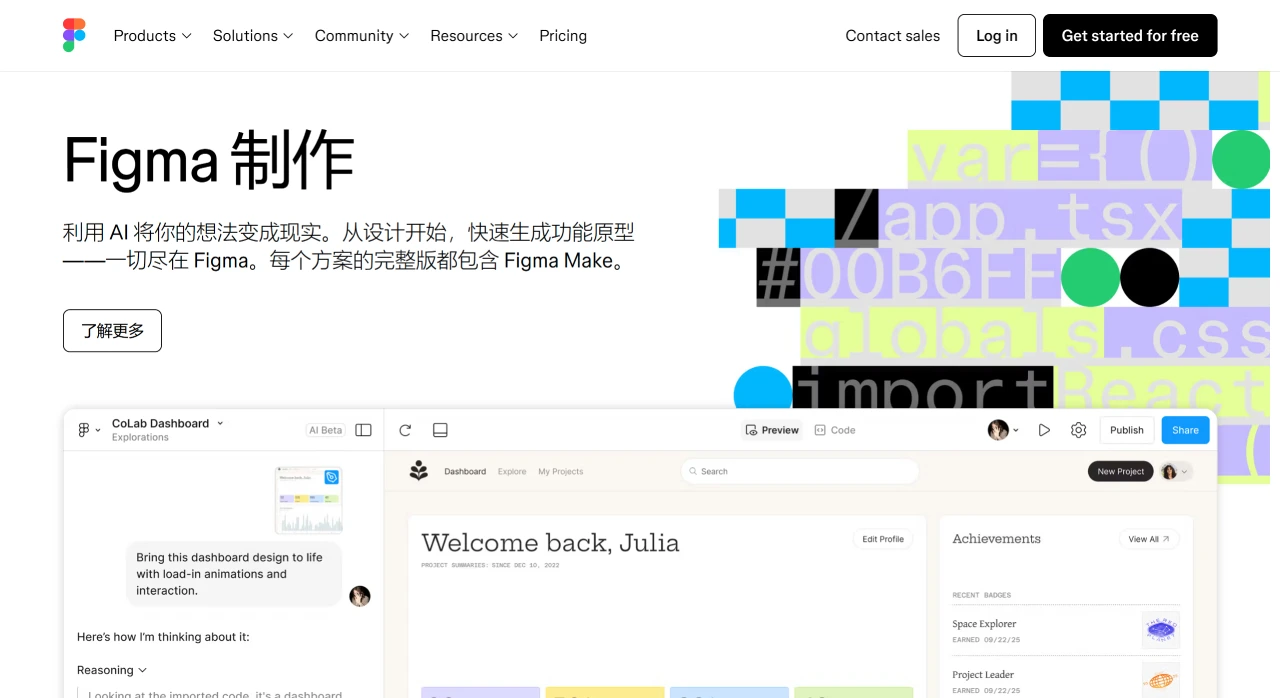
Figma launched Figma Make at the 2025 Config event. It is a brand-new coding tool that helps designers turn design files directly into products. It can import Figma design files directly, generate web pages with simple instructions, and support real-time editing, eliminating the cumbersome steps in traditional coding. In addition, Figma Make can interact with ai, enabling more efficient collaboration between design and development. This move by Figma not only expands the role of designers but also brings more possibilities to the industry, bringing the "design is code" concept to life.
Features of Figma Make
Quick conversion from design to prototype: Users can copy frames directly from Figma Design to the AI model, preserving their structure and metadata. Then, by using simple prompts, such as "make this button trigger an animation" or "make this element respond to scrolling," interactive prototypes can be quickly generated.
Precise editing and iteration: Designers can click on design elements and describe the desired changes in natural language to achieve precise editing and iteration while preserving the component hierarchy and consistency of the design system.
No need to start from scratch: Users don't need to create prototypes from scratch and can operate directly based on existing design files.
Team collaboration: Figma Make supports team collaboration, allowing users to edit projects together with team members.
Code generation and modification: It can generate code based on user prompts, and if there are developers on the team, they can directly modify the code to make adjustments.
Seamless integration with Figma Sites: Figma Make works seamlessly with Figma Sites, allowing users to easily embed generated prototypes into pages published through Figma Sites, achieving an end-to-end workflow from design to publication.
Use Cases of Figma Make
Rapid prototyping: Designers can use Figma Make to quickly transform design ideas into interactive prototypes.
Team collaboration and communication: In team projects, designers and developers can use Figma Make together to quickly iterate on designs and features.
Small teams or independent developers: Figma Make provides a way to quickly create and test web applications without deep programming knowledge.
Advantages
Lower technical barriers: Through prompts and AI, the technical barriers to complex interaction design are lowered, making it easy for designers and non-technical personnel to get started.
Improved design efficiency: Saves time and effort from design to development, allowing designers to focus more on creativity itself.
Powerful collaboration capabilities: Supports multiple people editing the same project simultaneously.
How to Use Figma Make
Basic Operations
Import design files: Directly copy frames from Figma Design to the AI model, preserving their structure and metadata. This way, you don't need to start from scratch and can quickly generate interactive prototypes based on existing designs.
Generate interactive prototypes: Through simple natural language prompts, such as "make this button trigger an animation" or "make this element respond to scrolling," the AI will quickly generate prototypes with interactive functions based on the prompts.
Real-time editing and collaboration: Users can view the generated application in real time in the preview window on the right and perform precise editing by clicking on elements. At the same time, Figma Make supports multiple people collaborating on the same project, allowing team members to edit together.
Advanced Features
Dynamic data testing: Use real data to test design functions, such as uploading files, dynamically displaying information feeds, etc., to help teams better understand how designs perform in real-world scenarios.
Cross-device adaptation: Quickly convert designs from one device format to another (such as from desktop to mobile) and conduct cross-platform testing to ensure consistent performance across different screens.
Code generation and modification: The AI generates code, and if developers are involved, they can directly modify the code to make necessary adjustments.
Seamless design-to-code workflow: Figma Make integrates directly into the existing Figma workflow, from Figma Design to Figma Sites, creating a continuous path from initial concept to interactive prototype to published website.
Detailed usage:https://www.figma.com/make/









