
 Script Planner Assistant▸
 AI Apps
 AI News
Insert Anything: An Open-Source Image Editing Framework for Face Swap, Outfit Change, and More
小编 ·

Insert Anything: An Open-Source Image Editing Framework for Face Swap, Outfit Change, and More
Insert Anything Introduction
Insert Anything is a unified image insertion framework jointly proposed by Zhejiang University, Harvard University, and Nanyang Technological University. It can seamlessly integrate objects from reference images into target scenes and supports a variety of real-world application scenarios, such as artistic creation, realistic face swapping, movie scene composition, virtual clothing try-on, accessory customization, and digital prop replacement.
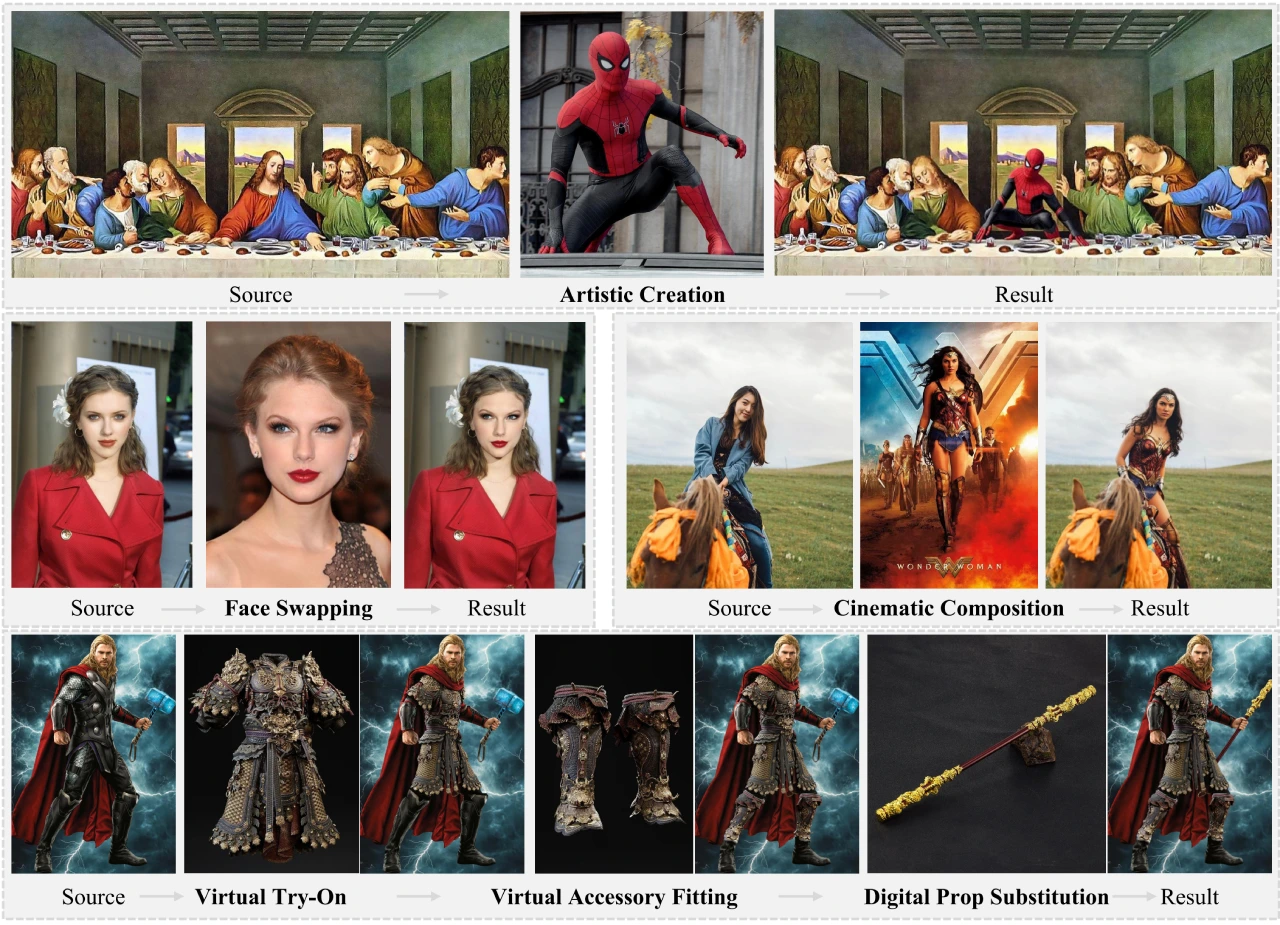
Insert Anything Technical Principles
1. AnyInsertion Dataset
Scale and Content: The framework is based on an AnyInsertion dataset containing 120,000 prompt-image pairs, covering various tasks such as person, object, and clothing insertion.
Multiple Control Modes: The dataset supports two control modes, namely mask prompts (58K pairs) and text prompts (101K pairs), providing rich training samples for the model.
2. Diffusion Transformer (DiT)
Multi-modal Attention Mechanism: Insert Anything leverages DiT's multi-modal attention mechanism to support mask- and text-guided editing. This mechanism processes visual inputs and text descriptions separately through the image branch and text branch, and then fuses this information through multi-modal attention.
Image Branch: Processes reference images, source images, and masks, extracts visual features, and concatenates them with noise.
Text Branch: Encodes text descriptions to provide semantic guidance.
3. Contextual Editing Mechanism
Diptych and Triptych Prompt Strategies:
Mask Prompt Diptych: The reference image is on the left, and the target image with the mask is on the right.
Text Prompt Triptych: The reference image is on the left, the source image is in the middle, and the text-generated result is on the right.
Function: This mechanism treats the reference image as contextual information, ensuring visual consistency between the inserted element and the target scene through implicit interaction while preserving its unique features.
Advantages
Versatility: A single model can handle multiple insertion tasks, avoiding the need to train separate models for each task.
Flexibility: Supports both mask and text control modes to meet the editing needs of different users.
Visual Consistency: Through the contextual editing mechanism, ensures that inserted elements blend naturally with the target scene.
Insert Anything Application Scenarios
Artistic Creation: Seamlessly insert artistic elements into different backgrounds.
Commercial Advertising: Insert product images into advertising scenes.
Pop Culture Creation: Insert pop culture elements into related scenes.
Project Links
Project Homepage:https://song-wensong.github.io/insert-anything/
Paper:https://arxiv.org/abs/2504.15009
Github:https://github.com/song-wensong/insert-anything









