
 Script Planner Assistant▸
 AI Apps
 AI News
SuperCoder: A Coding Assistant for the Terminal
小编 ·

SuperCoder: A Coding Assistant for the Terminal
What is SuperCoder?
SuperCoder is a coding assistant that runs in the terminal, helping developers streamline their development workflow. It offers the following features: quick code search, viewing project structure, modifying code with natural language commands, and fixing bugs. Installation is simple—download the ZIP package from the official website, extract it, add the relevant file path to your system's PATH, and you can launch it from the terminal with a command. It supports a wide range of development environments, including Python and several common frameworks, making it very convenient.
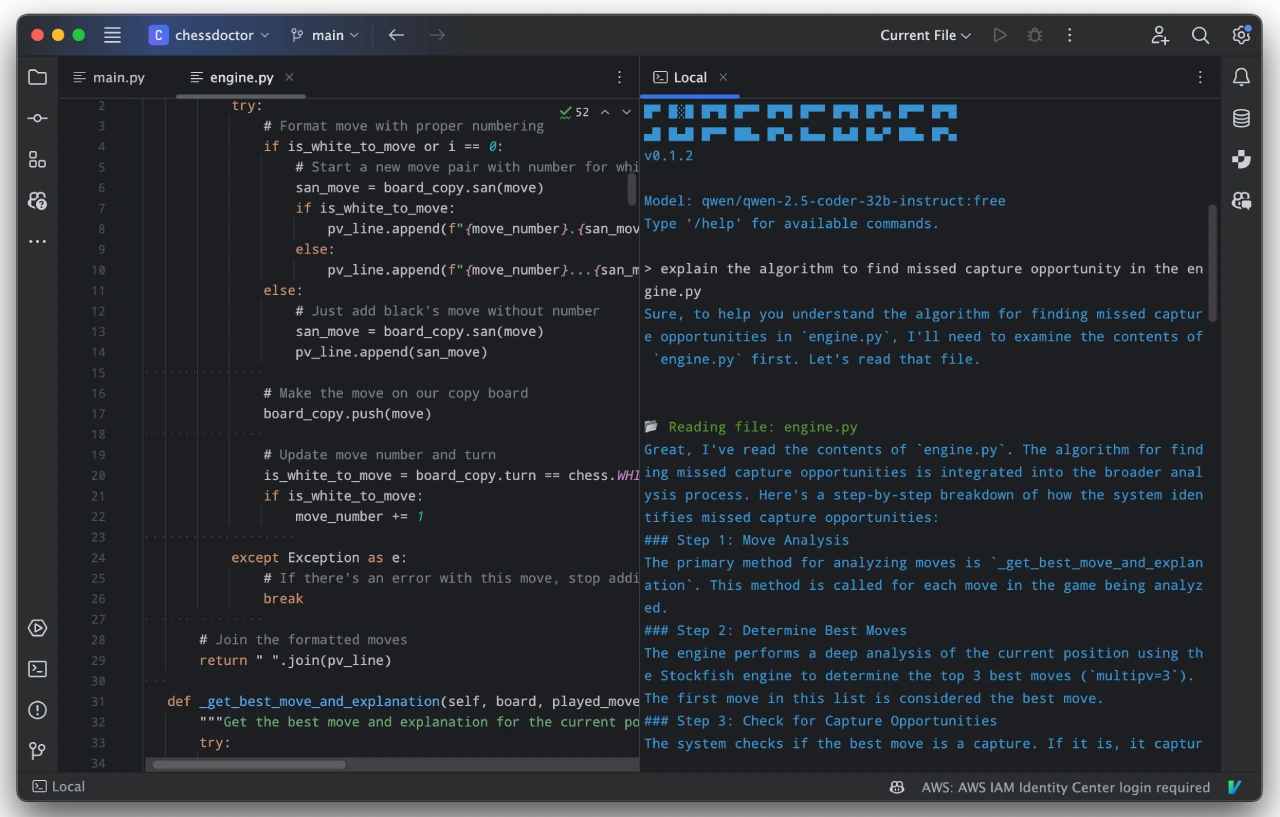
Main Features of SuperCoder
Code Search: Perform complex code searches within a project to quickly locate specific code patterns.
Project Structure Exploration: Provides an organized view of project folders and files for easy project navigation.
Code Editing: Seamlessly modify codebases using natural language commands.
Bug Fixing: Automatically fixes and improves code errors based on detailed user requests.
Cursor Rules Support: Leverages Cursor rules to intelligently understand and modify code at precise locations.
File Reading: Reads and displays the contents of specified files.
Command Execution: Runs shell commands as needed.
Tool Support
CodeSearchTool: Used to search for specific code patterns within a project.
CodeEditTool: Allows editing files within a project.
FileReadTool: Reads and displays file contents.
ProjectStructureTool: Provides an overview of project folders and files.
CommandExecutionTool: Executes shell commands based on the agent's evaluation.
Target Users
Programmers who prefer terminal-based workflows.
Enterprises and developers who need to rapidly develop and deploy software systems.
How to Use SuperCoder
Installation Steps
Download the ZIP package from the Release page.
Extract the ZIP package to a folder on your computer, and make sure the bin/supercoder or bin/supercoder.bat binary is accessible from your system's PATH.
In the terminal, run the supercoder command from any folder where you want to work.
Configuring the Agent
Using the Openai API
Before running the agent, you need to configure the OPENAI_API_KEY environment variable. You can obtain an API key by signing up on OpenAI.
export OPENAI_API_KEY=export OPENAI_MODEL= # Default value is "o3-mini"; please note the cost
Using a Local Model or Any OpenAI-Compatible API
If you have a local model or another OpenAI-compatible API, you can configure SuperCoder to use it by setting the following environment variables:
export SUPERCODER_BASE_URL=export SUPERCODER_API_KEY=export SUPERCODER_MODEL=
If using Google Gemini, you also need to set SUPERCODER_GEMINI_MODE=true. Note that the model you use should support tool calling.
Running the Coding Agent
After building the project, extract and run the generated binary. Once running, you can enter natural language commands, for example:
"Search for usage of function XYZ"
"Edit file path/to/file.scala to add a new method"
"Show me the project structure"
The agent will interpret these commands and invoke the appropriate tools.
Development Environment Setup
Prerequisites
Java 8 or higher
SBT (Scala Build Tool)
Steps
1. Clone the repository:
git clone cd SuperCoder
2. Build the project using SBT:
sbt compile
3. Run the tests to make sure everything is working:
sbt test
Project Address
GitHub Repository:https://github.com/huytd/supercoder









