
 Script Planner Assistant▸
 AI Apps
 AI News
Zotero PDF2zh: Translate PDFs in Zotero with PDF2zh
小编 ·

Zotero PDF2zh: Translate PDFs in Zotero with PDF2zh
What is Zotero PDF2zh?
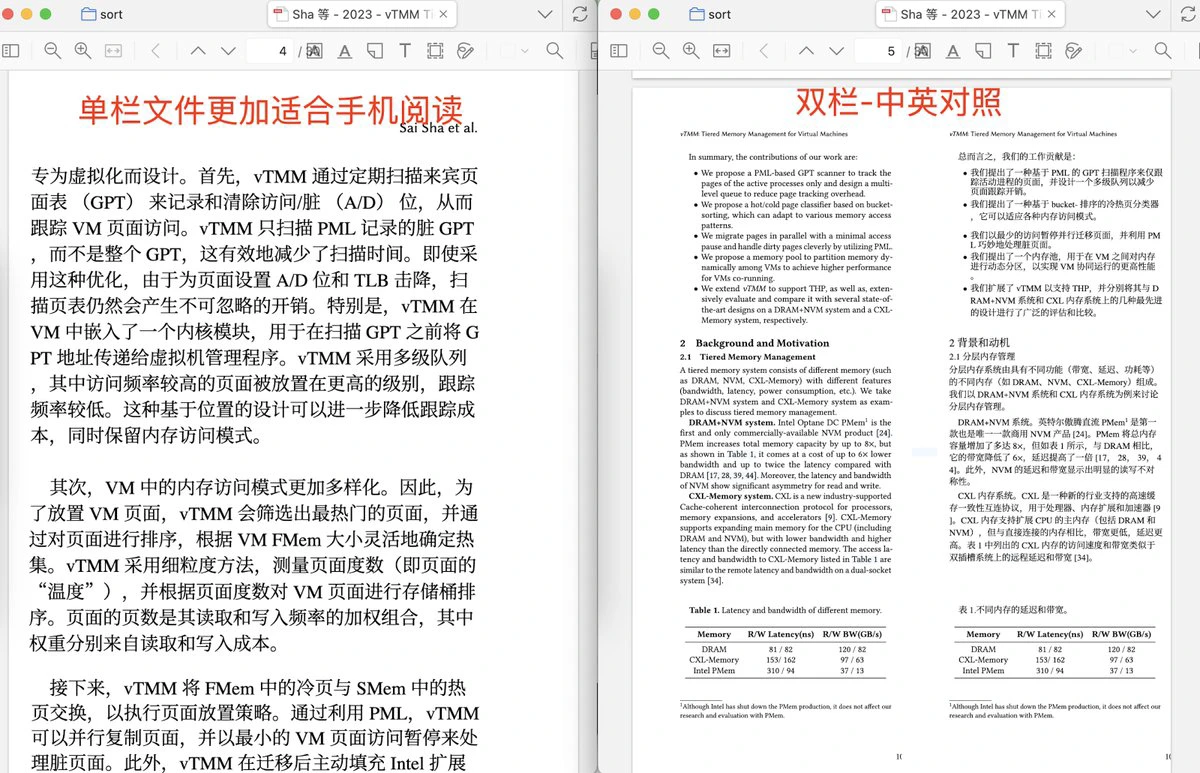
Zotero PDF2zh is an AI plugin developed for the Zotero literature management tool. It can translate the English content of PDF files into Chinese, and supports multiple translation engines and output formats. It can handle mathematical formulas, and can convert two-column papers into single-column format, making them easier to read on mobile phones.
Zotero PDF2zh Features
One-click translation of English PDF papers: Supports translation of entire papers, outputting pure Chinese or Chinese-English bilingual PDFs.
Multiple translation engine support: Integrates Bing, DeepSeek, Zhipu, and other translation engines, and supports custom API interfaces.
Preserves formulas and figures: Uses pdf2htmlEX to parse PDFs, accurately preserving LaTeX formulas, tables, and images.
Two-column to single-column: Intelligently converts two-column PDFs to single-column, optimizing reading on phones and tablets.
Font optimization: Supports custom Chinese fonts (LXGW WenKai is recommended) to improve reading readability.
Multiple output formats: Supports generating mono (containing only the target language), dual (source language and target language side by side), and compare (Chinese-English dual-column comparison) PDF files.
Zotero PDF2zh Installation and Usage Steps
1. Install PDF2zh
Installation commands:
pip install pdf2zh: Install the latest version of pdf2zh.
pip install --upgrade pdf2zh: Update the installed pdf2zh version.
Current version: v1.9.0.
2. Configure Plugin Parameters in Zotero
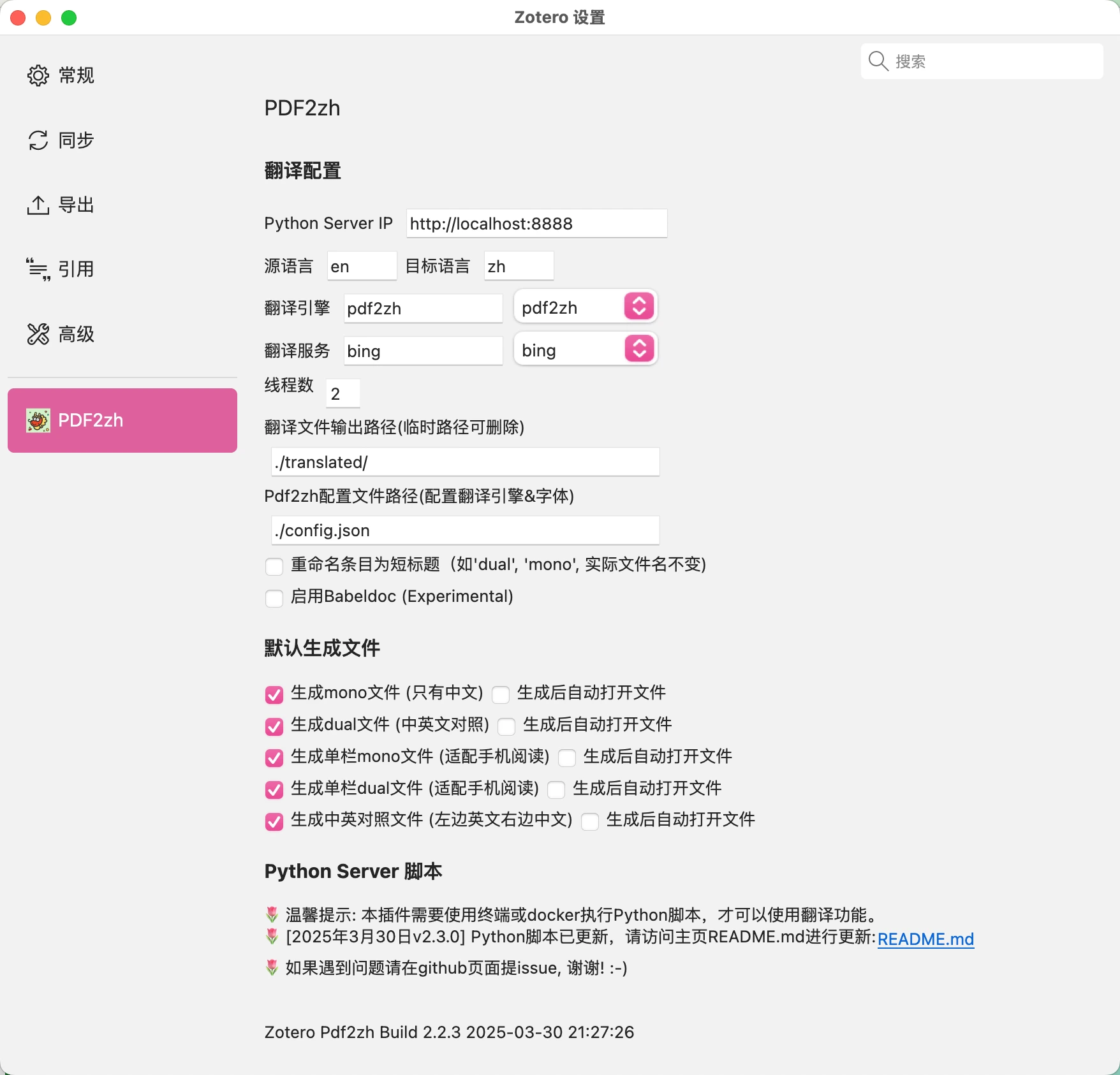
1. Set translation parameters
Python Server IP: Defaults to http://localhost:8888, the port number can be modified as needed.
Translation engine: Defaults to Bing, can be selected from the drop-down menu or entered manually.
Number of threads: Defaults to 4, used to control the number of execution threads during translation.
Translation file output path: Temporarily stores the translated PDF files, defaults to empty, it is recommended to set it to an absolute path.
Pdf2zh configuration file path: Used to configure the translation engine and fonts, defaults to empty, it is recommended to set it to an absolute path.
Rename to short title: Renames the title of newly added items to a short title (such as mono, dual, etc.), without changing the original file name.
2. Select the default generated translation file
Default generated files: mono and dual files.
Control options: Check the boxes to control which files are added to Zotero, and choose whether to open them automatically after generation.
3. Add the PDF2zh Configuration File & Modify the Chinese Translation Font (Optional)
Create a new config.json file: Enter the configuration file path into the Zotero translation configuration.
Example config.json:
{
"NOTO_FONT_PATH": "./LXGWWenKai-Regular.ttf",
"translators": [
{
  "name": "openai",
  "envs": {
"OPENAI_BASE_URL": "https://api.openai.com/v1",
"OPENAI_API_KEY": "sk-xxxxxxxxx-xxxxxxxxxx-xxxxxxxxxxxxx",
"OPENAI_MODEL": "gpt-4o-mini"
  }
}
]
}
NOTO_FONT_PATH: Custom font path.
translators: Multiple AI translation engines can be configured (not required if using the default Bing or Google).
4. Execute the Script
Download the script file:
wget https://github.com/guaguastandup/zotero-pdf2zh/raw/refs/heads/main/server.py
Execute the script file:
python server.py 8888
Notes:
If the port number is modified, it needs to be modified accordingly in the Zotero configuration.
The Zotero plugin configuration will override the configuration in the Python script. If you do not want to configure it in Zotero, you can leave the Zotero plugin configuration blank.
5. Translate Files
PDF2zh: Translate PDF: The generated files are determined by the "Default generated files" setting in the Zotero plugin. By default, two files are generated: mono and dual.
PDF2zh: Cut PDF: Cuts a two-column PDF file into a single-column file, suitable for reading on mobile phones, and generates a single-column PDF file with the "cut" suffix.
PDF2zh: Chinese-English Dual-Column Comparison: Cuts and splices a file with the "dual" suffix into a Chinese-English comparison file, generating a Chinese-English dual-column comparison PDF file with the "compare" suffix.
Project Link
https://github.com/guaguastandup/zotero-pdf2zh









