
 Script Planner Assistant▸
 AI Apps
 AI News
KoalaWiki: An Open-Source DeepWiki Alternative That Auto-Analyzes Your Git Repository
小编 ·

KoalaWiki: An Open-Source DeepWiki Alternative That Auto-Analyzes Your Git Repository
What is KoalaWiki?
KoalaWiki is an open-source AI-driven code knowledge base platform, similar to DeepWiki launched by Cognition Labs. Its main function is to automatically parse your Git code repositories, produce relatively detailed, structured code documentation and project insights, helping development teams gain a deeper understanding of the code structure and working principles. It provides intelligent assistance for new team members to get up to speed quickly, as well as for project maintainers to organize code logic.
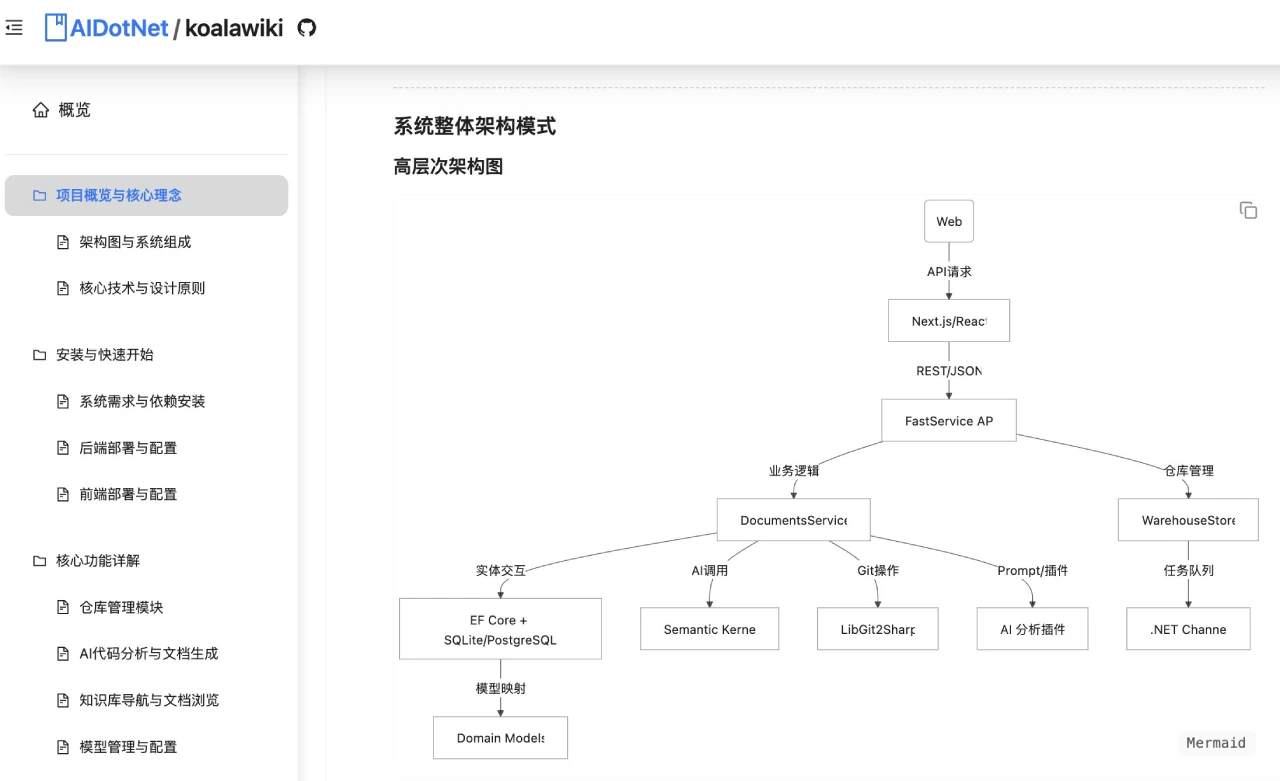
Core Features of KoalaWiki
Repository Management: Supports adding and managing multiple Git code repositories.
AI Code Analysis: Leverages advanced AI technology to analyze code structure and relationships.
Automatic Documentation Generation: Automatically generates detailed code documentation, including architecture overviews, component descriptions, and more.
Knowledge Base Navigation: Provides an intuitive directory tree structure for easy browsing and searching.
Support for Multiple AI Models: Integrates various AI models such as OpenAI, allowing users to configure flexibly based on their needs.
Code Search: Features powerful code search capabilities to quickly locate the information you need.
Technical Architecture
Backend: .NET Core, using Entity Framework Core and SQLite database.
Frontend: Next.js and React, using the Ant Design component library.
AI Integration: Microsoft Semantic Kernel with the OpenAI API.
Version Control: LibGit2Sharp for Git repository operations.
Installation and Usage
System Requirements: Requires the installation of .NET 9.0 SDK and Node.js 18+.
Installation Steps:
Clone the repository: git clone https://github.com/AIDotNet/koalawiki.git.
Start the backend API: cd src/KoalaWiki, run dotnet run.
Start the frontend development server: cd web, run npm install and npm run dev.
Usage:
Add a repository: Click the "Add New Repository" button, fill in the Git repository address, branch, and other information.
Configure the AI model: Select the appropriate AI model and configure parameters.
Browse the knowledge base: Once the repository analysis is complete, you can browse the code documentation through the navigation tree.
View code analysis: Check the AI-generated code structure analysis and documentation descriptions.
Advantages
Open-Source and Free: Based on the MIT license, fully open-source, with no subscription fees.
Local Deployment: Supports local deployment for higher data security.
Multi-Model Support: Supports integration with various AI models with flexible configuration.
Customization: Can be deeply customized according to team needs.
KoalaWiki Use Cases
Onboarding New Developers: Helps new team members quickly understand the codebase.
Project Maintenance: Assists project maintainers in organizing code logic.
Team Collaboration: Facilitates code knowledge sharing among team members.
Official Website:https://koala.token-ai.cn/
Github:https://github.com/AIDotNet/KoalaWiki









