
 Script Planner Assistant▸
 AI Apps
 AI News
ScreenPipe: 24/7 Continuous Recording of Your Screen and Audio
小编 ·

ScreenPipe: 24/7 Continuous Recording of Your Screen and Audio
What is Screenpipe?
Screenpipe is an open-source, cross-platform tool that records desktop activity 24/7. It can capture screen, audio, keyboard, mouse, and webcam data, and store them in a local database. Finally, it leverages LLMs to directly converse with, summarize, and review everything you've done on your computer.
Screenpipe Features
Data Capture: Records screen, audio, UI elements, and user interactions 24/7 without interruption, comprehensively obtaining desktop activity information.
Data Processing: Provides text extraction and audio transcription capabilities, and stores the processed data in a local SQLite database for easy subsequent analysis and use.
ai Capabilities: Supports embedding and RAG (Retrieval-Augmented Generation) pipelines, and uses local large language models (LLMs) through Ollama, OpenAI/Anthropic proxies, providing support for various intelligent applications.
Application Deployment: Allows users to deploy Next.js applications directly to the desktop without additional wrappers.
Plugin System (Pipes): Supports developers in creating and using various plugins to extend functionality, such as automatically generating meeting notes and analyzing workflows.
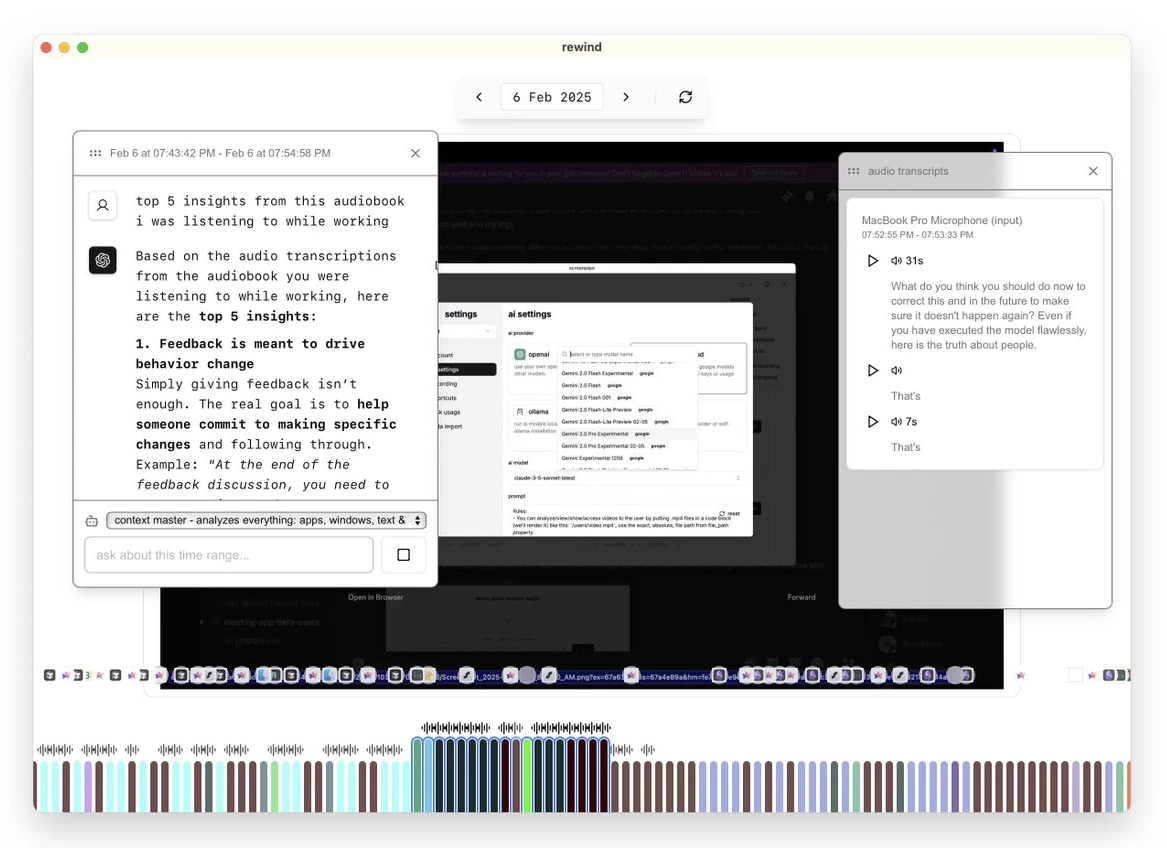
Screenpipe Use Cases
Meeting Management: Automatically records and transcribes meeting content, extracts key points, and facilitates later review.
Content Creation: Generates reports, articles, or social media content based on screen activity.
Personal Knowledge Base: Creates a searchable digital interaction archive to quickly find past presentations, webinars, or online course content.
Automated Data Entry: Automatically fills information from the screen into CRM systems or other databases, saving time.
How to Use Screenpipe
Install Screenpipe: Download from the official website or compile from source code.
Configure Recording Settings: Choose the screen and audio inputs you want to record.
Install Plugins: Install plugins from the Screenpipe Store to extend functionality.
Use AI Features: Query history, generate summaries, or automate tasks through AI features.
Screenpipe Development Technologies
Frontend: Developed with NextJS App and TypeScript, styled with Tailwind, using ShadcnUI components, and deployed directly to the desktop.
Backend: Stores data directly on the user's device by calling screenpipe localhost:3030, calls LLMs through local endpoints, and supports creating operations such as clicks and typing.
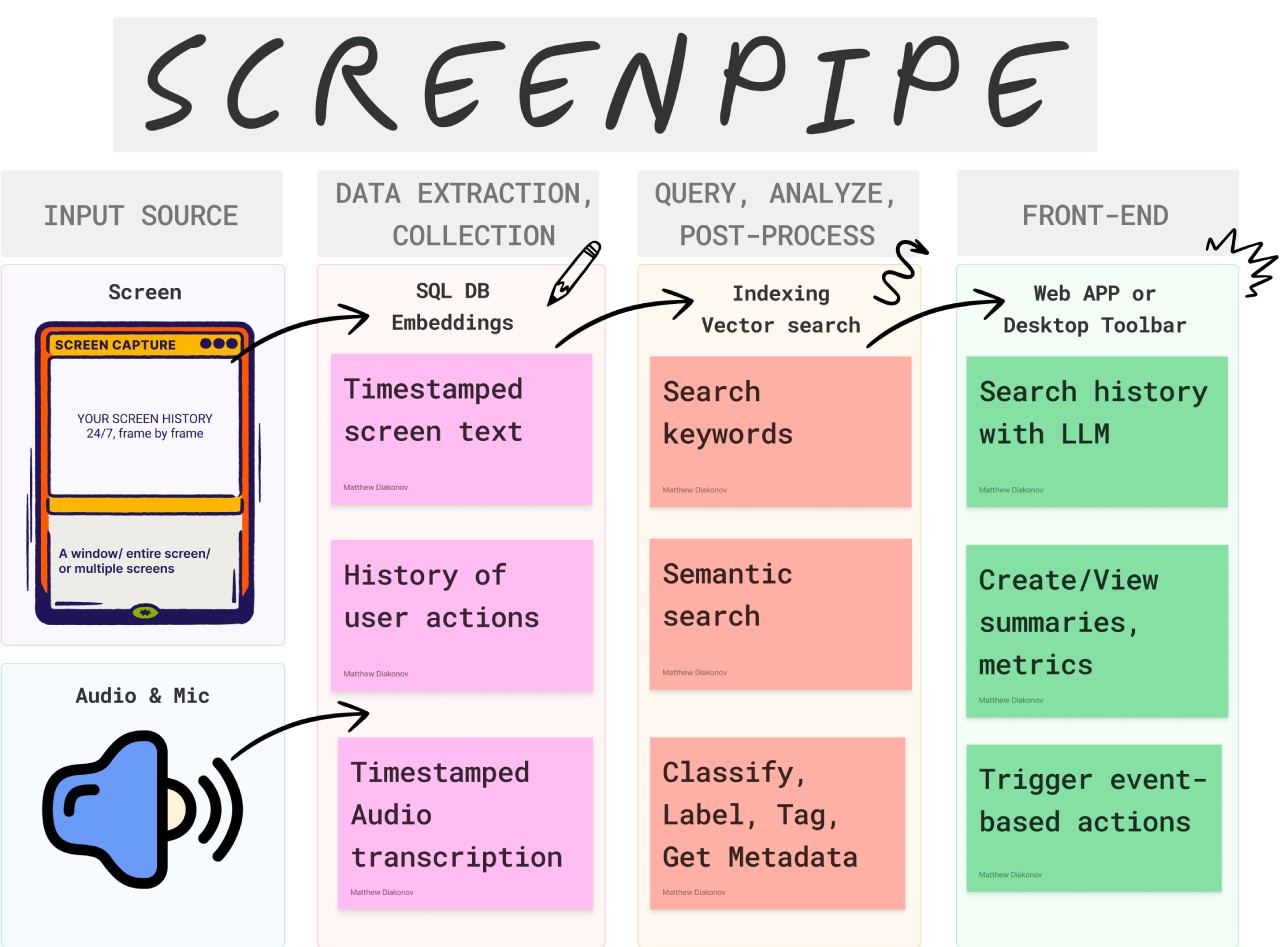
Problems Screenpipe Solves
Cross-Platform Challenges: Handles differences in native APIs, permissions, and features across different operating systems (Windows, macOS, and Linux).
Performance Optimization: Optimizes CPU and GPU (when available) usage to balance system resources with real-time processing needs.
Storage and Processing: Implements video compression, structured data storage, and data deduplication.
OCR and Voice Processing: Integrates and optimizes OCR engines, handles multiple languages, and performs real-time voice processing.
Vector Search Infrastructure: Builds an efficient embedding storage/retrieval system (WIP).
Rust Ecosystem Complexity: Handles FFI bindings, async runtime, unsafe code for system APIs, and cross-boundary error handling.
FAQ
Q: Compared with other similar tools, what is Screenpipe's biggest advantage?
A: Screenpipe's biggest advantage lies in its open-source, cross-platform, and 100% local nature, allowing users to fully control their own data. At the same time, it provides rich plugins called "pipes" that allow users to customize functionality according to their needs, and can deploy Next.js applications directly on the desktop. It has significant effects in improving work efficiency and business growth, such as automatically filling CRM which increased customer revenue by 20%, features that many other tools lack.
GitHub:http://github.com/mediar-ai/screenpipe
Download & Try:http://screenpi.pe









