
 Script Planner Assistant▸
 AI Apps
 AI News
Mad Professor Reads Papers: A Cantankerous AI Professor That Makes Academic Reading Faster and More Fun
小编 ·

Mad Professor Reads Papers: A Cantankerous AI Professor That Makes Academic Reading Faster and More Fun
What is Mad Professor Reading Papers
Mad Professor Reading Papers (mad-professor) is an academic paper reading companion application that integrates PDF processing, AI translation, RAG retrieval, AI Q&A, and voice interaction, providing academic researchers with a one-stop paper reading solution.

Key Features of Mad Professor Reading Papers
Automatic Paper Processing: After importing a PDF, paper content is automatically extracted, translated, and structured.
Bilingual Display: Supports Chinese-English side-by-side paper reading.
AI Smart Q&A: Combines with paper content to provide professional explanations and analysis.
Personalized AI Professor: The AI answers questions with a "grumpy professor" personality, adding fun to the experience.
Voice Interaction: Supports voice input questions and TTS voice answers.
RAG-Enhanced Retrieval: Precise retrieval and positioning based on paper content.
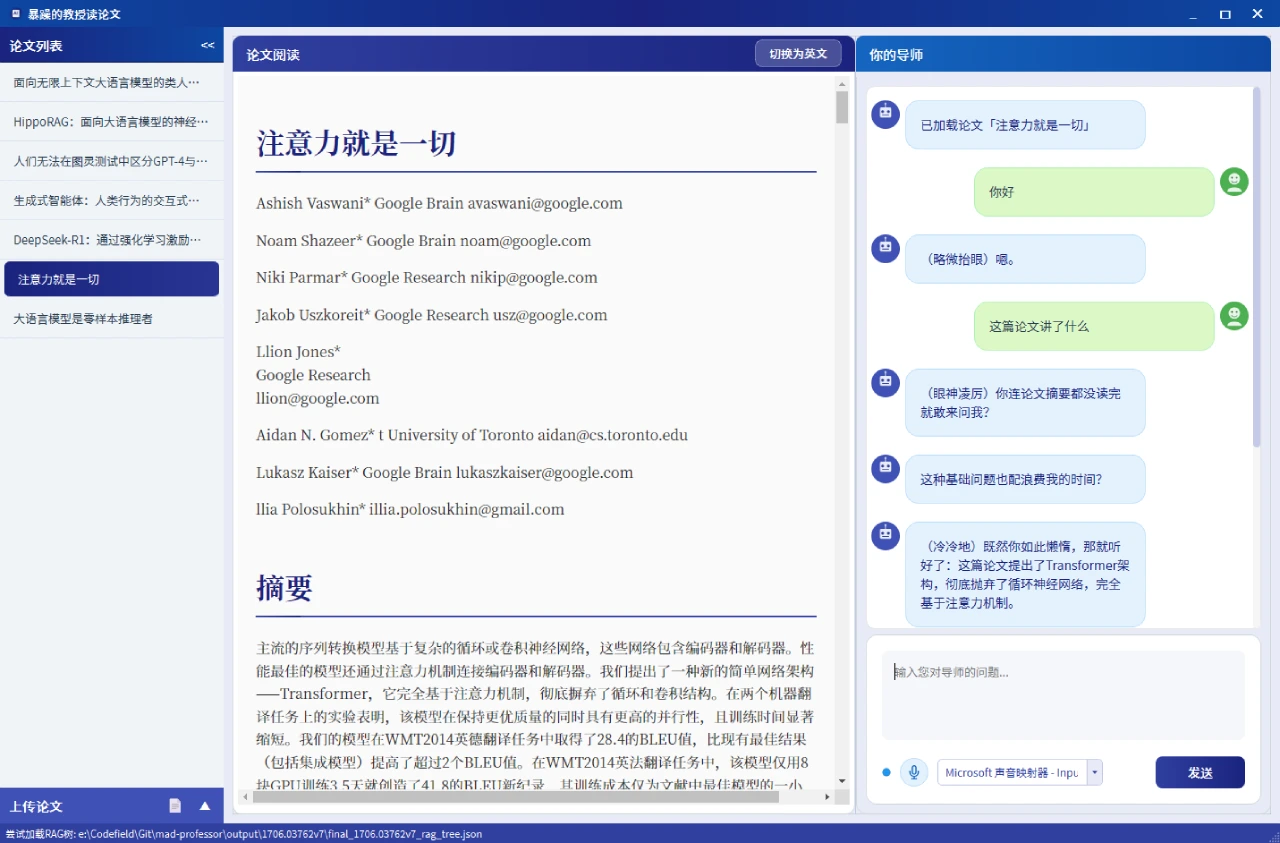
Split-Screen Interface: Paper content on the left, AI Q&A on the right, enabling efficient interaction.
Technical Architecture of Mad Professor Reading Papers
Frontend Interface:
A modern desktop application built with PyQt6.
Core Engine:
AI Q&A Module: An LLM-based academic question-answering system.
RAG Retrieval System: Vector retrieval-enhanced Q&A precision.
Paper Processing Pipeline: PDF to MD conversion, automatic translation, structured parsing.
Interaction System:
Speech Recognition: Real-time voice input recognition.
TTS Speech Synthesis: Real-time broadcast of AI answers.
Emotion Recognition: Adjusts response emotion based on question content.
Installation Guide for Mad Professor Reading Papers
Environment Requirements
Python 3.10 or higher
CUDA support
6GB+ VRAM
Project Dependencies
Open-source projects: MinerU, RealtimeSTT
Online API services: DeepSeek, MiniMax
Installation Steps
Create an environment using conda.
Install MinerU dependencies.
Install the remaining dependencies.
Install the CUDA and torch versions matching your computer's GPU.
Install the GPU version of FAISS.
Download model files and configure the model directory.
Configure API keys.
Usage Tutorial for Mad Professor Reading Papers
Importing Papers
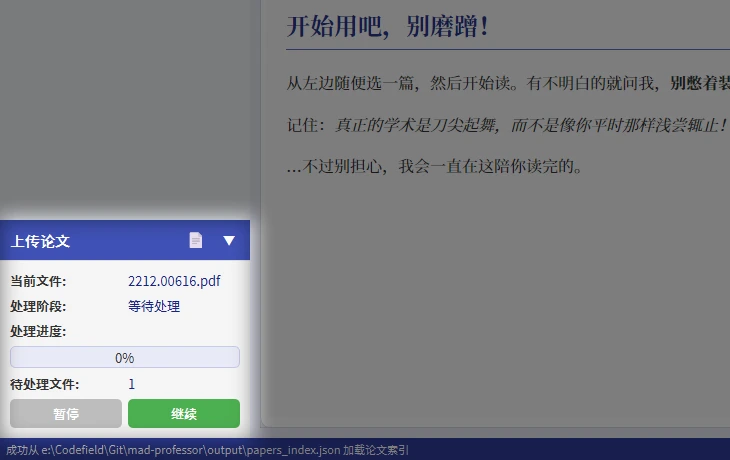
Click the "Import Paper" button on the sidebar and select a PDF file to import
Click "Continue" and wait for processing to complete (including translation and index construction)
Imported PDFs will be stored in the data folder; you can also place multiple PDFs in the data folder, and the program will detect unprocessed files and process them in batches
Reading Papers
Select a processed paper from the sidebar
View paper content in the main window; toggle between Chinese and English in the top-right corner
Left and right panels can be collapsed and hidden for an immersive reading experience
AI Q&A and Voice Conversation
Select a voice input device below the conversation window
Click the microphone button and start talking when the indicator light turns green
If the indicator light does not turn yellow while you are speaking, it may indicate that the input device cannot detect human voice; it is recommended to switch to another input device to try

Github:https://github.com/LYiHub/mad-professor-public









