
 Script Planner Assistant▸
 AI Apps
 AI News
Coze Space Beginner's Guide & Tutorial Manual
小编 ·

Coze Space Beginner's Guide & Tutorial Manual
The "Coze Space Beginner's User Tutorial Manual" is a complete and sufficiently detailed document that allows everyone to fully understand Coze Space through this manual—how to use it, what problems it can solve, what detailed features it has, who it is suitable for, and in what scenarios it can be used.
1. What is Coze Space?
Coze Space (扣子空间) is a platform launched by ByteDance. It can be used both to freely build AI applications and as a collaborative office tool. Its biggest highlight is that it lets you work with AI, just like having a smart assistant to help you get things done more efficiently.
Even if you don't know how to code, you can easily create AI-based Q&A bots through simple visual operations. In addition, it integrates more than 60 practical plugins, such as news reading, travel, and office efficiency enhancement. You can also develop your own plugins based on your needs.
2. Who is Coze Space suitable for?
B-side Enterprise Developers
R&D teams and digital transformation teams of medium and large enterprises: They can use Coze Space to develop AI tools that improve work efficiency, saving development costs while meeting various complex business needs.
Startups and small and medium-sized enterprises: Quickly build AI applications suitable for their own business to boost team productivity.
C-side Individual Developers
Programmers and tech enthusiasts: Especially developers who like to follow new technology trends on GitHub and pursue technical improvement, they can use it to optimize their own development workflows.
AI tech enthusiasts: People who are interested in AI and willing to delve deeply into AI tools and products will find plenty to explore here.
People who pursue efficiency: For example, office workers and college students who need to improve office and study efficiency can all use it for help.
3. In what scenarios can Coze Space be used?
Usage Scenario Distribution
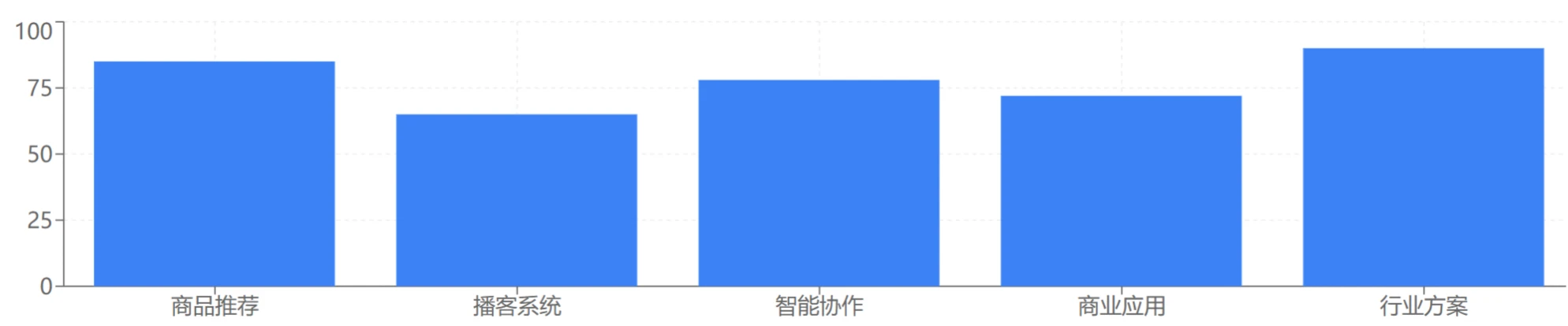
Product recommendations: E-commerce platforms can use it to accurately recommend products based on users' browsing history and purchase records, just like having a shopping assistant that understands you.
Personalized podcasts: Podcast creators can automatically generate podcast scripts and synthesize audio based on information such as weather and news, making the content more relevant to listeners' needs.
Smart collaboration: Project teams can assign tasks to AI through it. The AI will automatically analyze requirements, break down tasks, call tools, and generate results, greatly improving team collaboration efficiency.
Commercial applications: Enterprises can choose AI tools that suit them from the Bot Store and quickly deploy them into business processes to improve business efficiency.
Industry solutions: For example, intelligent customer service that can quickly respond to customer questions and improve customer satisfaction; or solutions that enhance production efficiency, integrated with traditional tools.
4. What are the main features of Coze Space?
Resource management: You can create independent spaces to manage multiple AI applications and agents, ensuring the security of resources and data. For example, an enterprise with multiple projects can have its own resource library for each project, making it easier to manage and use.
Development and publishing: A one-stop solution for application development, testing, monitoring, and publishing. You can publish the developed AI applications to multiple platforms such as Douyin Mini Programs, WeChat, and Feishu, allowing more people to use them.
Store and templates: Provides rich templates and commonly used content. You can directly select a template, modify and customize it according to your needs, and quickly build the AI application you want.
API integration: Publish agents or AI applications via API, or integrate them into your own applications to extend functionality.
Task automation: AI can automatically break down complex tasks into smaller tasks, call various tools to perform operations, and finally generate complete results, such as market research reports, PPT, documents, etc.
Expert-level Agent ecosystem platform: Built-in with a variety of professional AI assistants, such as "Huatai A-Share Observation Assistant" which can generate daily stock market morning reports and answer questions; "User Research Expert" which can analyze user data, generate surveys, interview outlines, etc.
Dual-mode collaboration: Exploration mode is suitable for quickly obtaining information or completing simple tasks, and AI can respond quickly; Planning mode is suitable for complex tasks, where AI will think deeply and develop comprehensive solutions.
Capability extension and open ecosystem: The first batch integrates plugins such as Feishu multi-dimensional tables, Amap, and image tools. In the future, it will also support developers to publish custom plugins. You can add plugins according to your needs to make AI more powerful.
5. How to use Coze Space tutorial?
Visit Coze Space: Log in or register on the official website (space.coze.cn).
Apply for an invitation code: Currently in the beta stage, an invitation code is required. How to obtain:
Users who have already made an appointment on the official website will gradually receive activation codes.
Follow the "Coze" WeChat official account, reply with "扣子空间", fill in the information, and you will have the opportunity to receive an activation code.
Visit the invitation code application address, fill in the information and submit. The invitation code will be sent to your phone.
Join the waitlist or use the invitation code: Log in to the official website, click "Quick Start", and if you have an invitation code, enter it directly to start using it.
Create a workspace: Enter the main interface, click "Create Space", fill in the name and description, and create your own workspace.
Add MCP extensions: Click "Extensions" and select the plugins you need, such as Amap, Feishu Docs, etc., for later use.
Use Agent to complete tasks: Enter task requirements in the workspace, select a mode, and the Agent will automatically analyze, break down tasks, and generate results. For example, enter "Plan a 2-day family trip in Shanghai", select the mode, and the Agent will provide a plan.
Experience MCP features: For example, upload data to Feishu Docs, or use the text-to-speech plugin to convert text into speech for easy listening.
6. Precautions
Performance:When handling complex tasks, efficiency needs improvement compared to some deep thinking models. Meanwhile, due to the large number of testers, the page may occasionally fail to display or generate results.
Accuracy: Like other AI systems, Kouzi Space may also experience hallucination issues, meaning the results it provides may not align with actual facts. For example, in generated pages, certain links may fail to open properly, or the information provided may contain errors.
Functional Limitations: In certain specific scenarios, Kouzi Space may be unable to resolve user problems. For example, when planning a route, it may not be able to call relevant tools directly in the code to obtain the latitude and longitude of stores, resulting in the inability to filter out valid stores.










