
 Script Planner Assistant▸
 AI Apps
 AI News
No-OCR: A Document Processing Tool That Doesn't Need OCR Text Extraction
小编 ·

No-OCR: A Document Processing Tool That Doesn't Need OCR Text Extraction
What is No-OCR?
No-OCR is a document processing tool that does not require complex OCR text extraction. Simply upload PDF files to quickly search or query content across multiple document collections. Without relying on traditional OCR technology, it can boost document analysis efficiency. It supports creating and managing PDF/document collections organized by "cases," while automatically building Hugging Face–style datasets. In addition, No-OCR offers vector-based search of PDF pages and related images (using LanceDB) and visual question answering for images and charts via Qwen2-VL. It supports hybrid search across text and visual queries, can be quickly deployed via Docker with simple configuration, and provides detailed development and installation instructions.
No-OCR Features
No OCR Required: Does not rely on OCR technology at all, suitable for PDFs rich in visual content.
Easy to Use: Upload PDFs and start searching immediately; supports complex visual content (such as tables, charts, layouts, etc.).
Open-Source Models: Uses open-source LLMs (large language models) for content retrieval and interpretation.
Deployability: Supports Docker deployment, suitable for any enterprise environment.
No-OCR Use Cases
Suitable Scenarios: If documents contain rich visual content (such as tables, charts, layouts, etc.), No-OCR is an excellent choice.
Unsuitable Scenarios: If documents are primarily plain text, traditional BM25 search may be more appropriate.
Mixed Content: If documents contain a mix of text and visual content, the solution may need to be adjusted based on your needs.
No-OCR Architecture Design
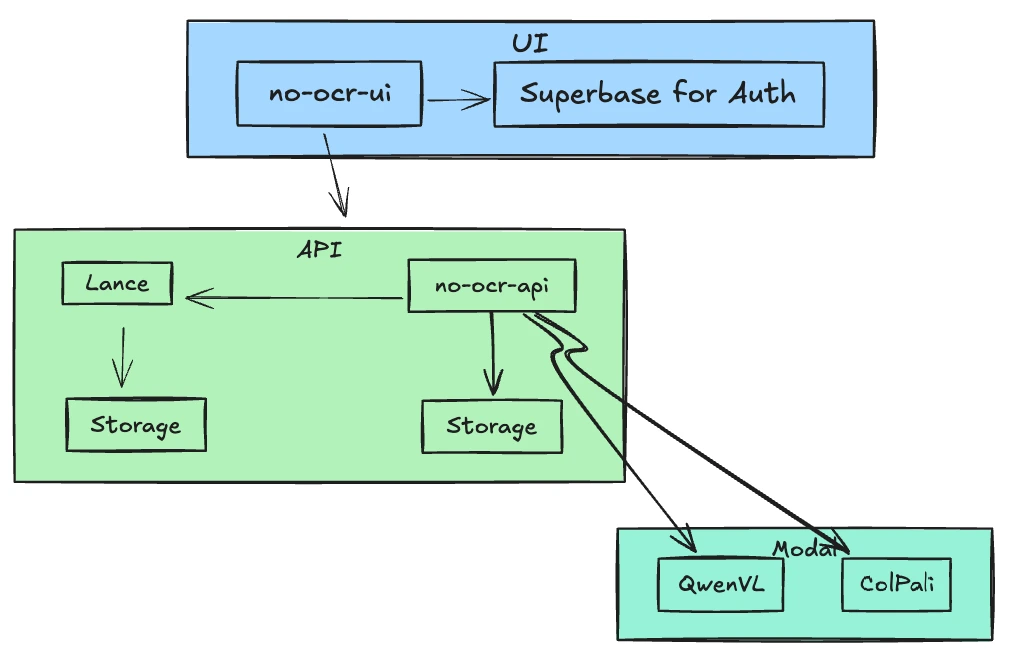
Simple Architecture: No dependency on databases or message queues; all persistence operations are based on the file system.
Main Services:
Modal: Used for LLM deployment.
Qdrant: Used for multi-vector search.
Supabase: Used for user authentication and authorization.
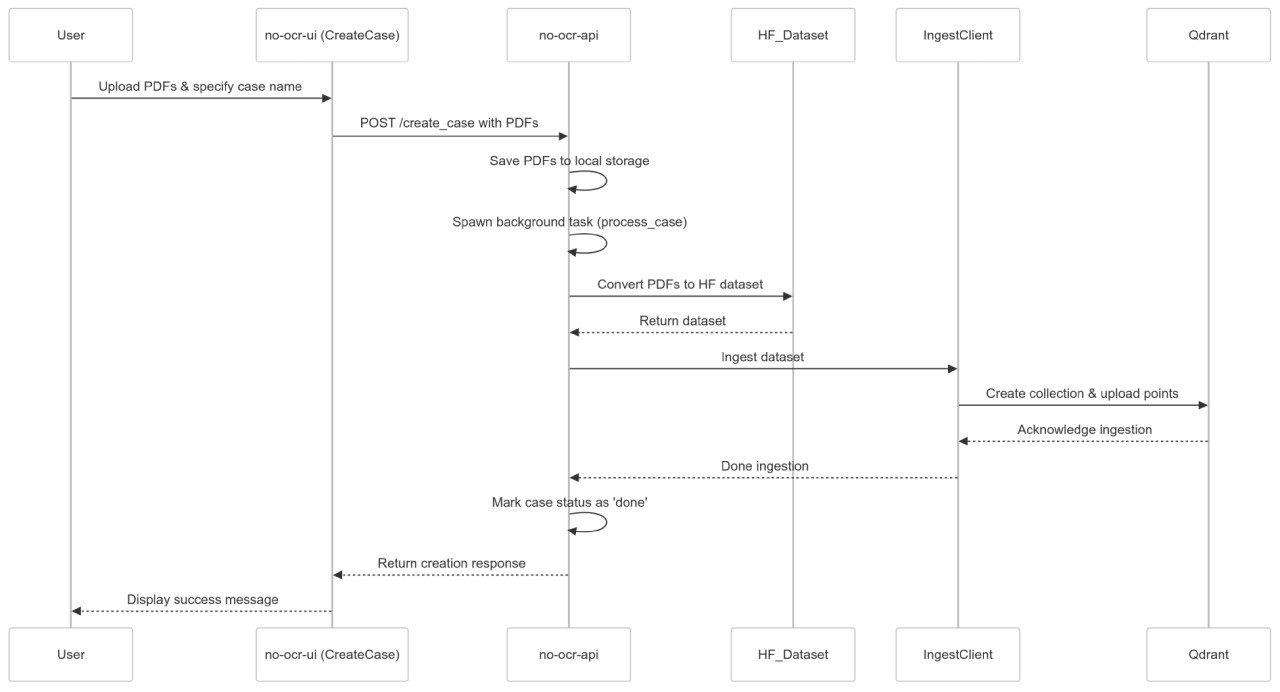
Creating Cases: Users upload PDF files and specify a case name; the system converts the PDFs into datasets and uploads them to Qdrant.
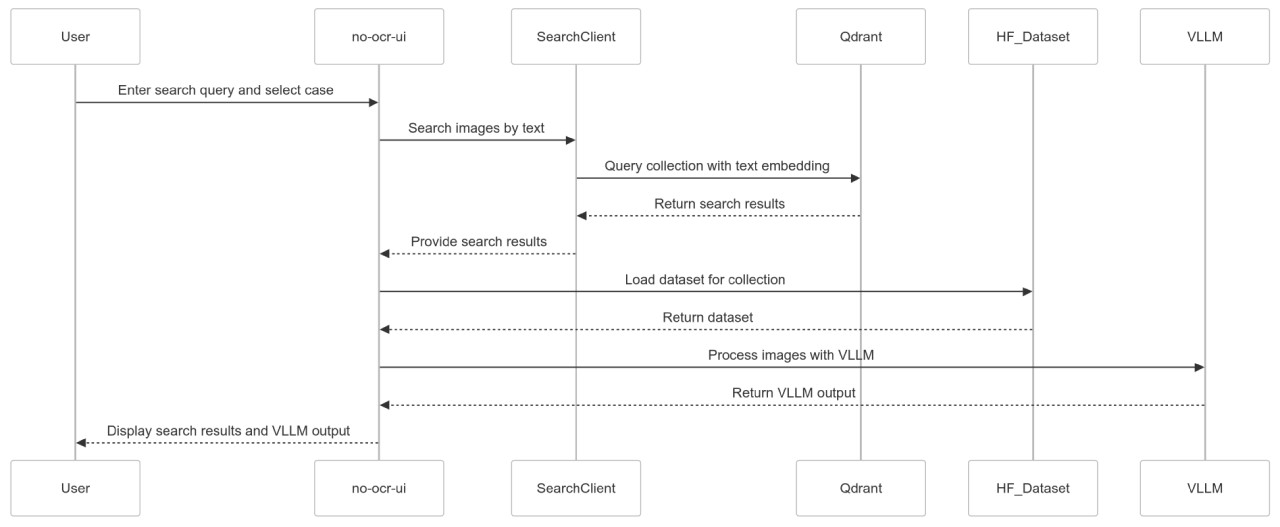
Search Workflow: Users enter a search query; the system uses LLMs to identify relevant pages and interpret the content.
No-OCR LLM Models
ColPali Family: Converts images into searchable formats for image retrieval.
Qwen2-VL Family: Used for reasoning over visual content; notably, the Qwen2-VL-7B-Instruct model is one of the current state-of-the-art open-source vision models.
Case Creation Workflow
How It Works
The No-OCR platform uses a streamlined RAG approach: users simply upload PDF files to create cases, and the system processes these files to make them searchable. Users can ask any question, including questions about visual elements, and the platform leverages top-tier open-source reasoning models to deliver answers.
Search Workflow
No-OCR Usage Steps
Upload and Process Complex PDFs: Users upload challenging PDF files to create a new case; the system generates embeddings without complex OCR processing.
Make It Searchable: Once processing is complete, users can run text-based queries to quickly find relevant pages and citations, no matter how complex the PDF layout is.
Ask Visually Related Questions: The platform quickly locates relevant pages, then uses a dedicated open-source vision model to further refine the answers, delivering context-aware insights even when PDFs contain charts or diagrams.
TLDR:https://no-ocr.com/about
Github:https://github.com/kyryl-opens-ml/no-ocr









