
 Script Planner Assistant▸
 AI Apps
 AI News
Codex CLI: OpenAI's Local Coding AI Agent
小编 ·

Codex CLI: OpenAI's Local Coding AI Agent
What is Codex CLI?
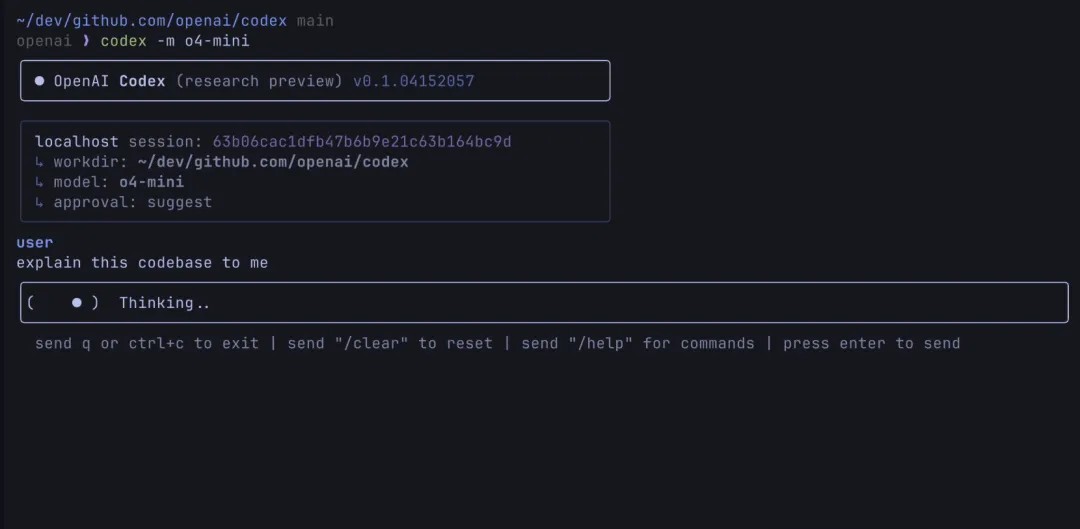
Codex CLI is a lightweight command-line tool released by Openai that provides terminal users with ChatGPT-like reasoning capabilities. It can actually run code, manipulate files, and iterate, with all operations performed under version control. It supports multimodal input, allowing users to complete tasks such as code generation, editing, and running through natural language instructions.
Main Features of Codex CLI
Code Generation and Editing: Users can ask Codex CLI to generate code through simple English instructions, such as "create a Python script that reads a CSV file and prints the average of a column."
File Management: Supports file operations, such as "move all .txt files to a folder named notes."
Debugging Assistance: Users can paste error messages, and Codex CLI will provide fix suggestions.
Project Scaffolding: Can quickly generate project templates, such as "scaffold a basic Node.js server."
Multimodal Support: Supports functionality via screenshot or chart input.
Local Execution: Codex CLI runs locally. All file reads, writes, and command executions are completed locally. Unless the user actively chooses to share, the source code will not leave the local environment.
Features of Codex CLI
Open Source and Free: Codex CLI is fully open source. Users can freely view, modify the code, and contribute to its development.
Local Execution: The tool runs in the local terminal, ensuring code execution and file operations are completed within the user's system, safeguarding data privacy.
Model Agnostic: Uses OpenAI's GPT-4-turbo model by default, but users can switch to other compatible API endpoints, such as o3 and o4-mini.
Flexible Configuration: Configured via the .codex YAML file, supporting custom variables and templates.
Security Model and Permissions
Codex CLI provides three approval modes. Users can choose via the --approval-mode parameter:
Suggest Mode (default): Can read any file in the repository, but requires user approval for all file writes and Shell commands.
Auto-Edit Mode: Can read and apply patches to write files, but requires user approval for all Shell commands.
Full Auto Mode: Can read and write files and execute Shell commands without user approval.
Use Cases of Codex CLI
Codex CLI is primarily aimed at developers working in terminal environments, helping them complete daily development tasks more efficiently. It is not a fully automated coding assistant, but is used to support and accelerate routine tasks.
How to Install Codex CLI
Install via npm (recommended):
npm install -g @openai/codex
Build from source:
Clone the repository and navigate to the CLI package directory:
git clone https://github.com/openai/codex.git
cd codex/codex-cli
Install dependencies and build:
npm install
npm run build
Run the locally built CLI or link it globally via npm link.
Configuration
Codex CLI looks for configuration files in the ~/.codex/ directory:
config.yaml: Can set configuration items such as the default model.
instructions.md: Can define custom instructions.
Usage
Run interactively:
codex
Run a specific command:
codex "explain this codebase to me"
Full auto mode:
codex --approval-mode full-auto "create the fanciest todo-list app"
Non-interactive / CI Mode
Codex CLI can be run in headless mode in CI/CD pipelines. For example:
- name: Update changelog via Codex
run: |
npm install -g @openai/codex
export OPENAI_API_KEY="${{ secrets.OPENAI_KEY }}"
codex -a auto-edit --quiet "update CHANGELOG for next release"
GitHub address:https://github.com/openai/codex
Details:https://help.openai.com/en/articles/11096431-openai-codex-cli-getting-started









