
 Script Planner Assistant▸
 AI Apps
 AI News
LLManager: An AI Approval Automation Tool with Memory
小编 ·

LLManager: An AI Approval Automation Tool with Memory
What is LLManager?
LLManager is an intelligent approval tool built on LangGraph for managing various approval requests. It learns from historical decisions through dynamic prompt generation and reflection mechanisms to optimize future approval outcomes. Users can customize approval and rejection criteria, and it supports multiple models. It is suitable for scenarios such as enterprise approvals, content moderation, and customer service—for example, HR approvals and text content approvals—and it can continuously improve its decision-making capabilities through reflection and learning.

LLManager Features
Approval Workflow Management: LLManager is a LangGraph-based workflow specifically for managing approval requests. It handles various approval requests through dynamic prompt composition and reflection mechanisms, and is able to learn and improve over time.
Custom Configuration: Users can customize the approval workflow by setting approvalCriteria and rejectionCriteria. In addition, the model to use (modelId) can be specified, with the default being anthropic/claude-3-7-sonnet-latest.
Learning and Improvement: LLManager learns from past approval decisions through a reflection mechanism, generating new prompts to improve future approval outcomes.
Dynamic Prompt Generation: During the approval process, LLManager dynamically generates prompts based on historical data and semantic search results to help the model better understand the current request.
How LLManager Works
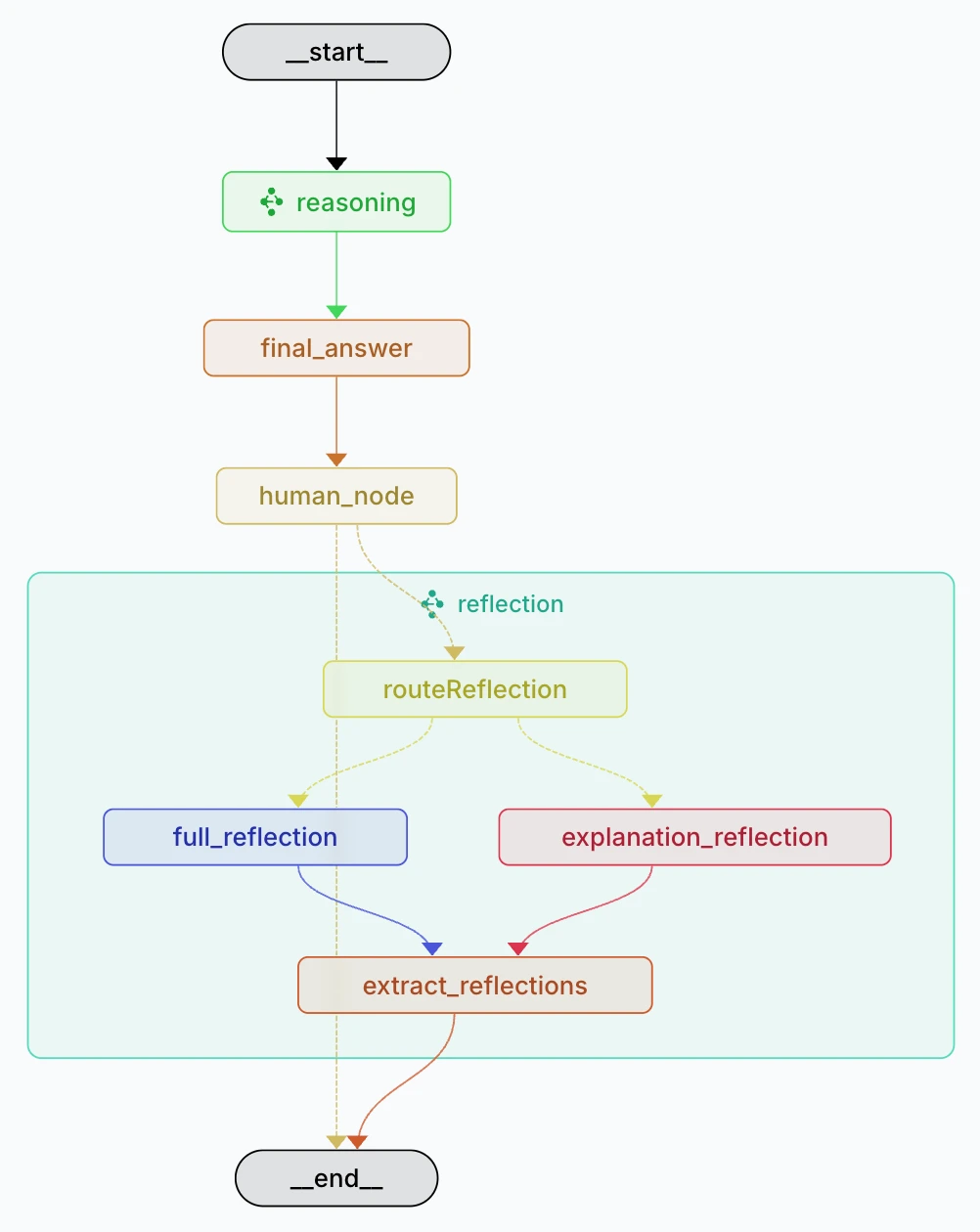
After receiving a request, it first generates a "reasoning report" on whether to approve through a reasoning subgraph, combining past cases and reflection to extract dynamic context. Then, based on the reasoning report and context, it generates a final conclusion. After that, it enters the human review stage, where a human decides whether to accept, modify, or reject the request. If the human modifies the conclusion or explanation, the system enters a reflection subgraph to generate new reflections that are stored and used to optimize future approval decisions.
LLManager Use Cases
Enterprise Approval Workflows: LLManager can be used for various enterprise approval workflows, such as expense reimbursements, leave requests, and project approvals, improving approval efficiency through automation and intelligence.
Content Moderation: On content publishing platforms, LLManager can be used to review user-generated content and ensure it complies with platform rules.
Customer Service: In customer service scenarios, LLManager can be used to handle customer requests, automatically determine whether a request meets service standards, and generate corresponding handling suggestions.
How to Use LLManager
1. Configure the environment:
Clone the LLManager repository:
git clone https://github.com/langchain-ai/llmanager.git
Install dependencies:
cd llmanager
yarn install
Configure the .env file and fill in the necessary API keys and other information.
2. Run the development server:
Start the development server:
yarn start
This will start an in-memory LangGraph server, typically running at http://localhost:2024.
3. Run the evaluation:
Run the end-to-end evaluation:
yarn test:single evals/e2e.int.test.ts
Record the assistant UUID generated during the evaluation process for subsequent operations.
4. Use Agent Inbox:
Visit dev.agentinbox.ai and add a new inbox.
Enter the assistant UUID, deployment URL (such as http://localhost:2024), and a custom name.
View and handle approval requests through Agent Inbox.
GitHub repository: https://github.com/langchain-ai/llmanager









