
 Script Planner Assistant▸
 AI Apps
 AI News
Microsoft MineWorld: Real-Time Open-Source Interactive World Model Built on Minecraft
小编 ·

Microsoft MineWorld: Real-Time Open-Source Interactive World Model Built on Minecraft
What is MineWorld?
MineWorld is a real-time interactive world model based on Minecraft, open-sourced by Microsoft on April 14, 2025. Its goal is to build a dynamic environment for intelligent agents that can perceive, reason, and act.
MineWorld Technical Features
Vision-Action Autoregressive Transformer: MineWorld leverages a vision-action autoregressive Transformer driving model, converting game scenes and actions into discrete token IDs, then trained through next-token prediction.
Parallel Decoding Algorithm: A novel parallel decoding algorithm has been developed to simultaneously predict spatially redundant tokens in each frame, enabling models of different scales to generate 4 to 7 frames per second, achieving real-time interaction with game players.
Input and Output: The model takes an initial image of the game scene and user-selected actions as input, and generates the corresponding next scene.
Evaluation Metrics: New evaluation metrics are proposed that not only assess visual quality but also evaluate action-following capability when generating new scenes.
MineWorld Applications
Embodied AI Research: Provides a complex and dynamic virtual testing platform for embodied AI research.
Reinforcement Learning Training: Can be used for reinforcement learning training, helping agents learn and adapt in simulated environments.
Interactive AI Agent Testing: Provides a real-time, interactive environment for testing interactive AI agents.
How to Use MineWorld
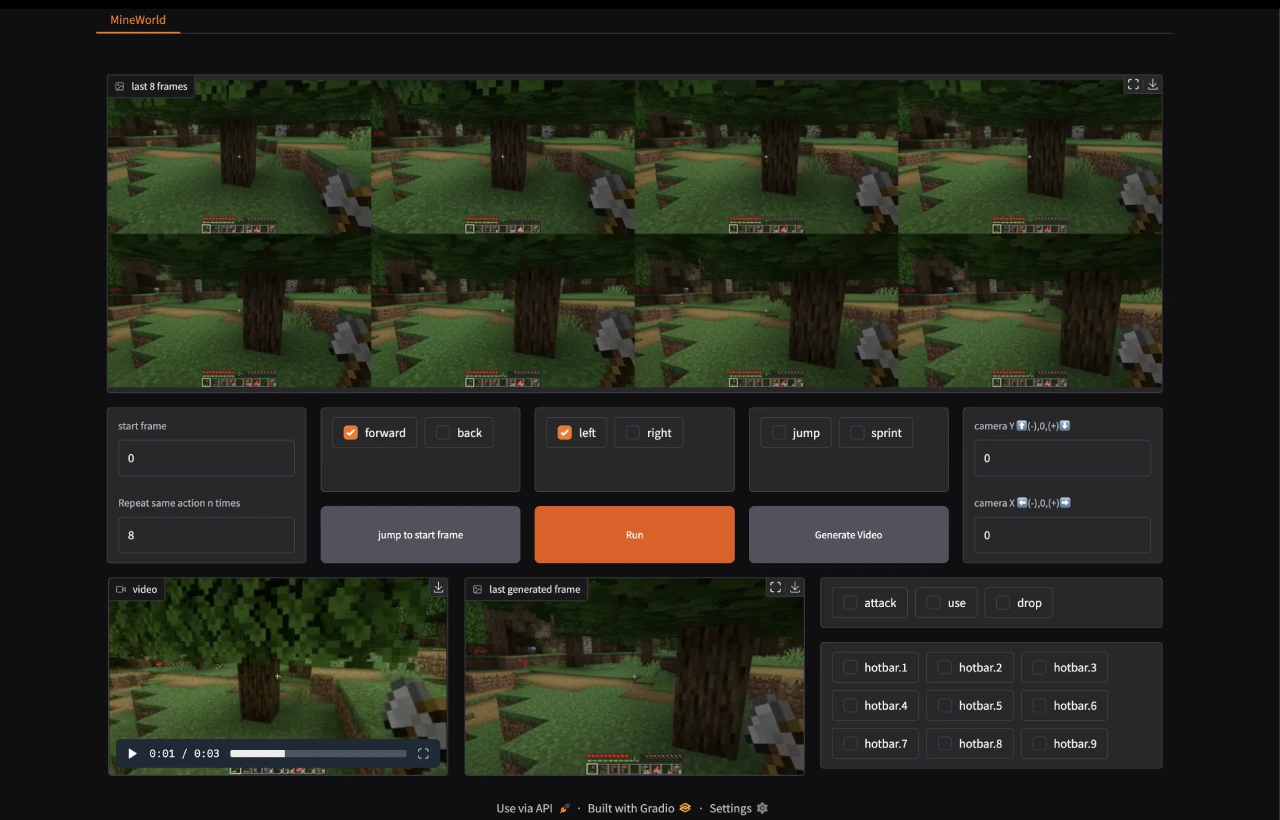
Web Demo: Users can launch a web game by running specific commands and access it via a local or public URL. Users can select the initial frame, control camera movement, and execute game actions such as jumping and moving.
Local Execution: Users can also run the model locally to reproduce the evaluation results from the paper.
MineWorld Scope and Limitations
Scope: MineWorld is specifically trained for the Minecraft game domain and is only applicable to generating game-related scenes.
Limitations:
Cannot generate results in other video domains (such as internet videos).
The generated video resolution is limited, which may lead to loss of detail.
The model may inherit biases, errors, or omissions from the training data.
Further testing and validation are required before considering application in commercial or real-world scenarios.
MineWorld Installation and Usage
1. Environment Configuration:
Clone the repository:
git clone https://github.com/microsoft/mineworld.git
cd mineworld
Create and activate the Conda environment:
conda create -n mineworld python=3.10
conda activate mineworld
pip3 install -r requirements.txt
A high-performance GPU (such as A100 or H100) is recommended for inference.
2. Download Pre-trained Models:
Download the pre-trained model and related configuration files, and place them in the checkpoints folder.
The data structure is as follows:
├── checkpoints
│   ├── 300M_16f.ckpt
│   ├── 700M_16f.ckpt
│   ├── 700M_32f.ckpt
│   ├── 1200M_16f.ckpt
│   └── 1200M_32f.ckpt
│   └── vae
│       ├── config.json
│       └── vae.ckpt
├── validation
│   └── validation.zip
└── gradio_scene
├── scene.mp4
└── scene.jsonl
3. Run the Web Demo:
Launch the Web Demo with the following command:
python mineworld.py --scene "path/to/scene.mp4" --model_ckpt "path/to/ckpt" --config "path/to/config"
Access the local or public URL and interact through the web page.
You can select the initial frame, control camera movement, and execute game actions (such as jumping, moving, etc.).
4. Local Inference:
Use the following command to perform local inference:
python inference.py --data_root "/path/to/validation/dataset" --model_ckpt "path/to/ckpt" --config "path/to/config" --demo_num 1 --frames 15 --accelerate-algo 'naive' --top_p 0.8 --output_dir "path/to/output"
Compute evaluation metrics:
bash scripts/setup_metrics.sh
bash scripts/compute_metrics.sh
GitHub:https://github.com/microsoft/MineWorld









