
 Script Planner Assistant▸
 AI Apps
 AI News
KAG: Logical Reasoning QA Framework Based on OpenSPG Engine and LLMs
小编 ·

KAG: Logical Reasoning QA Framework Based on OpenSPG Engine and LLMs
What is KAG?
KAG (Knowledge Augmented Generation) is a professional domain knowledge service framework launched by Ant Group. Built on the OpenSPG engine and LLMs, it aims to deliver a logical reasoning question-answering solution for vertical-domain knowledge bases. By combining the strengths of knowledge graphs and vector retrieval, it effectively overcomes the ambiguity of traditional RAG vector similarity calculation and the noise issues introduced by OpenIE-based GraphRAG. It supports logical reasoning, multi-hop fact-based QA, and outperforms current state-of-the-art (SOTA) solutions.
KAG Core Features
Professional Domain QA Enhancement: Combines knowledge graphs and vector retrieval to improve the QA capabilities of large language models in specific domains, generating more accurate, professional, and logically coherent answers.
Knowledge Representation and Retrieval Optimization: Adopts an LLM-friendly knowledge representation framework to achieve mutual indexing between knowledge graphs and original text chunks, optimizing the representation, reasoning, and retrieval processes of knowledge, and improving the accuracy and relevance of retrieval results.
Hybrid Reasoning and Problem Solving: Based on a logical-form-guided hybrid reasoning engine, it transforms natural language questions into a problem-solving process that combines linguistic and symbolic approaches, integrating retrieval, knowledge graph reasoning, language reasoning, and numerical computation to effectively handle complex problems.
Knowledge Alignment and Semantic Enhancement: Performs knowledge alignment based on semantic reasoning, defining domain knowledge as various semantic relations, improving the standardization and connectivity of knowledge, and enhancing the accuracy and consistency of knowledge representation.
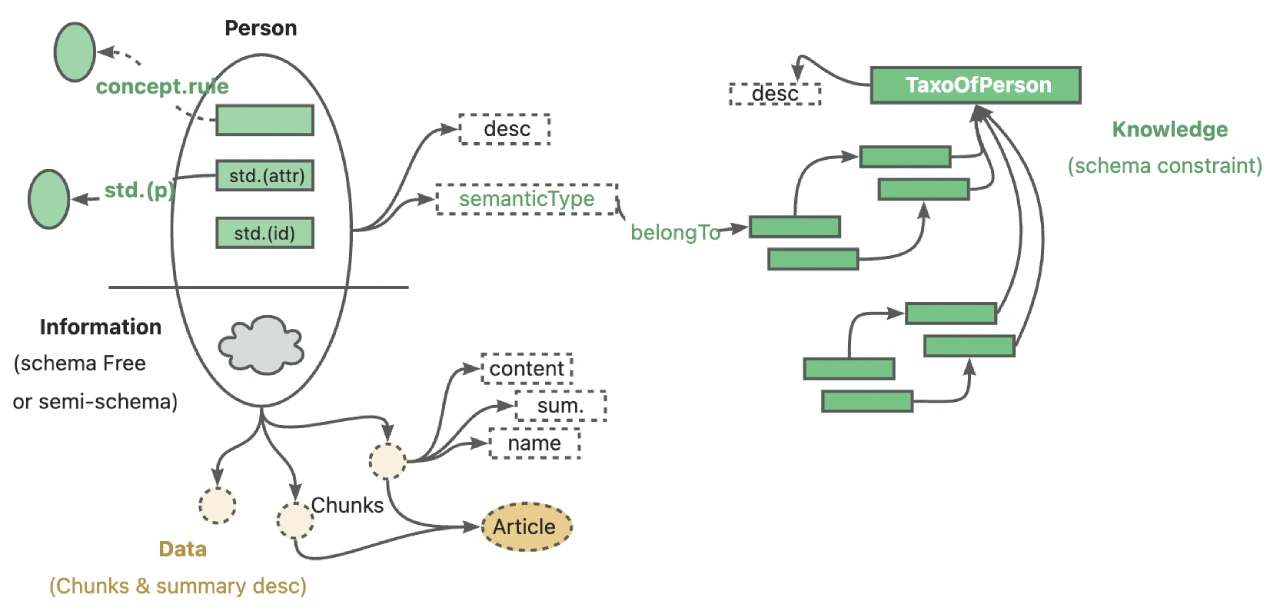
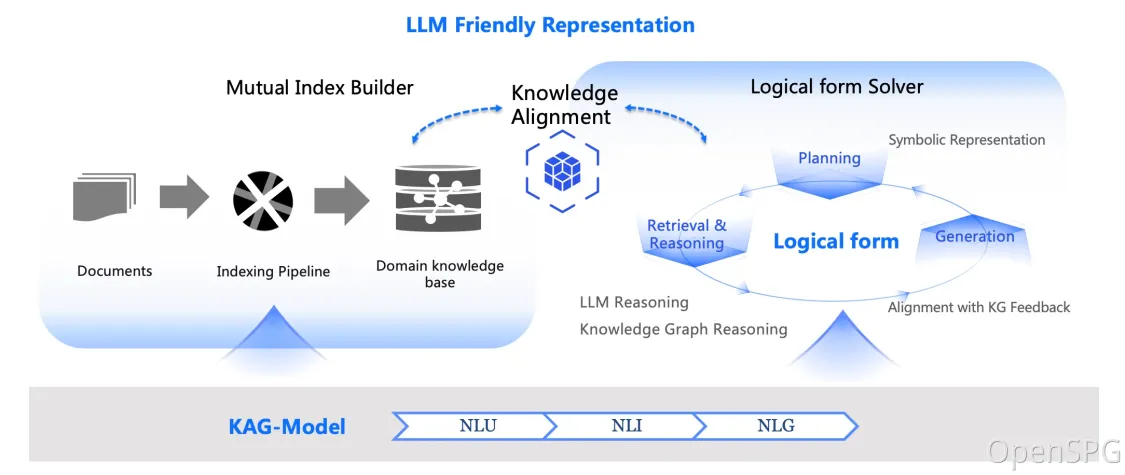
KAG Technical Architecture
kg-builder: Responsible for knowledge representation and construction. It implements LLM-friendly knowledge representation, upgrades SPG knowledge representation capabilities based on the DIKW hierarchy, is compatible with both schemaless and schema-based knowledge construction, and supports mutual indexing between graph structures and text chunks, providing support for efficient retrieval in the subsequent reasoning and QA stage.
kg-solver: Responsible for reasoning and problem solving. It adopts a logical-form-guided hybrid solving and reasoning engine, containing three operators: planning, reasoning, and retrieval. It integrates four problem-solving processes—retrieval, knowledge graph reasoning, language reasoning, and numerical computation—to handle complex logical reasoning and QA tasks.
kag-model: Will be open-sourced gradually in the future; its functionality is not detailed in the current version.
KAG Usage Tutorial
Product Edition (For General Users)
System Requirements: Recommended system versions are macOS Monterey 12.6 or later, CentOS 7/Ubuntu 20.04 or later, Windows 10 LTSC 2021 or later.
Software Requirements: macOS/Linux users need Docker and Docker Compose; Windows users need WSL 2/Hyper-V, Docker, and Docker Compose.
Installation Steps: Use the following commands to download docker-compose.yml and start the service with Docker Compose:
curl -sSL https://raw.githubusercontent.com/OpenSPG/openspg/refs/heads/master/dev/release/docker-compose.yml -o docker-compose.yml
docker compose -f docker-compose.yml up -d
Usage: Open the KAG product default link http://127.0.0.1:8887 in a browser, and log in using the default username openspg and password openspg@kag.
Toolkit Edition (For Developers)
Installation Steps:
Set up a Python virtual environment, clone the code, and install KAG.
macOS/Linux developers:
conda create -n kag-demo python=3.10 && conda activate kag-demo
git clone https://github.com/OpenSPG/KAG.git
cd KAG && pip install -e .
Windows developers:
py -m venv kag-demo && kag-demo\Scripts\activate
git clone https://github.com/OpenSPG/KAG.git
cd KAG && pip install -e .
Usage: Developers can leverage the various built-in components of KAG to reproduce the effects on built-in datasets and implement solutions for new scenarios.
GitHub: https://github.com/OpenSPG/KAG
OpenSPG: https://spg.openkg.cn/









