
 Script Planner Assistant▸
 AI Apps
 AI News
LangChain Launches mcpdoc: Extracts Information from llms.txt to Solve Information Overload and Inaccuracy
小编 ·

LangChain Launches mcpdoc: Extracts Information from llms.txt to Solve Information Overload and Inaccuracy
MCPdoc What is it?
mcpdoc is a tool launched by LangChain that exposes the content of llms.txt files in the form of a programming development tool via an MCP server. It solves the problems of information overload/incompleteness/inaccuracy, helps AI assistants understand complex framework documentation, and provides developers with a more efficient and transparent development experience.
mcpdoc Principle
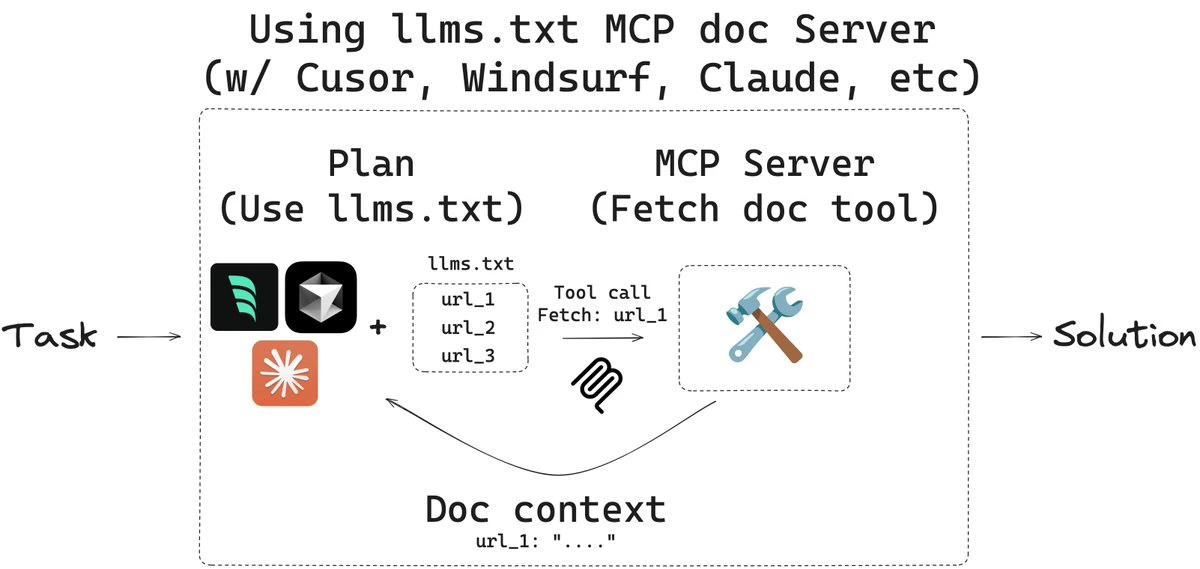
The core of mcpdoc is the MCP server, which is responsible for indexing and managing LLM configuration information and providing contextual data to IDEs and other applications. Based on the current development environment and code context, applications request relevant LLM configuration information from the MCP server through API calls.
mcpdoc Core Features
Provides an access interface for llms.txt files: llms.txt is a file that provides contextual information for LLMs (Large Language Models), containing background information, guidance content, and links to detailed documentation. Through the MCP server, mcpdoc provides this information to IDEs or other applications in a standardized way.
Supports multiple documentation sources: Users can specify the source of llms.txt files in various ways, including directly specifying a URL, using a YAML configuration file, or a JSON configuration file.
Enhances the contextual understanding capabilities of development tools: Through the MCP server, IDEs or other applications can dynamically retrieve and parse the content of llms.txt files, thereby providing developers with richer contextual information to help them better understand and use LLMs.
Audits and controls tool calls: Compared with directly using built-in tools to read and process llms.txt files, mcpdoc allows users to audit each tool call and the returned contextual content, providing greater transparency and control.
mcpdoc Use Cases
Integrated Development Environments (IDEs): For example, IDEs such as Cursor and Windsurf can dynamically retrieve contextual information from llms.txt files through the MCP server provided by mcpdoc, thereby offering developers smarter code assistance features.
AI-assisted development tools: Tools like Claude Code/Desktop can leverage the contextual information provided by mcpdoc to deliver more accurate code suggestions and documentation support for developers.
Documentation generation and management: mcpdoc can help developers automatically generate and manage code-related documentation, reducing the workload of manually writing and maintaining documentation.
mcpdoc How to Use
Installation
First, you need to install the uv tool, which can be installed with the following command:
curl -LsSf https://astral.sh/uv/install.sh | sh
Start the MCP Server
You can start the mcpdoc server with the following command, specifying the source of the llms.txt file:
uvx --from mcpdoc mcpdoc \
--urls "LangGraph:https://langchain-ai.github.io/langgraph/llms.txt" "LangChain:https://python.langchain.com/llms.txt" \
--transport sse \
--port 8082 \
--host localhost
The --urls parameter is used to specify the source of the llms.txt file, and multiple URLs can be specified.
The --transport parameter specifies the communication method, such as sse (Server-Sent Events).
The --port and --host parameters are used to specify the server's port and host address.
Github Project:https://github.com/langchain-ai/mcpdoc









