
 Script Planner Assistant▸
 AI Apps
 AI News
LocAgent: An Open-Source Tool for Assisting Programmers with Code Localization
小编 ·

LocAgent: An Open-Source Tool for Assisting Programmers with Code Localization
What is LocAgent?
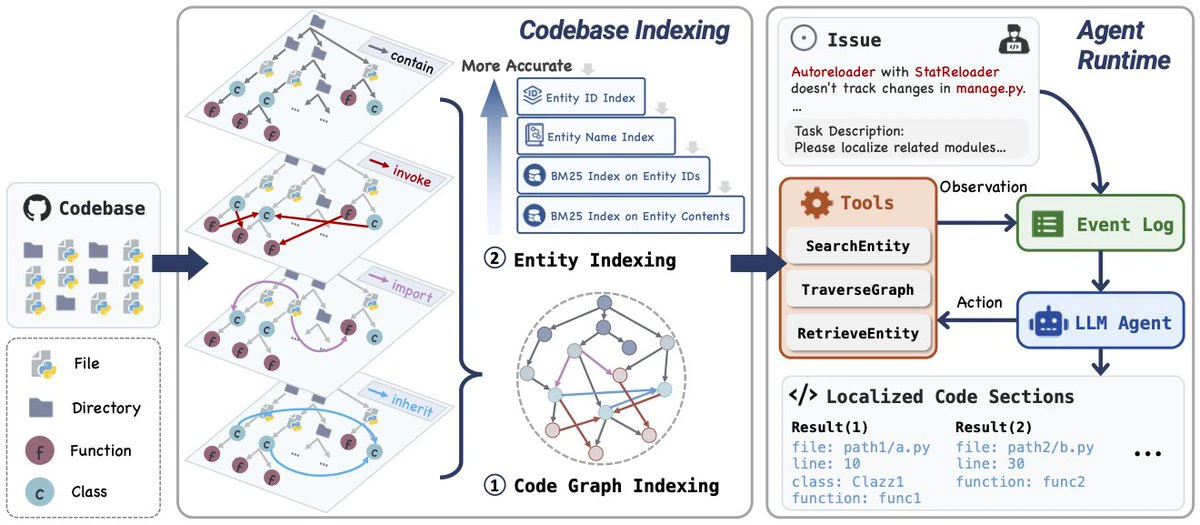
LocAgent is a code localization framework jointly developed by Stanford University, Yale University, and the University of Southern California, among other institutions. It helps developers quickly and accurately locate the code sections that need modification by parsing the codebase into a directed heterogeneous graph that captures the structure and dependency relationships of the code.
Core Technology
Graph-based Code Representation: LocAgent parses the codebase into a directed heterogeneous graph, where nodes represent entities in the codebase (such as files, classes, functions, etc.), and edges represent the relationships between these entities (such as import relationships between files, call relationships between functions, and inheritance relationships between classes). This graph structure can reveal complex dependency relationships hidden within the code, providing a solid foundation for subsequent code localization tasks.
Multi-hop Reasoning Mechanism: Based on the multi-hop reasoning capabilities of Large Language Models (LLMs), LocAgent can penetrate multiple layers of dependencies to locate the root cause of problematic code. For example, when dealing with complex codebases, even if the target code is not explicitly mentioned in the problem description, LocAgent can still reason through the graph structure to find the relevant code entities.
Sparse Hierarchical Index: LocAgent enhances its search capability through sparse hierarchical entity indexing. This indexing mechanism creates multiple indexes for each node in the graph, including indexes based on entity IDs, indexes based on entity names, and inverted indexes based on the BM25 algorithm. These indexes help LocAgent quickly locate code entities related to the problem description within seconds, maintaining efficient performance even in large codebases.
Main Features
Rapid Localization of Problematic Code: Based on natural language descriptions of issues (such as bug reports, feature requests, performance issues, or security vulnerabilities), LocAgent can quickly pinpoint the specific files, classes, functions, or lines of code that need modification in the codebase.
Support for Multiple Issue Types: LocAgent supports various types of software development and maintenance tasks, including bug fixing, feature addition, performance optimization, and security vulnerability remediation.
Intelligent Dependency Analysis: Automatically tracks complex call relationships between code entities.
Performance
On the SWE-Bench-Lite dataset, when LocAgent uses the Qwen2.5-32B model, the file-level localization accuracy reaches 92.7%, a significant improvement over Claude-3.5's 86.13%.
On the Loc-Bench dataset, LocAgent achieves 84.59% Acc@5 and 87.06% Acc@10 file-level localization accuracy.
LocAgent is also highly cost-effective. When using the Qwen2.5-7B model, the cost per sample is only $0.05, a reduction of approximately 86% compared to Claude-3.5's $0.66.
Use Cases
Bug Fixing: Quickly locate the code position causing the error, reducing debugging time.
Feature Addition: Help developers find where to add new functionality in the code.
Performance Optimization: Locate code sections affecting performance for optimization.
Security Vulnerability Fixes: Quickly find code related to security vulnerabilities for timely remediation.
Technical Principles
Graph-based Code Representation
LocAgent parses the codebase into a directed heterogeneous graph, where nodes represent code entities (files, classes, functions, etc.), and edges represent dependency relationships such as calls and inheritance. This structure captures the hierarchy and semantic associations of complex codebases.
Multi-layered Index Retrieval System
Entity ID Index: Supports exact matching (such as searching for a specific class or method).
Semantic Fuzzy Index: Based on the BM25 algorithm, allows natural language queries (such as "the logic that handles order payments").
Structural Feature Index: Supports "find similar by structure" through code skeleton features (such as function parameter lists).
Three Intelligent Tools
SearchEntity: Triggers an intelligent scan through keywords, combines NLP to extract core entities, and returns matching results.
TraverseGraph: Performs multi-hop traversal along relationships such as call chains and inheritance chains, penetrating complex dependencies.
RetrieveEntity: Retrieves complete attributes of entities (code content, file path, etc.) to assist in in-depth analysis.
How to Use LocAgent
Environment Preparation
Install Dependencies: LocAgent depends on a Python environment and requires Python 3.8 or above. In addition, some Python packages need to be installed, such as torch, transformers, etc. You can install them with the following command:
pip install -r requirements.txt
Download Codebase:LocAgent supports multiple datasets, such as SWE-Bench_Lite and Loc-Bench. You can choose the appropriate dataset based on your needs and download it locally. For example:
git clone https://github.com/czlll/SWE-bench_Lite.git
Codebase Parsing
Generate Graph Index: LocAgent needs to parse the codebase into a directed heterogeneous graph and generate a graph index. This can be done with the following command:
python parse.py --dataset czlll/SWE-bench_Lite --repo_path ./SWE-bench_Lite --index_dir ./index
Among them, --dataset specifies the dataset name, --repo_path specifies the codebase path, and --index_dir specifies the path to save the generated graph index.
Start LocAgent
Run Script: Start LocAgent for code localization using the following command:
python run.py --localize --dataset czlll/SWE-bench_Lite --repo_path ./SWE-bench_Lite --index_dir ./index --use_function_calling True
Among them, --localize indicates starting the localization process, and --use_function_calling enables the LLM's function calling capability.
Evaluate Results
Evaluate Localization Results: After localization is complete, the results will be saved in a JSONL file. You can use the evaluation tool provided by LocAgent to evaluate the results. For example:
python evaluation/run_evaluation.py --result_file ./results.jsonl
Among them, --result_file specifies the path to the localization result file.
GitHub Project:https://github.com/gersteinlab/LocAgent









