
 Script Planner Assistant▸
 AI Apps
 AI News
Chatlog: An Open-Source Tool for Summarizing and Querying Chat Records via MCP
小编 ·

Chatlog: An Open-Source Tool for Summarizing and Querying Chat Records via MCP
What is Chatlog?
Chatlog is an open-source tool based on MCP for summarizing and querying chat records. It provides chat record summarization and query functions, perfectly solving the pain point of overwhelming group chat messages that are hard to read through. It features a user-friendly interface along with command-line tools, supports WeChat 3.x and 4.0 versions, and can query chat records, contacts, group chats, and recent conversations. With the MCP SSE protocol, it seamlessly integrates with AI assistants that support MCP, such as Claude, ChatWise, and Cherry Studio. It supports both Windows and macOS systems.

How Chatlog Can Help Users
Back up and view WeChat chat content.
Browse chat records through the command line or a visual interface.
Launch a local HTTP server for easy access via browser or AI assistant.
Integrate with AI chat assistants (such as ChatWise) to call WeChat data.
Chatlog Installation and Usage Tutorial
Preparations
Desktop WeChat:
Download and install the latest version of the WeChat client (Windows or macOS).
Migrate chat records to the computer:
Open WeChat on your phone, and tap in order: Me → Settings → General → Chat Record Migration & Backup → Migrate → Migrate to Computer.
Follow the prompts to transfer the chat records from your phone to the desktop WeChat. This process will not delete the chat data on your phone.
Install Chatlog
1. Download the installer directly:
Open the Chatlog Releases page.
Download the appropriate pre-compiled version according to your system (Windows or macOS).
After extraction, you will get the chatlog executable file.
2. Install from source (requires Go environment installed):
go install github.com/sjzar/chatlog@latest
After installation, chatlog will be in the $GOPATH/bin directory.
Special Note for macOS Users
When decrypting the WeChat key for the first time, you need to disable SIP (System Integrity Protection):
Intel Mac: Hold Command + R while powering on to enter Recovery Mode.
Apple Silicon: Hold the power button to enter Recovery Mode.
Menu bar: Utilities → Terminal.
Enter the command:
csrutil disable
Restart the system.
After disabling SIP, it is recommended to install Xcode (download from the App Store).
SIP only needs to be disabled when obtaining the key, and can be re-enabled afterward.
Run Chatlog
1. Launch the program:
Double-click to run chatlog, or enter in the command line:
./chatlog
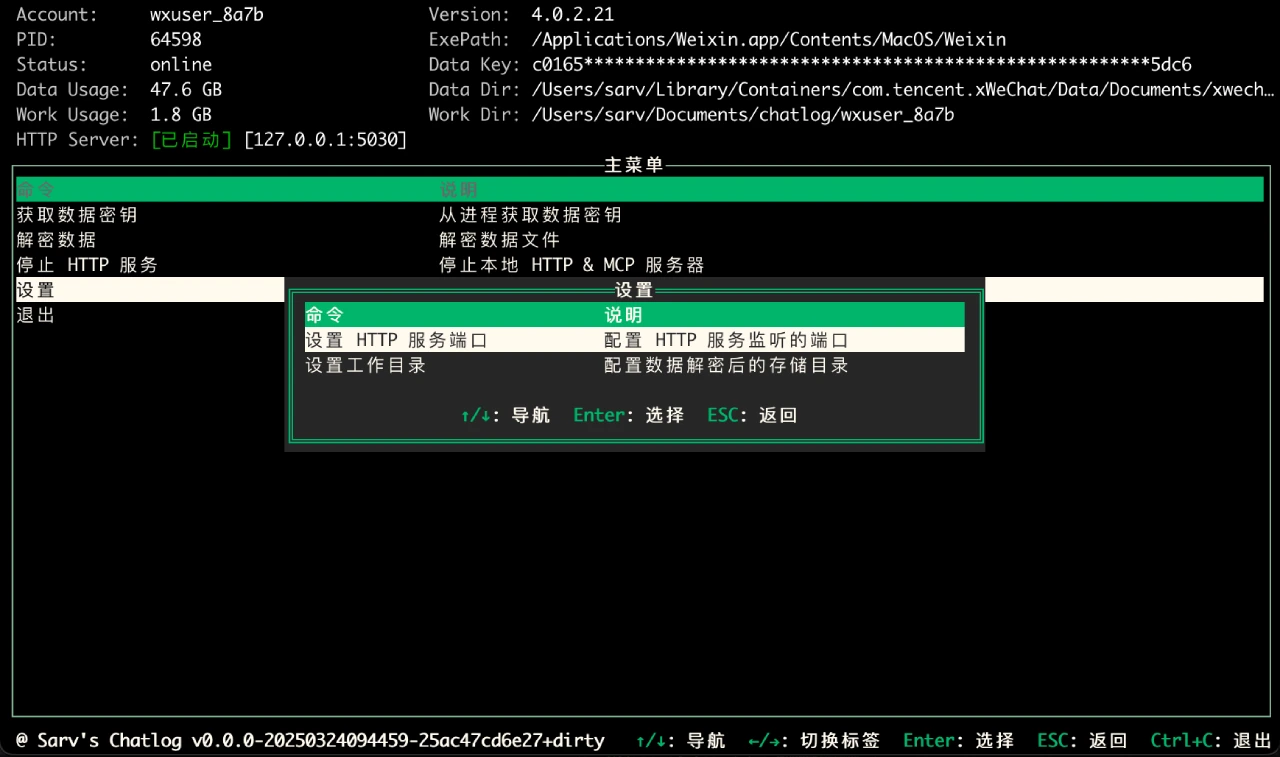
Enter a simple terminal interface, use arrow keys to select menus, press Enter to confirm, Esc to return, and Ctrl+C to exit.
2. Obtain the key and decrypt the database:
If you only want to use the command line:
# Obtain the WeChat key
./chatlog key
# Decrypt the database
./chatlog decrypt
Once done, Chatlog will automatically load WeChat data.
Start the HTTP Service
After starting, Chatlog will automatically launch a local HTTP service (default port 5030), which you can access in your browser:
http://localhost:5030
Or call the API:
Chat records:
GET /api/v1/chatlog?talker=wxid_xxx&limit=100
Contact list:
GET /api/v1/contact
Group chat list:
GET /api/v1/chatroom
Session list:
GET /api/v1/session
Integrate with ChatWise
Chatlog supports the MCP SSE protocol, making it easy for AI assistants to call WeChat data.
ChatWise setup method:
1. Open ChatWise → Settings → Tools.
2. Create a new tool, and select sse as the type.
3. Fill in the parameters:
{
"id": "chatlog",
"type": "sse",
"url": "http://127.0.0.1:5030/sse",
"autoRun": true
}
4. Check "Auto-execute tools".
5. Save it.
Chatlog Use Cases
Personal data management: Users can easily manage and query their WeChat chat records, and perform data backup and analysis.
AI data analysis: Through the HTTP API and MCP SSE protocol, chat records are connected to AI tools for intelligent analysis, such as sentiment analysis, topic modeling, etc.
Troubleshooting and performance monitoring: In development environments, it can be used for troubleshooting and performance monitoring.
Log analysis and optimization: Analyze information in chat records to provide data support for product optimization.
Security auditing: Track sensitive operations, and promptly detect and prevent security risks.
Chatlog FAQ
1. Is the data safe?
Chatlog only runs locally; data will not be uploaded to the cloud.
2. Will it corrupt WeChat data?
No, Chatlog is read-only and will not modify the WeChat database.
3. Does it support multiple accounts?
The current version mainly targets one WeChat account.
4. Does it support multimedia files?
Not supported yet, but will be added in future versions.









