
 Script Planner Assistant▸
 AI Apps
 AI News
PDF Document Layout Analysis: A Docker-Based PDF Layout Analysis and PDF OCR Service
小编 ·

PDF Document Layout Analysis: A Docker-Based PDF Layout Analysis and PDF OCR Service
What is PDF Document Layout Analysis?
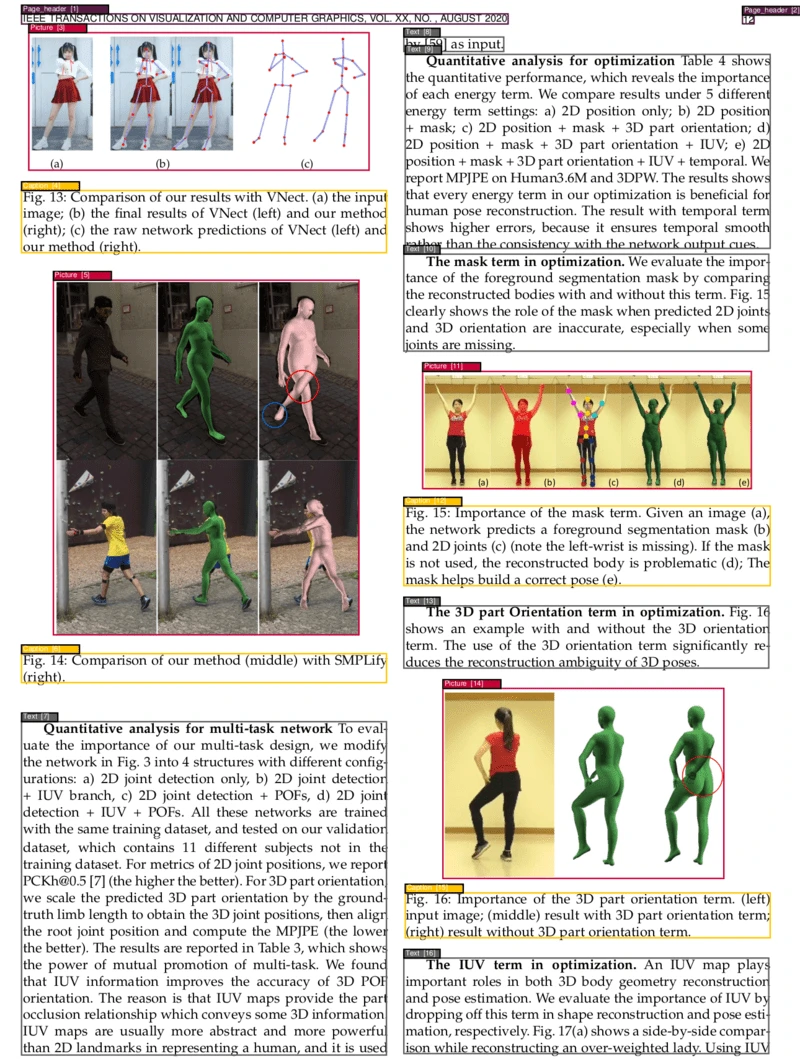
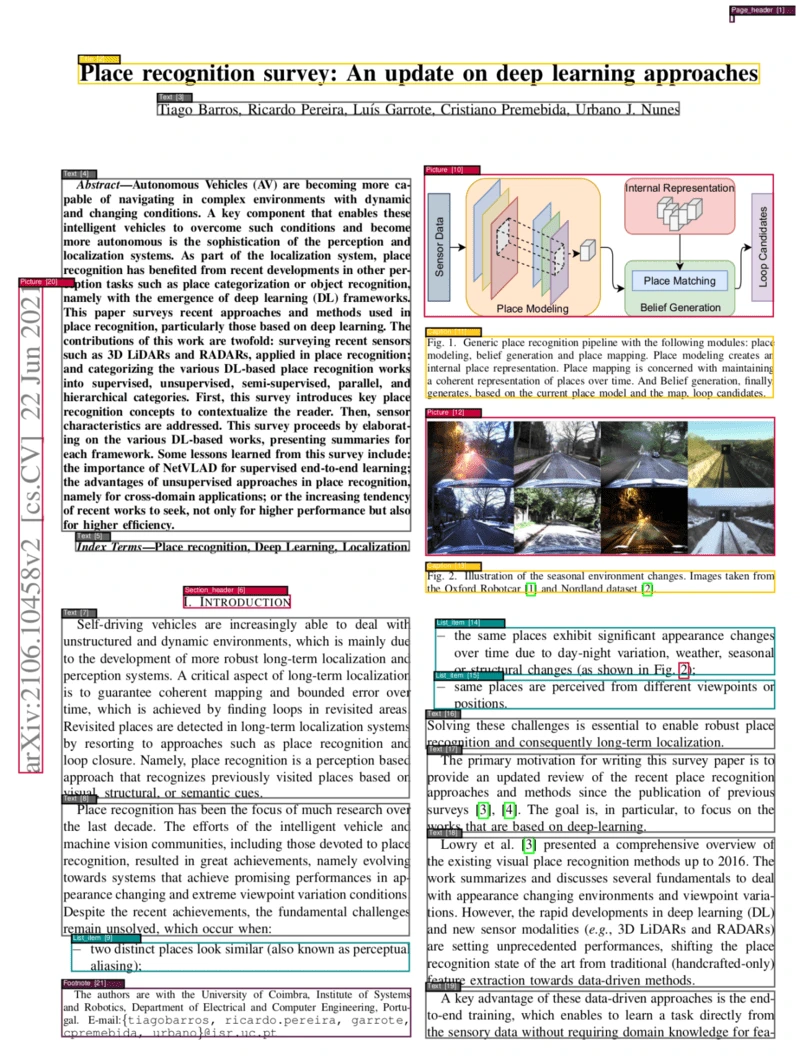
PDF Document Layout Analysis is a Docker-based service used to analyze the layout of PDF documents. It can segment and classify different parts of a PDF page, accurately and automatically identifying elements such as text, headings, images, and tables within a PDF page, and determining the correct order of these elements.
Features of PDF Document Layout Analysis
1. OCR Functionality
Multilingual Support: Supports OCR for multiple languages. Users can process PDF documents in different languages by specifying language parameters.
Text Extraction: Converts images or non-searchable text in PDFs into a searchable text format, facilitating subsequent processing and analysis.
2. Page Segmentation and Classification
Recognition of Multiple Elements: Capable of identifying and classifying various elements within a PDF page:
Text: Regular text content.
Headings: Titles and subheadings of the document.
Images: Images on the page.
Tables: Table content.
Formulas: Mathematical formulas, with support for LaTeX format output.
List Items: Ordered or unordered lists.
Headers and Footers: Page headers and footers.
Footnotes: Footnotes within the document.
Others: Such as image captions, table titles, etc.
Precise Classification: Uses advanced vision models (such as Vision Grid Transformer - VGT) and machine learning models (such as LightGBM) to ensure high-precision classification results.
3. Element Ordering
Logical Order: Automatically determines the logical order of elements based on page layout and element types, ensuring that the output matches the reading order of the document.
Custom Sorting Rules: Combines Poppler's initial reading order with paragraph types to sort elements, ensuring logical and coherent output.
4. Visualization Output
Visualized PDF: Supports visualizing analysis results as a new PDF file, allowing users to intuitively view the segmentation and classification results.
Annotation Feature: In the visualization output, different types of elements are marked with different colors or styles for easy differentiation.
5. Table and Formula Extraction
Table Extraction: Supports extracting tables into multiple formats, such as Markdown, LaTeX, or HTML, for further processing and analysis.
Formula Extraction: Formulas are output in LaTeX format, convenient for use in academic and engineering documents.
Application Scenarios of PDF Document Layout Analysis
Academic Research: Extract and organize text, figures, tables, and references from research papers, facilitating literature reviews and data analysis.
Legal Document Analysis: Analyze and structure legal documents, contracts, and case files.
Business Reports: Automatically extract financial data, charts, and key metrics to facilitate insight generation and summaries.
Archives and Digitization: Digitize and categorize historical documents, manuscripts, and archives, preserving them in a searchable format.
Publishing and Media: Organize and format the content of manuscripts, articles, and reports to ensure consistency and quality.
Quick Start
Running the Service: Supports both GPU and non-GPU modes.
OCR Functionality: Supports multiple languages, invoked via curl commands.
Obtaining Segmentation Results: Send a PDF file via curl command to receive the segmented results.
Stopping the Service: Provides a command to stop the server.
Dependencies and Requirements
Docker Desktop: Requires Docker Desktop 4.25.0 or higher.
GPU Support: If GPU acceleration is needed, the corresponding GPU support software must be installed.
Hardware Requirements: At least 2 GB of memory is required. If using a GPU, 5 GB of GPU memory is needed.
Models
Vision Model (Vision Grid Transformer - VGT): The default model, trained by the Alibaba research team. It supports more complex layout analysis but requires more resources.
LightGBM Model: A non-vision model that uses XML information extracted by Poppler for classification and segmentation. It is faster and uses fewer resources.
Data
Training Data: Uses the DocLayNet dataset, which contains 11 categories such as titles, footnotes, formulas, list items, etc.
Usage
Basic Commands: Send a PDF file via curl command, choosing to use the vision model or the non-vision model.
Visualization Output: Supports visualizing analysis results as a PDF file.
Table and Formula Extraction: Supports extracting tables and formulas in different formats (such as LaTeX, Markdown).
Output Order
Sorting Rules: Sorting is based on Poppler's initial reading order and paragraph types, ensuring a logical output order.
Performance and Speed
Performance: The VGT model performs excellently on the PubLayNet dataset, with an average accuracy exceeding 96%.
Speed: The non-vision model processes at 0.42 seconds per page on CPU; the vision model takes 1.75 seconds per page on GPU and 13.5 seconds per page on CPU.
Related Links
GitHub:https://github.com/huridocs/pdf-document-layout-analysis
DockerHub:https://hub.docker.com/r/huridocs/pdf-document-layout-analysis









