
 Script Planner Assistant▸
 AI Apps
 AI News
Where to Find and How to Use the "Merchant-Managed Influencer Coupons" Feature on Douyin E-commerce
小编 ·

Where to Find and How to Use the "Merchant-Managed Influencer Coupons" Feature on Douyin E-commerce
What is Merchant Self-Management of Creator Coupons?
The "Merchant Self-Management of Creator Coupons" feature on Douyin e-commerce is a price management tool provided by the Douyin platform for merchants. With "Merchant Self-Management of Creator Coupons," merchants can independently decide whether store products can use coupons issued by creators. It helps merchants better control coupons issued by creators, thereby avoiding price confusion and profit loss caused by creators overusing coupons. Merchants can enable or disable this feature through the backend settings, and can flexibly set exemption conditions, such as adding specific creators to a whitelist, or granting exemptions based on creator tier.
Feature Highlights
Store-Wide Management:
Merchants can enable or disable the permission for all store products to use creator coupons.
Once enabled, no new creator coupons can be created for any store product during creator promotions.
Whitelist Exemption:
Merchants can set up a creator whitelist; exempted creators can still use creator coupons within the managed scope.
On the whitelist management page, click the "Add Whitelisted Creator" button. You can search for and add creators by entering their UID (Unique User Identifier) or nickname.
Select Exemption Scope: You can choose to exempt specific creators from the management scope, allowing them to still use creator coupons even when store-wide product management is enabled.
After completing the addition, the system will prompt a success message, and the creator will be added to the whitelist. Once a creator is added to the whitelist, they will not be subject to the creator coupon management restrictions within the managed scope. Merchants should carefully select which creators to add to the whitelist.
Tier-Based Exemption:
Merchants can choose to exempt by creator tier, for example, allowing only top-tier creators to use creator coupons.
Immediate Effect:
Settings take effect immediately after the operation, but only apply to subsequent creator coupon creation scenarios. Previously created creator coupons are not affected by this management.
Where is the Feature and How to Use It?
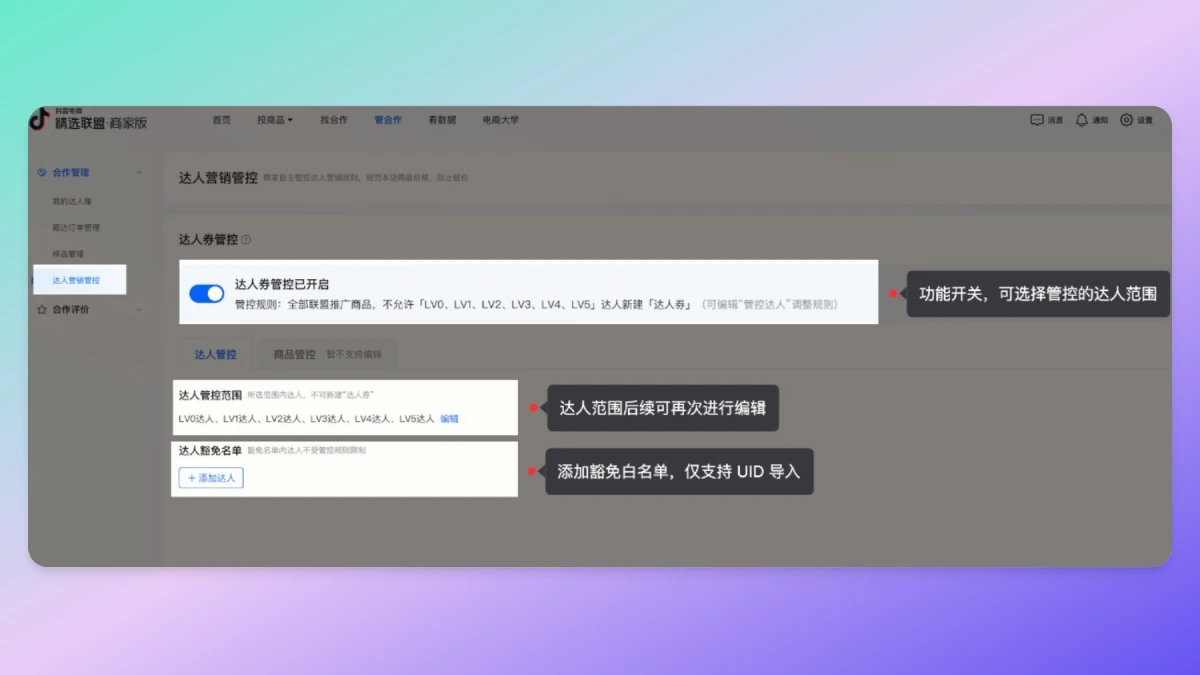
Log in to the Douyin e-commerce backend.
Go to [Select Alliance] - [Cooperation Management] - [Creator Marketing Management] page.
Find the "Management Toggle" or "Whitelist Management" feature entry on this page.
How to Use - Step-by-Step Tutorial
1. Enable/Disable the Management Toggle:
Click the "Enable" or "Disable" button to choose whether to manage creator coupons for all store products.
2. Set Up the Whitelist:
Click the "Add Whitelisted Creator" button.
Enter the creator's UID or nickname, search for and add the creator to the whitelist.
After confirming the addition, the creator will be exempted and can still use creator coupons.
3. Tier-Based Exemption:
On the settings page, choose to exempt by creator tier and select the corresponding creator tier range.
Through the "Merchant Self-Management of Creator Coupons" feature, merchants can more flexibly manage the permissions for using creator coupons, better control the pricing system and marketing costs, and thereby improve overall operational efficiency and profit levels. Additionally, it should be noted that: merchants need to regularly review the whitelist and exemption settings to ensure they align with current marketing strategies and price management requirements.









