
 Script Planner Assistant▸
 AI Apps
 AI News
CodeScientist: An End-to-End Semi-Automated Scientific Discovery System
小编 ·

CodeScientist: An End-to-End Semi-Automated Scientific Discovery System
What is CodeScientist?
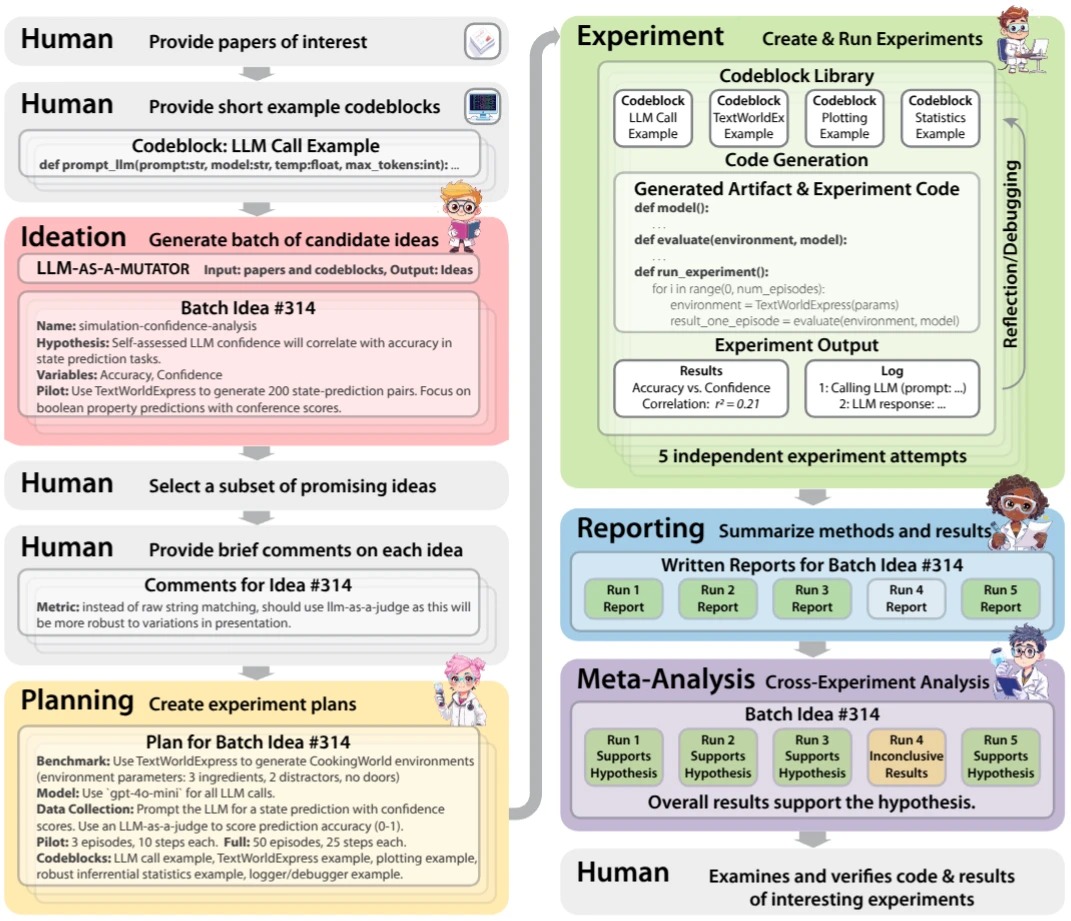
CodeScientist is an end-to-end semi-automated scientific discovery system that primarily focuses on how to conduct scientific discovery through automated means, especially scientific experiments expressed in the form of code. Its purpose is to create novel experimental ideas by mutating combinations of scientific articles and code examples using a genetic mutation approach (using the LLM-as-a-mutator method). CodeScientist aims to push the boundaries of autonomous scientific discovery, helping scientists identify gaps in scientific knowledge and automatically generate, test, and validate new experiments to fill those gaps.
In plain terms, scientists usually have to conduct many experiments to explore the unknown, but this process is very time-consuming. CodeScientist is like an intelligent assistant that can automatically come up with new experimental ideas, then perform the experiments on its own, and finally organize the results into reports. At the same time, it reads many scientific articles and code, and then uses a clever method (called genetic mutation) to modify this content to create entirely new experimental ideas. This is like providing scientists with many new ideas, helping them find knowledge gaps that have not been discovered before.
CodeScientist Features
End-to-End Automation: CodeScientist can automatically complete the entire process from experimental design to report generation, including generating experimental ideas, creating experimental plans, writing and debugging experimental code, running experiments, and generating detailed experimental reports.
Modular Design: It supports custom code blocks and domain-specific papers, allowing the system to easily adapt to the needs of different research fields. Users can add specific code blocks and papers according to their research direction to generate experimental ideas that better meet domain requirements.
Flexible Operation Modes: It supports both human-in-the-loop and fully automated modes. In human-in-the-loop mode, humans can assist in building code examples, screening experimental ideas, and providing brief comments on implementing the ideas; in fully automated mode, the system can independently generate experimental ideas and run experiments.
Rich Datasets: The project provides a large amount of experimental data and reports, facilitating user analysis and reproduction.
Genetic Mutation Engine: It uses LLM (Large Language Model) to mutate existing scientific articles and code to generate new experimental ideas, enabling the exploration of a broader experimental space.
Experiment Construction and Debugging: It automatically creates experimental code, and runs and debugs this code in containers, ensuring the executability and reliability of experiments.
CodeScientist Use Cases
Automated Experimental Design: In the fields of data science and machine learning, automatically generate and test experimental hypotheses, quickly iterate and verify different experimental schemes, and improve research efficiency.
Scientific Paper Analysis: Generate new research ideas and experimental designs based on existing papers, helping researchers mine potential research directions from a large amount of literature.
Educational Tools: As a teaching tool, help students understand the process of scientific experimental design and execution, cultivating students' scientific research thinking and experimental abilities.
Multi-Domain Research: Suitable for scientific research scenarios that require rapid iteration and testing of a large number of experiments, especially in the fields of ai agents and virtual environments.
CodeScientist Installation and Usage
1. Install Environment:
Install basic environments such as Python, Git, and PyTorch.
Clone the CodeScientist source code: git clone https://github.com/allenai/codescientist.git.
Install the required dependency libraries for the source code, usually via pip install -r requirements.txt.
2. Configure System:
Configure API Keys: Ensure that the API key provided for CodeScientist has hard limits, and continuously monitor the usage of the API key.
Set Up Code Block and Paper Library: Add custom code blocks and domain-specific papers according to research needs.
3. Run Experiments:
Select Operation Mode: You can choose the human-in-the-loop mode or the fully automated mode.
Start CodeScientist: Run the main program of the system to begin the generation and execution of experiments.
Monitor Experiment Progress: View the running status and results of experiments through the system's monitoring tools.
4. Result Analysis:
View Experiment Reports: After the experiment is completed, the system will generate a detailed experimental report, including experimental results and conclusions.
Conduct Meta-Analysis: The system will repeat each experiment multiple times to evaluate the reliability of the results.
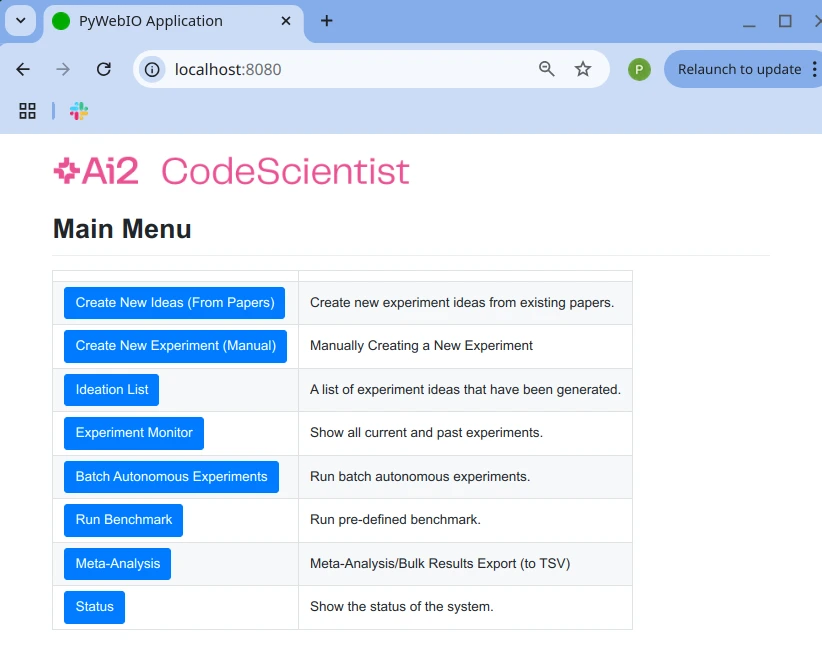
Github Project:https://github.com/allenai/codescientist









