
 Script Planner Assistant▸
 AI Apps
 AI News
Krillin AI: A Pro-Grade Video Translation, Dubbing & Voice Cloning Tool Based on LLMs
小编 ·

Krillin AI: A Pro-Grade Video Translation, Dubbing & Voice Cloning Tool Based on LLMs
What is Krillin ai?
Krillin AI is a professional-grade tool for video translation, dubbing, and voice cloning based on large language models (LLMs). It offers a one-click deployment of the entire workflow and can generate content adapted for platforms such as Douyin, Xiaohongshu, Bilibili, Video Account, TikTok, and YouTube Shorts. It supports Bilibili and translation in 56 languages including Chinese, English, Japanese, German, Turkish, and more. Through an end-to-end workflow, users only need a few clicks to transform raw footage into cross-platform content.
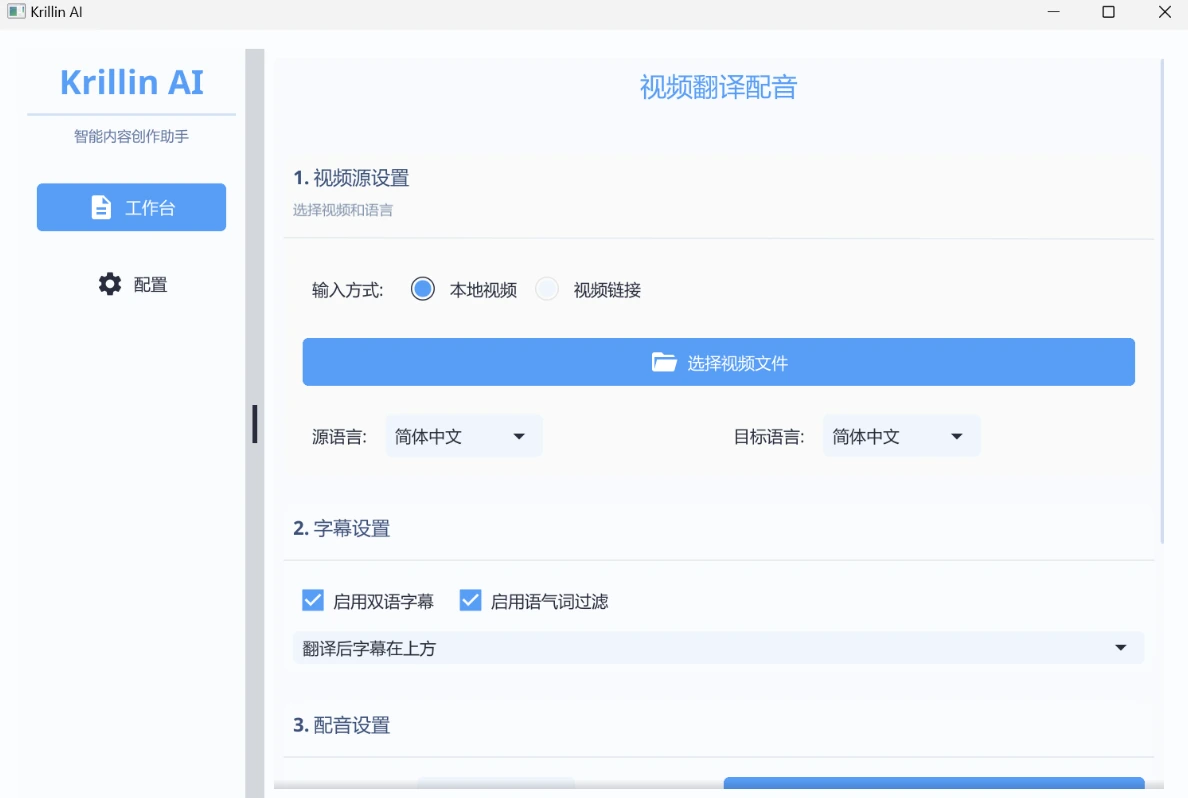
Krillin AI Features
One-click full workflow startup: No complex configuration required; dependencies are automatically installed, and the entire process from video download to final output can be completed with a single click.
Multilingual support: Supports translation in 56 languages, covering the world's major languages.
Multi-platform adaptation: Adapted to content formats for platforms such as Douyin, Xiaohongshu, Bilibili, TikTok, and YouTube.
Video acquisition: Integrated with yt-dlp, supports downloading videos from platforms such as YouTube and Bilibili, and also supports uploading local videos.
Subtitle recognition and translation: Uses the Whisper model for high-precision subtitle recognition, and supports speech and large model services from major providers such as OpenAI and Alibaba Cloud.
Intelligent subtitle segmentation and alignment: Uses proprietary algorithms to intelligently segment and align subtitles, avoiding misalignment and loss of context.
Custom word replacement: Supports one-click word replacement to adapt to language styles in specific domains.
Professional-grade translation: A paragraph-level translation engine ensures contextual consistency and semantic coherence.
Dubbing and voice cloning: Optionally generate dubbed narration in translated videos using default male or female voices, or upload local audio samples to clone a voice for narration.
Video composition: One-click composition of horizontal and vertical videos, with automatic handling of subtitles that exceed the width limit.
Krillin AI Application Scenarios
Film and TV enthusiasts: Breaks down language barriers, allowing film and TV enthusiasts to freely explore the global audiovisual world.
Creators: Saves time and costs, quickly producing multilingual versions of video content.
Corporate training and international communication: Helps multinational companies quickly translate training videos; enables real-time translation of speeches during international conferences.
Krillin AI Tutorial
Installation and startup: No complex configuration required; simply install and launch Krillin AI.
Video import: Download videos via the integrated yt-dlp, or upload local videos.
Subtitle recognition and translation: Select the target language, and Krillin AI will automatically perform subtitle recognition and translation.
Dubbing and composition: Select a dubbing voice or upload an audio sample for voice cloning, then compose the video with a single click.
Krillin AI Basic Installation Steps
1. Download the executable file:
Visit Krillin AI's Release page and find the executable file that matches your device's operating system (such as Windows or macOS version).
Place the downloaded file into an empty folder.
2. Configuration file setup:
Create a folder named config within the folder.
Create a file named config.toml inside the config folder.
Copy the contents of the config-example.toml file from the config directory in Krillin AI's source code, and paste them into the config.toml file.
Fill in the configuration information according to your needs. If you need to use the OpenAI model but don't know how to obtain an API Key, you can join the QQ group provided by the project for a free trial.
3. Start the service:
Double-click the executable file, or run it in the terminal to start the service.
Open your browser and enter http://127.0.0.1:8888 (if you changed the port in the configuration file, use the port you set).
Github project: https://github.com/krillinai/KrillinAI









