
 Script Planner Assistant▸
 AI Apps
 AI News
Saber-Translator: Intelligently Detects Manga Speech Bubbles and Accurately Recognizes Japanese for Fast Translation to Chinese
小编 ·

Saber-Translator: Intelligently Detects Manga Speech Bubbles and Accurately Recognizes Japanese for Fast Translation to Chinese
What is Saber-Translator?
Saber-Translator is a powerful AI manga translation tool, designed for manga enthusiasts. It intelligently detects speech bubbles in manga and accurately recognizes Japanese text, quickly translating it into fluent Chinese. It supports both image and PDF manga formats, offering features such as batch upload, customizable translation effects, real-time preview, and a foreign language learning mode that helps users learn a language while reading manga.
Features of Saber-Translator
Multiple Format Support: Supports uploading manga files in image formats (JPG, PNG, etc.) and PDF, with one-click batch upload.
Intelligent Detection and Recognition: Uses the YOLOv5 model to accurately locate speech bubbles in manga, and leverages Manga OCR technology to efficiently recognize foreign text within the bubbles.
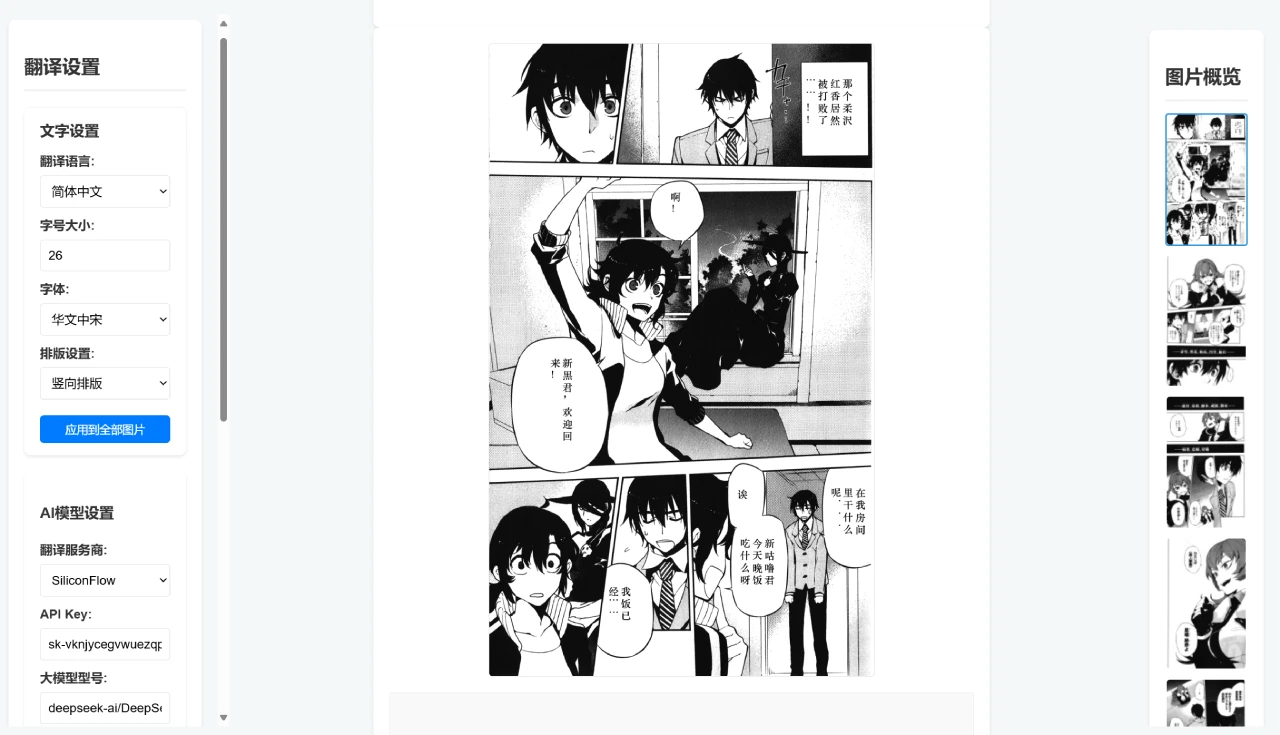
AI Translation Engine: Built-in support for translation service providers such as SiliconFlow and DeepSeek, with API Key authentication to ensure translation quality and stability. Users can also use large models locally deployed via ollama for translation, and freely select and switch between translation models.
Highly Customizable: Users can adjust custom prompts based on the manga style to optimize translation results. It also offers multiple Chinese font and font size options, and supports both horizontal and vertical layouts to suit different manga reading habits.
Real-time Preview and Convenient Operation: The web interface provides real-time preview of translation effects, with parameter adjustments taking effect instantly. It also supports keyboard shortcuts (such as Alt + Up/Down arrow keys to adjust font size) and an edit mode for individually editing each bubble.
Efficient Management and Download: A sidebar displays image thumbnails for quick switching and management. It supports downloading translated images individually or in batches, with packaged downloads available in multiple formats such as zip, pdf, and cbz.
Model Records and Recommendations: Automatically records the AI models frequently used by the user for quick selection next time, and plans to provide model selection suggestions.
Foreign Language Learning Feature: Users can use dual-prompt output to learn a foreign language while reading manga, with a text box below the manga displaying explanations of the translation.
How to Use Saber-Translator
Quick Start: Users can visit the Releases page to download the latest version of the compressed package. After extracting it, run Saber-Translator.exe, and the program will automatically open the web interface in the browser (default address is http://127.0.0.1:5000/). Users can refer to the usage tutorial to upload manga, configure translation settings, start translation, and view and download translation results.
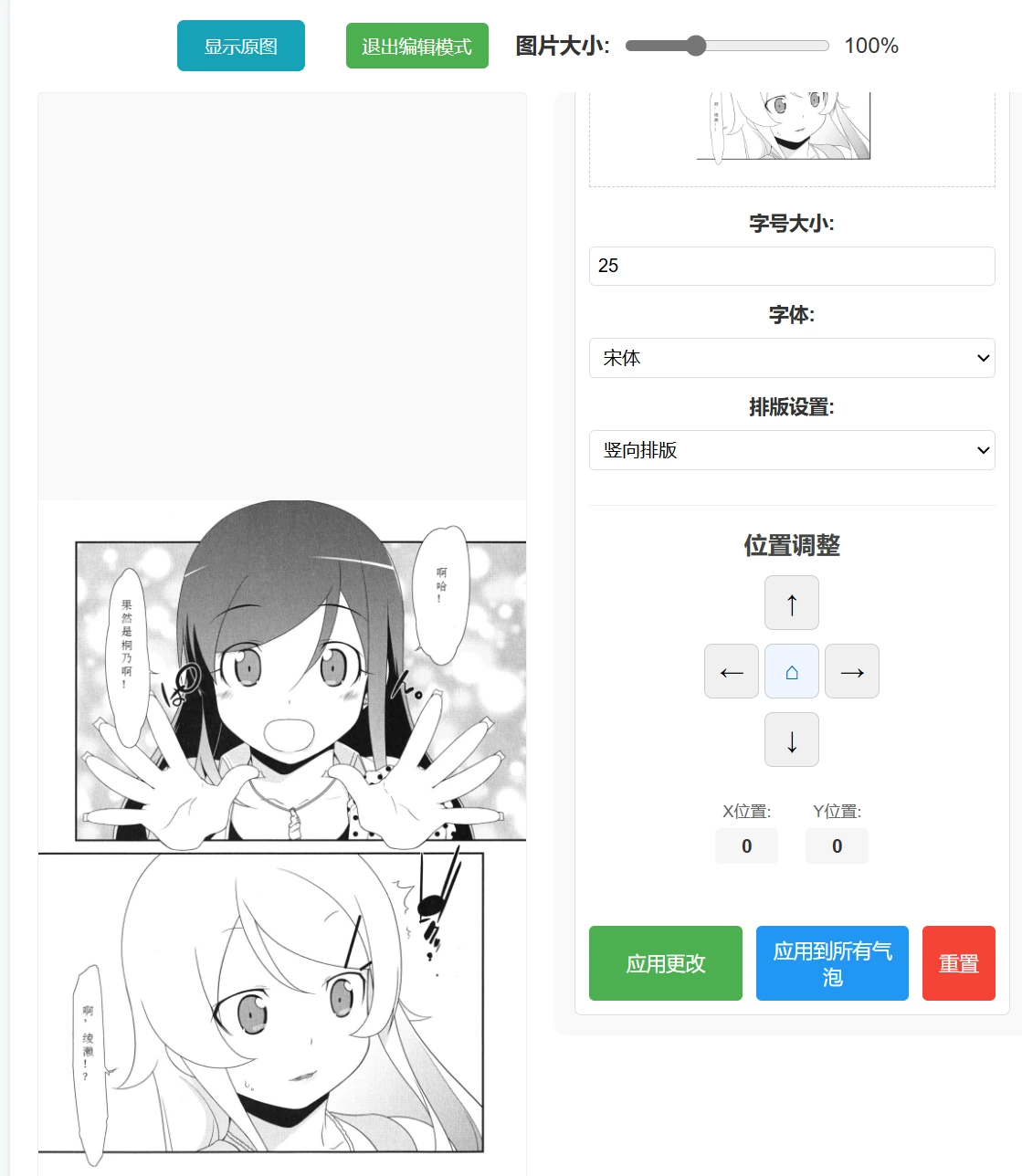
Edit Mode: After an image is translated, users can click the "Switch to Edit Mode" button above the image to enter edit mode, where they can modify the font size, font, position, and layout of the text in each speech bubble.
Foreign Language Learning: Users can manually open the text box prompt settings, and the text box below the manga will display how each sentence was translated and what knowledge points are involved. Note that this will reduce translation speed.
Main Application Scenarios of Saber-Translator
Manga Reading: Helps manga enthusiasts quickly translate non-native language manga, enhancing the reading experience.
Manga Creation and Translation: Assists scanlation groups in improving translation efficiency and helps creators check translation accuracy.
Cultural Exchange and Education: Promotes the exchange of manga across different cultural backgrounds and aids language learning.
Assistive Tools: Provides reading assistance for the visually impaired and supports researchers in conducting technical research.
Publishing and Commerce: Supports manga publishers in cross-border distribution and assists cross-border collaboration projects.

Github Address:https://github.com/MashiroSaber03/Saber-Translator









