
 Script Planner Assistant▸
 AI Apps
 AI News
DSO: A Physics-Aware 3D Model Optimization Framework Open-Sourced by Oxford
小编 ·

DSO: A Physics-Aware 3D Model Optimization Framework Open-Sourced by Oxford
What is DSO?
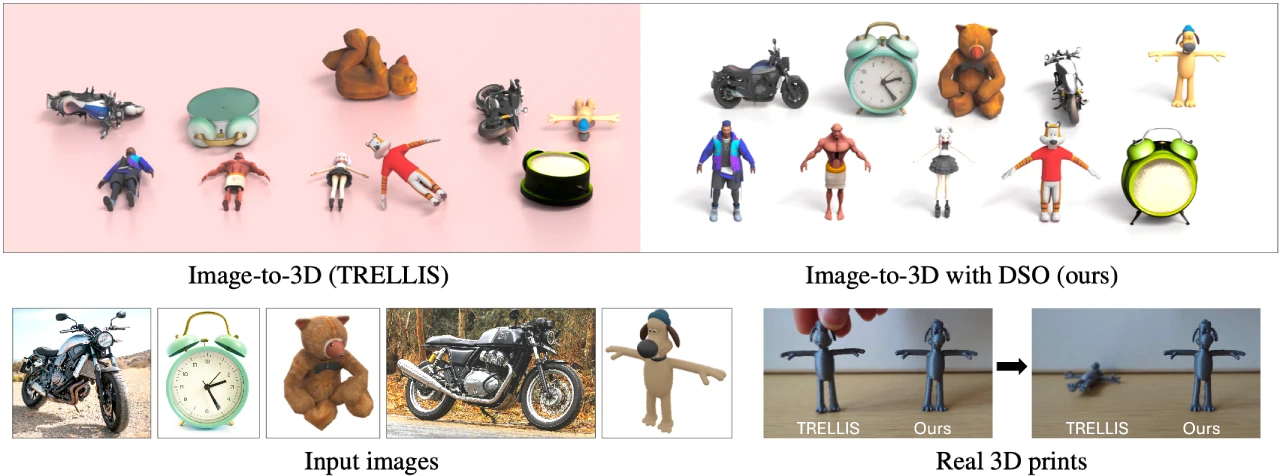
DSO (Direct Simulation Optimization) is a method published by the University of Oxford designed to enhance image-to-3D model generators (such as TRELLIS). Through direct simulation optimization, it improves the stability of the generated 3D objects in physical simulations and the real world. It does not require any extra cost at test time and can produce standable 3D objects within seconds.
DSO Features
Improved 3D Model Stability: Addresses the issue that traditional generators cannot produce 3D objects capable of standing under gravity, significantly enhancing the stability of 3D-generated objects during physical simulation and 3D printing.
Efficiency: Does not add any extra cost at test time, generating stable 3D objects in a matter of seconds.
Compatibility: Optimizes on top of existing image-to-3D model generators (such as TRELLIS), allowing seamless integration and fully leveraging their original features and advantages.
Provides Pretrained Models: Offers two pretrained model checkpoints trained via Direct Preference Optimization (DPO) and Direct Reward Optimization (DRO) respectively, making it easy for users to get started quickly.
DSO Application Scenarios
3D Printing: The generated 3D models are more likely to stand stably after actual printing, reducing print failures or the need for additional support structures caused by unstable models, thereby improving the success rate and practicality of 3D printing.
Virtual Reality and Augmented Reality: Creates more realistic and stable 3D objects in virtual environments, enhancing user experience—for instance, objects placed in virtual scenes can stably exist in accordance with physical laws.
Game Development: Provides physics-compliant solutions for generating 3D models in games, enabling in-game objects to behave more naturally under physical factors such as gravity, thereby enhancing the sense of realism and immersion.
Architectural Design and Industrial Design: Helps designers quickly generate 3D model prototypes that conform to physical stability for initial design evaluation and verification, reducing the number of design revisions and iterations caused by stability issues.
DSO Usage Tutorial
1. Install Dependencies:
Install TRELLIS dependencies: create a Python environment, install the specified version of PyTorch and related dependency libraries, run the script to install other relevant libraries, and finally install the Kaolin library.
Install the remaining dependencies using the pip install -r requirements.txt command.
2. Download Pretrained Models: Use the git lfs install and git clone commands to download the pretrained models trained via DPO and DRO.
3. Quick Start for Generation: Use the example.py script, load the pretrained model and input image, perform preprocessing and generation through TrellisImageTo3DPipeline, and finally export the generated model in GLB format.
4. Evaluation:
Download the evaluation dataset.
Use the trained checkpoint to generate 3D models.
Compute stability and geometric metrics.
5. Training:
Generate synthetic training data, including obtaining images, generating 3D models, adding simulation feedback, and saving physical plausibility scores.
Launch the training job by specifying the data directory and running the finetune.py script.
Github Address: https://github.com/RuiningLi/dso









