
 Script Planner Assistant▸
 AI Apps
 AI News
AutoAgent: Create and Deploy AI Agents with Simple Natural Language Descriptions
小编 ·

AutoAgent: Create and Deploy AI Agents with Simple Natural Language Descriptions
What is AutoAgent?
AutoAgent is a fully automated and zero-code LLM (Large Language Model) AI agent framework developed by the Data Intelligence Lab at the University of Hong Kong. Users only need to describe their needs to the system in everyday language (such as "help me write a summary"), and the system will automatically generate an AI assistant (AI Agent). These assistants are powered by large models like GPT-4 or Claude, but users don't need any technical background to use them.
AutoAgent Features
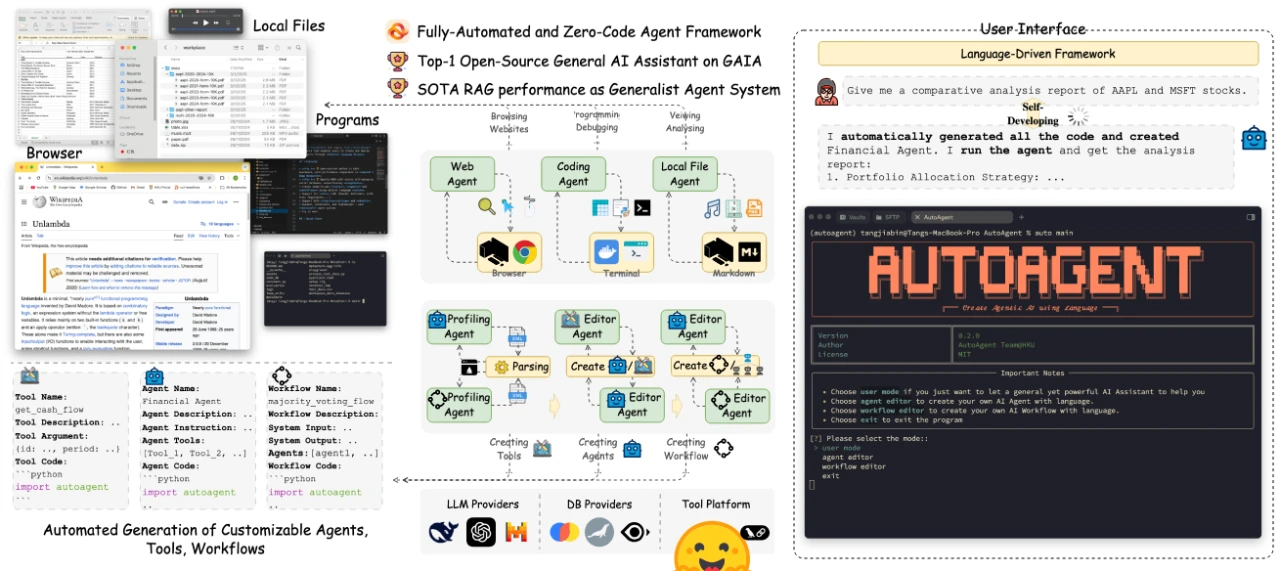
Natural Language Agent Creation: Users only need to describe their needs in text, and a dedicated AI agent will be automatically generated. For example, just say "I want an assistant that writes articles," and it will create one for you—no coding required.
Multi-Agent Collaboration System: Built-in ready-to-use multi-agent mode that supports complex task decomposition and collaboration.
Support for Multiple LLM Models: Compatible with various large models such as OpenAI, Anthropic, and Deepseek, giving users the freedom to choose.
File Upload and Data Interaction: Supports uploading files (such as images, PDFs, etc.) to enhance data processing capabilities.
Command Line Interface: Provides a CLI mode, making it convenient for users to directly enter requests and get results.
High-Performance Task Processing: Outstanding performance on the GAIA benchmark, with efficiency comparable to paid AI tools.
Workflow Editor: Design agent collaboration workflows through natural language, simplifying complex task management.
Flexible Interaction: Supports two modes—"Function Calling" (letting AI execute specific tasks) and "ReAct" (letting AI think first, then act).
AutoAgent Use Cases
Creative Design Field: For example, creating a "Da Vinci Agent" that generates and optimizes images based on natural language descriptions.
Finance Field: Build financial agents that manage local financial documents and retrieve financial information online to generate investment analysis reports.
Education, Healthcare, and Other Fields: Suitable for scenarios requiring automated task processing. Users can quickly create personalized AI agents based on their own needs.
How to Use?
AutoAgent offers three modes:
User Mode
An out-of-the-box AI assistant with powerful capabilities, similar to OpenAI's research tools.
Suitable for in-depth research or solving complex problems.
Example: Upload a file and have it help you analyze it.
Agent Editor
Create simple assistants using natural language.
Example: "Make me a weather-checking assistant," and it will be generated immediately.
Workflow Editor
Build more complex task workflows.
Example: "First gather information, then write a report," and it will automatically arrange the tasks.
AutoAgent Advantages
Zero Barrier to Entry: No programming knowledge required; ordinary users can get started easily.
High Performance: Performance comparable to Deep Research using Claude 3.5, surpassing OpenAI's o3 model.
Model Flexibility: Compatible with any LLM, including Deepseek-R1, Grok, Gemini, etc.
Wide Range of Uses: Can be used for research, automating tasks, or customizing dedicated assistants.
File Support: Supports file uploads to enhance data interaction capabilities.
How to Get Started
1. Installation
You can clone the project via Git and install it using pip.
You can also install it via Docker, which will automatically pull the pre-built image.
2. API Key Setup
You need to create an environment variable file (such as .env) and set the required LLM API keys.
CLI Mode Launch
Use the auto main command to launch the complete AutoAgent, including User Mode, Agent Editor, and Workflow Editor.
Supports multiple LLM providers, such as Anthropic, OpenAI, Mistral, etc.
GitHub Project:https://github.com/HKUDS/AutoAgent









